
Tap Break Out
อัปเดตเมื่อ
เวอร์ชันปัจจุบัน
ให้บริการโดย

เวลาคุณเล่น Tap Break Out, คุณอาจรู้สึกว่ามือคุณอาจบังจอแล้วทำให้ไม่ได้เล่นแบบเต็มที่. เล่นแบบไร้ขีดจำกัดด้วยเม้าส์และคีย์บอร์ด. MEmu มีตัวเลือกหลายอย่างให้คุณใช้งานเกมที่คุณเล่นแบบที่คุณต้องการ. ดาวน์โหลดและเล่น Tap Break Out บน PC. เล่นนานแค่ไหนก็ได้, ไม่ต้องชาร์จแบตเตอรี่, หรือเจอคนโทรเข้ามาระหว่างเล่น. MEmu 9 เป็นตัวเลือกสำหรับการเล่น Tap Break Out บน PC. ทางทีมงานเราได้ปรับแต่งเกม, ปรับให้เล่นเกมบางเกมได้เหมือนเล่น Tap Break Out เป็นเกม PC เช่นเล็งด้วยเม้าส์หรือใช้คีย์บอร์ด. ระบบของเรายังทำให้คุณสามารถเปิดเล่นได้มากกว่า 2 เกมพร้อมๆกันในคอมของคุณ. และที่สำคัญที่สุด, ระบบโปรแกรมของเราสามารถทำให้คุณใช้ระบบของ PC ทำให้เกมลื่นเหมือนกับใช้โทรศัพท์รุ่นล่าสุด. เราไม่ได้ดูแลเรื่องการเล่นเกม, แต่เราดูแลถึงความสนุกสนานที่คุณได้จากการเล่นด้วย.
แสดงเพิ่มเติม
ดาวน์โหลด Tap Break Out บน PC ด้วย MEmu Android Emulator สนุกกับการเล่นบนหน้าจอขนาดใหญ่ A fast-paced, one-handed portrait-mode combat experience.
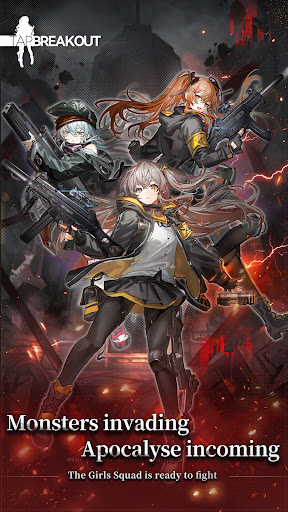
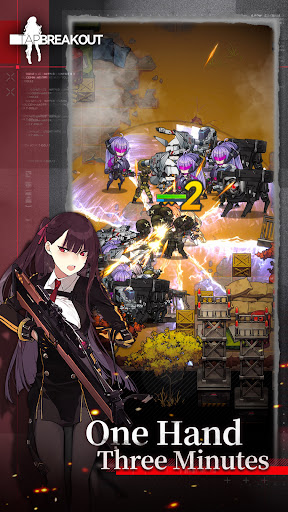
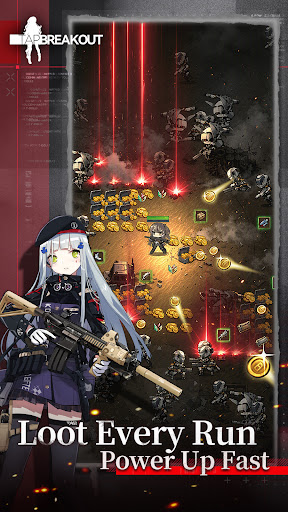
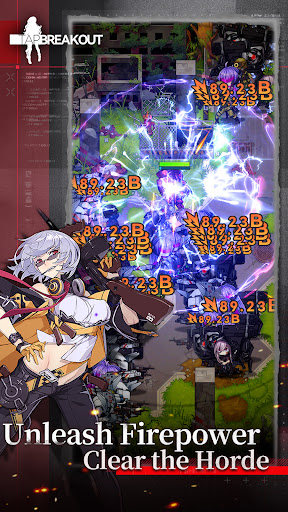
A fast-paced, one-handed portrait-mode combat experience. Complete 1–3 minute battles, collect powerful gear, and strengthen your T-Dolls with every run. Lead your team through fierce battles and reclaim your homeland, one step at a time!
Fingertip Breakout — A One-Handed Portrait-Mode Survival RPG
Command your T-Dolls, break through enemy lines, and take back your homeland one battle at a time.
As storms and fog engulf the remnants of the old world, you take command of scattered T-Dolls and lead them through the wasteland. Fight through the wasteland, collect powerful gear, strengthen your T-Dolls, and rebuild a new future from the ruins.
Enjoy fast-paced 1–3 minute battles with simple one-handed controls. Collect gear after every run, unleash devastating attacks, and experience the thrill of turning the tide against endless enemy waves.
◆ One-Handed Command | Thrilling 1–3 Minute Runs
Simply move with the virtual joystick while your squad fires automatically. Whether you're commuting, waiting in line, or relaxing before bed, jump into a quick run anytime, anywhere.
◆ Gear Drops Every Run | Equip in One Tap and Power Up Fast
Every battle drops gear, with multiple gear slots for flexible builds. Equip everything in one tap and watch your Combat Power soar—after every run, you'll be stronger than before. ◆ Screen-Filling Firepower | Unleash Devastating Horde-Clearing Action Countless enemies flood the battlefield as your T-Dolls unleash a storm of firepower. Watch your kill streak climb higher and higher—the larger the horde, the greater the thrill.
◆ Rally Your T-Dolls | Build Your Strongest Team
Recruit dozens of unique T-Dolls, each with stunning character art, personal voice lines, and distinct personalities. Build your team, unlock bonds, and customize your formations to overcome every enemy.
◆ Decorate the Dorm | A Home in a Fallen World
Between battles, manage your own base and freely arrange furniture and decorations. Build a warm haven in the ruined wasteland where your squad can rest.
◆ Endless Supplies | Grow Stronger Without the Grind
Receive continuous supplies, claim rewards instantly, and equip your T-Dolls with a single tap. No tedious grinding, no pressure—return anytime and get your team ready for battle.
▍Official Community
Customer Support Email: [sharpstudio-cs@sunborngame.com]
Facebook: [https://www.facebook.com/profile.php?id=61593238119824]
แสดงเพิ่มเติม

1. ดาวน์โหลดตัวติดตั้ง MEmu และสิ้นสุดการติดตั้ง

2. เริ่ม MEmu จากนั้นเปิด Google Play บนหน้าแรก

3. ค้นหา Tap Break Out ใน Google Play
Install
4. ดาวน์โหลดและติดตั้ง Tap Break Out
5. เมื่อติดตั้งเสร็จให้คลิกที่ไอคอนเพื่อเริ่มใช้งาน

6. สนุกกับการเล่น Tap Break Out บนพีซีด้วย MEmu
MEmu App Player เป็นอีมูเลเตอร์ Android ที่ดีที่สุดและผู้คนกว่า 50 ล้านคนเพลิดเพลินไปกับประสบการณ์การเล่นเกม Android ที่ยอดเยี่ยม เทคโนโลยีการจำลองเสมือนของ MEmu ช่วยให้คุณเล่นเกม Android หลายพันเกมได้อย่างราบรื่นบนพีซีของคุณแม้แต่เกมที่ต้องใช้กราฟิกมากที่สุด
จอใหญ่และกราฟฟิกสวยกว่า; เล่นได้นาน, ไม่ต้องใช้แบตเตอรี่โทรศัพท์หรือเน็ตโทรศัพท์.
ระบบปรับแต่งปุ่มคีย์บอร์ดและเม้าส์ตามที่คุณเลือก
เล่นมากกว่าหนึ่งเกมบน PC ในเวลาเดียวกันด้วยระบบหลายจอหรือ Multi-Instance manager.
Play Tap Break Out on PC by following steps:

























![[ไกด์เกม] CookieRun Classic แนะนำ 5 คุกกี้น่าปั้น น่าลงทุน ที่มือใหม่ห้ามพลาด! (เล่นบน PC ผ่าน MEmu ให้ลื่นสุด ๆ) PC](https://www.memuplay.com/blog/wp-content/uploads/2026/08/579c01ab-a953-45b3-8115-9b6279b7d6f9.png)















