Tree of Savior: Neverland
Updated
Current Version
1.39.15412
Offered By

With your passion for Tree of Savior: Neverland, you shouldn’t have to limit yourself to the small screen of a phone. Play like a pro and take full control of the game using a keyboard and mouse. MEmu gives you everything you’re looking for. Download and play Tree of Savior: Neverland on PC. Play as long as you want — no more worries about battery life, mobile data, or unexpected calls. The all-new MEmu 9 is the best way to play Tree of Savior: Neverland on PC. With our expertly designed keymapping system, Tree of Savior: Neverland feels just like a real PC game. The MEmu multi-instance manager lets you run two or more accounts on the same device at the same time. Most importantly, our exclusive emulation engine unlocks your PC’s full potential, delivering smooth and seamless performance.
Show more
Download Tree of Savior: Neverland on PC with MEmu Android Emulator. Enjoy playing on big screen. Evolve Together, Get More Fun!

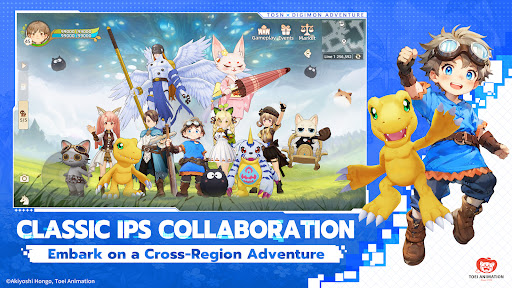
Evolve Together, Get More Fun! Claim Collaboration-Exclusive Agumon and Gabumon! Get 120 Draws and 8-Piece Gold Gear Set in the Collaboration Adventure Server!
The space-time rift opens on April 24, and Digimon surprises arrive in Norn, sparking an evolution craze!
With chosen heroes from 11 Asian regions, embark on an unknown adventure and face powerful new enemies!
*Classic IPs Collaboration – Embark on a Cross-Region Adventure
When the iconic anime "Digimon Adventure" collaborates with "Tree of Savior", a game that has carried years of dreams, it brings exclusive stories, battle companions, and a cross-regional co-play experience! "Chosen Heroes," are you ready?
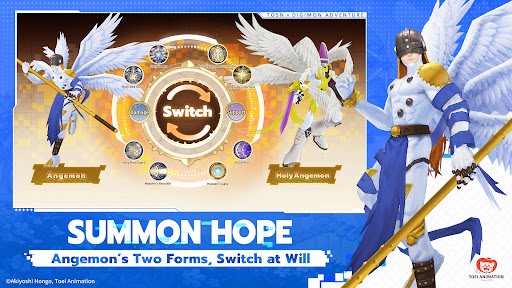
*Summon Hope, Angemon’s Two Forms, Switch at Will
Collaboration-exclusive powerful red Phantom Fruit – "Angemon" and "HolyAngemon" arrive!
Switch between two forms at will to adapt to battlefield conditions. Use Angemon to unleash massive damage on enemies, or switch to HolyAngemon to revive your closest allies and fight together until the very end!
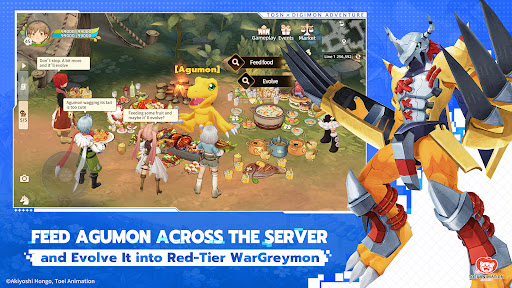
*Feed Agumon Across the Server and Evolve It into Red-Tier WarGreymon
Claim "Agumon" and "Gabumon" during the collaboration. They will accompany you on your adventure and create new evolution miracles!
Participate in the "Evolve! Agumon" event, where heroes from 11 Asian regions feed Agumon together, evolving it up to red-tier "Wargreymon"; Activate the Adventure Pass and complete the collab events to evolve Gabumon up to red-tier "MetalGarurumon"
*Heroes Chosen Across 11 Aisan Regions, Join Forces to Defeat Vamdemon
Collaboration-exclusive boss dungeon – "Battle Vamdemon" arrives! Chosen heroes from 11 Asian regions can team up for a damage challenge. Earn rewards like event avatar, frame, and more! Top damage rankings may win Agumon evolution materials and a red title.
*Saviors of the Continent of Norn, Together, Seal Away Dark Master: Piedmon
Collaboration-exclusive rare red card – "Piedmon" is available! Take part in the Lucky Blindbox and Exchange event for a chance to get it. This time, let the Dark Master become part of your "collection"!
*Digimons and rewards unlock at certain levels. Please check in-game for specific reward requirements and event details.
Show more

1. Download MEmu installer and finish the setup

2. Start MEmu then open Google Play on the desktop

3. Search Tree of Savior: Neverland in Google Play
Install
4. Download and Install Tree of Savior: Neverland
5. On install completion click the icon to start

6. Enjoy playing Tree of Savior: Neverland on PC with MEmu
MEmu Play is the best Android emulator and 100 million people already enjoy its superb Android gaming experience. The MEmu virtualization technology empowers you to play thousands of Android games smoothly on your PC, even the most graphic-intensive ones.
Bigger screen with better graphics; Long duration, without limitation of battery or mobile data.
Full Keymapping support for precise control of keyboard and mouse or gamepad.
Multiple game accounts or tasks on single PC at one time with Multi-Instance manager.
Play Tree of Savior: Neverland on PC by following steps: