Tusok Tusok: Street Food Stand
Updated
Current Version
0.10.0
Offered By

With your passion for Tusok Tusok: Street Food Stand, you shouldn’t have to limit yourself to the small screen of a phone. Play like a pro and take full control of the game using a keyboard and mouse. MEmu gives you everything you’re looking for. Download and play Tusok Tusok: Street Food Stand on PC. Play as long as you want — no more worries about battery life, mobile data, or unexpected calls. The all-new MEmu 9 is the best way to play Tusok Tusok: Street Food Stand on PC. With our expertly designed keymapping system, Tusok Tusok: Street Food Stand feels just like a real PC game. The MEmu multi-instance manager lets you run two or more accounts on the same device at the same time. Most importantly, our exclusive emulation engine unlocks your PC’s full potential, delivering smooth and seamless performance.
Show more
Download Tusok Tusok: Street Food Stand on PC with MEmu Android Emulator. Enjoy playing on big screen. Your kariton has a brand-new pwesto on the street corner.
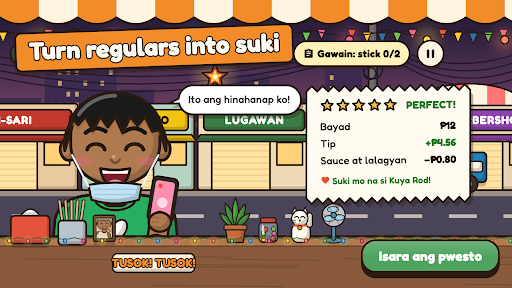

Your kariton has a brand-new pwesto on the street corner. The fishball is ready, the oil is hot, and the first customer is already at the counter.
"Boss, bente na fishball, sweet and spicy, hiwalay ang sauce!"
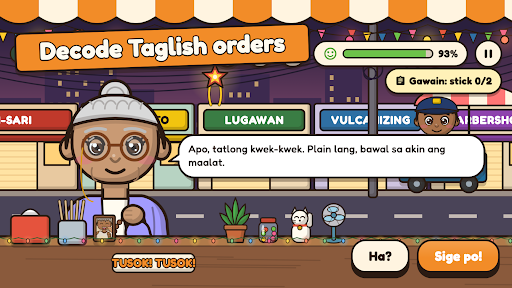
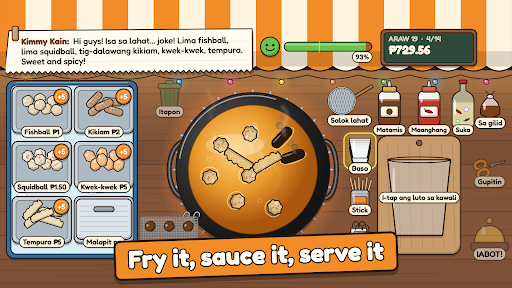
Tusok! Tusok! is a cozy street-food sim about the Filipino kanto. Every order is a little puzzle: work out what each customer really wants, then fry it, pack it, sauce it and serve it before they lose patience.
DECODE THE ORDER
"Bente na fishball" means ₱20 worth, so 20 pieces. "Bola ng pusit" is squidball. "Yung dati" means you'd better remember your suki's usual. Tap "Ha?" if you missed something, but don't make them wait too long!
FRY IT RIGHT
Drop fishball, kikiam, squidball, kwek-kwek and tempura into the kawali and scoop them out at the perfect golden luto. Leave them too long and they burn. Choose baso, stick or supot, pour on matamis, maanghang or suka, and snip the kikiam with the gunting.
MAKE SUKI
Ten regulars and more: Lola Ising who calls you apo, Mang Caloy the jeepney driver in a hurry, Kimmy Kain the food vlogger, Kuya Rod the delivery rider, Tito Boy the balikbayan. Serve their usual perfectly and they become your suki. A suki waits longer, tips more, and loves a free dagdag.
GROW THE KARITON
Spend each night's earnings on new stock and upgrades: a radyo, benches, string lights, a bigger kawali, a stronger flame, and your pamangkin to help with the sauce.
A STORY ON THE STREET CORNER
Mang Berto has sold fishball across the street for thirty years, and he isn't sure about the new kid. Survive payday crowds, a rainy day and the barangay fiesta, be kind to Bunso, and earn the respect of the king of the kanto.
COZY, NOT STRESSFUL
- No timers on your day, no energy bars and no ads
- Big text option, colour-blind cues for doneness, and a battery saver mode
- Made in the Philippines, in Taglish
Show more

1. Download MEmu installer and finish the setup

2. Start MEmu then open Google Play on the desktop

3. Search Tusok Tusok: Street Food Stand in Google Play
Install
4. Download and Install Tusok Tusok: Street Food Stand
5. On install completion click the icon to start

6. Enjoy playing Tusok Tusok: Street Food Stand on PC with MEmu
MEmu Play is the best Android emulator and 100 million people already enjoy its superb Android gaming experience. The MEmu virtualization technology empowers you to play thousands of Android games smoothly on your PC, even the most graphic-intensive ones.
Bigger screen with better graphics; Long duration, without limitation of battery or mobile data.
Full Keymapping support for precise control of keyboard and mouse or gamepad.
Multiple game accounts or tasks on single PC at one time with Multi-Instance manager.
Play Tusok Tusok: Street Food Stand on PC by following steps: