TwinSeek: Find the Differences
Updated
Current Version
1.3.22
Offered By

With your passion for TwinSeek: Find the Differences, you shouldn’t have to limit yourself to the small screen of a phone. Play like a pro and take full control of the game using a keyboard and mouse. MEmu gives you everything you’re looking for. Download and play TwinSeek: Find the Differences on PC. Play as long as you want — no more worries about battery life, mobile data, or unexpected calls. The all-new MEmu 9 is the best way to play TwinSeek: Find the Differences on PC. With our expertly designed keymapping system, TwinSeek: Find the Differences feels just like a real PC game. The MEmu multi-instance manager lets you run two or more accounts on the same device at the same time. Most importantly, our exclusive emulation engine unlocks your PC’s full potential, delivering smooth and seamless performance.
Show more
Download TwinSeek: Find the Differences on PC with MEmu Android Emulator. Enjoy playing on big screen. Some puzzle games make you wait.
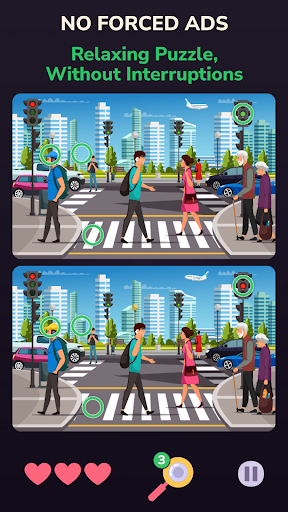
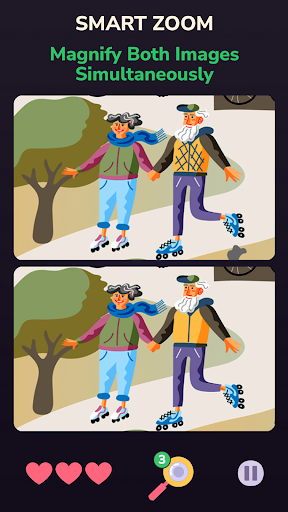
Some puzzle games make you wait. TwinSeek makes you think.
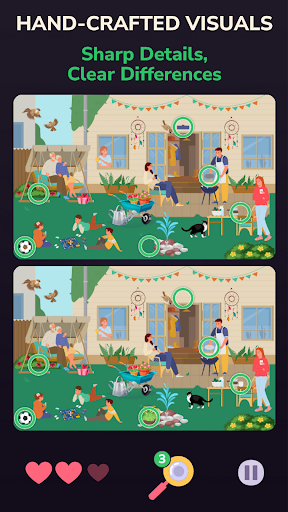
No ads breaking your focus. No AI-generated filler. Hand-crafted spot the difference puzzles designed for relaxation, focus and mental clarity – built to challenge your eye and calm your mind.
Created by NICMIT, an indie studio dedicated to calm puzzle games – built with care, not generated by algorithm.
PREMIUM EXPERIENCE, NO FORCED ADS
Built to respect your time. Pay once and get everything. No interrupting ads between levels, no energy system, no loot boxes, no subscriptions.
Optional rewarded ads and in-app purchases exist only if you want extra hints – you can complete the full game with just your initial purchase. Play offline, anytime, without pop-ups or distractions.
REAL ART, REAL CHALLENGE
TwinSeek includes 200 carefully crafted puzzles built from hand-curated illustrations – never auto-generated, never repeated for filler. Unique moods, rich color palettes and carefully placed differences, optimized for clarity on both phones and tablets.
A mix of relaxed untimed puzzles and timed challenges keeps the experience fresh without ever feeling repetitive.
TRAIN YOUR EYES, RELAX YOUR MIND
Slow down, observe and notice what others miss. Regular play sharpens visual attention, concentration and short-term memory – while helping you unwind after a busy day.
Short sessions fit perfectly into breaks, commutes or quiet evenings when you want active screen time instead of endless scrolling. Perfect for anyone who wants an observation game that puts the mind to work without adding stress.
NEVER GET STUCK
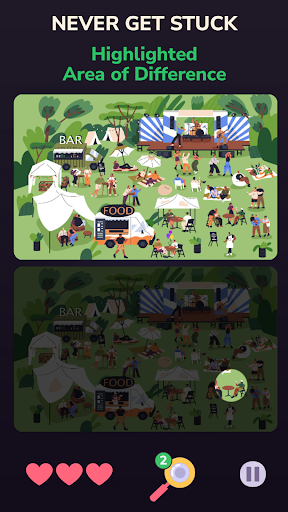
Daily free rewards and the daily lucky wheel help you collect extra coins and hints. When you use a hint, the screen darkens and only the area containing a difference stays visible – so you always move forward at your own pace.
SMART ZOOM & INTUITIVE CONTROLS
Pinch to zoom and both images move together – you never lose alignment between them. Pan smoothly across every corner. The challenge comes from the puzzles, not from fighting the interface.
COMPETE & COLLECT
Climb the global leaderboard and unlock Google Play Achievements as you progress. Whether you play for calm or for the top spot, TwinSeek rewards both patience and precision.
CLOUD SAVE & PROGRESS CONTROL
Sign in with your Google or Apple account to keep your progress safe across devices – no password needed. Change or lose your phone? Pick up exactly where you left off. Want a fresh start? Reset anytime and replay from level 1.
BUILT FOR A GLOBAL AUDIENCE
TwinSeek is localized into 14 languages: English, French, German, Spanish, Italian, Romanian, Portuguese, Indonesian, Turkish, Polish, Korean, Japanese, Russian and Hindi.
PAY ONCE, PLAY FOREVER
No forced ads. No paywalls. No shortcuts. Just a carefully crafted spot the difference game that rewards patience, precision and a sharp eye.
Download TwinSeek: Find the Differences and see what you've been missing.
Show more

1. Download MEmu installer and finish the setup

2. Start MEmu then open Google Play on the desktop

3. Search TwinSeek: Find the Differences in Google Play
Install
4. Download and Install TwinSeek: Find the Differences
5. On install completion click the icon to start

6. Enjoy playing TwinSeek: Find the Differences on PC with MEmu
MEmu Play is the best Android emulator and 100 million people already enjoy its superb Android gaming experience. The MEmu virtualization technology empowers you to play thousands of Android games smoothly on your PC, even the most graphic-intensive ones.
Bigger screen with better graphics; Long duration, without limitation of battery or mobile data.
Full Keymapping support for precise control of keyboard and mouse or gamepad.
Multiple game accounts or tasks on single PC at one time with Multi-Instance manager.
Play TwinSeek: Find the Differences on PC by following steps: