Unforeseen: The decision game
Updated
Current Version
1.2.1
Offered By

With your passion for Unforeseen: The decision game, you shouldn’t have to limit yourself to the small screen of a phone. Play like a pro and take full control of the game using a keyboard and mouse. MEmu gives you everything you’re looking for. Download and play Unforeseen: The decision game on PC. Play as long as you want — no more worries about battery life, mobile data, or unexpected calls. The all-new MEmu 9 is the best way to play Unforeseen: The decision game on PC. With our expertly designed keymapping system, Unforeseen: The decision game feels just like a real PC game. The MEmu multi-instance manager lets you run two or more accounts on the same device at the same time. Most importantly, our exclusive emulation engine unlocks your PC’s full potential, delivering smooth and seamless performance.
Show more
Download Unforeseen: The decision game on PC with MEmu Android Emulator. Enjoy playing on big screen. Discover Unforeseen, the game where life simulation meets financial management for a one-of-a-kind experience!
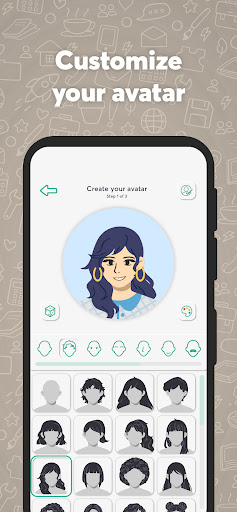
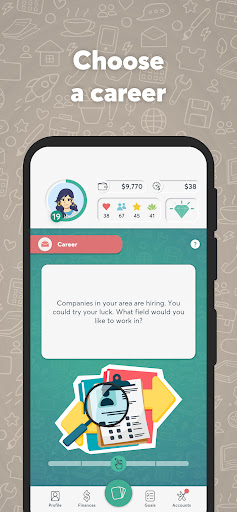
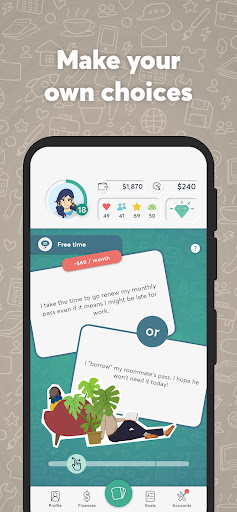
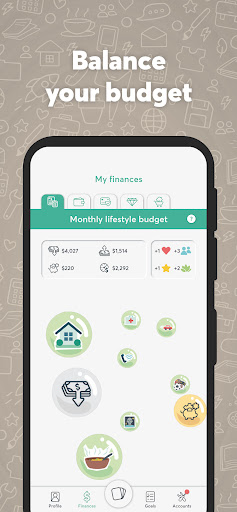
Discover Unforeseen, the game where life simulation meets financial management for a one-of-a-kind experience! Create your avatar and navigate the challenges of being a young adult. Health, relationships, self-esteem: As the years go by, your choices influence your avatar's happiness and virtual budget while helping you build real-world financial knowledge. You'll gain hands-on experience with managing your personal finances in Canada.
Get the financial knowledge you need—and have fun doing it!
MAKE CHOICES
Pick from a wide selection of cards that offer a range of life choices. In Unforeseen, every decision matters. As you play, you can stay true to your personality or explore a whole new side of yourself by making bold choices in a safe space.
LIFE SIMULATION
Unforeseen is an immersive simulation environment. At every turn, you'll have to make decisions that impact your avatar's life. Every choice you make influences your avatar's well-being, career, relationships and even its financial health.
RICH NARRATIVE
The game takes place in a fictional world filled with random and sometimes surprising situations that add a layer of realism and depth to your experience. Buy a house, go back to school, or find love!
LEARNING THROUGH EXPERIMENTATION
Just like in real life, your finances affect your avatar's well-being. You can use what you learn in the game to improve your own financial life: From budgeting to investing, not to mention credit, taxes and fraud attempts.
MAINTAINING LIFE BALANCE
Health, interpersonal relationships, self-esteem and peace of mind influence your avatar's well-being. Juggle these different aspects by managing your budget to optimize your experience and alter the course of your avatar's life.
UNLOCK ACHIEVEMENTS
Boost your score by developing financial virtues, accumulating retirement points and reaching professional and personal milestones. But watch out—if your well-being or finances run out, it's game over!
Play now!
IMPORTANT INFORMATION
Unforeseen: The decision-making game takes place in a fictional world. To be as realistic as possible and help players build financial literacy, Unforeseen uses terms from the Canadian financial system. Playing Unforeseen should never be used as a substitute for consulting a financial advisor.
Internet connection is required and data fees can apply.
TERMS OF USE AND PRIVACY POLICY
By downloading Unforeseen, you agree to our Terms of use and our Privacy Policy, which you can read for more details.
By downloading the Unforeseen: The decision-making game, you consent to the installation of the app and any updates, which can be automatically installed depending on the default settings of your device or operating system, or the settings you selected. You can withdraw your consent at any time by uninstalling this app.
Show more

1. Download MEmu installer and finish the setup

2. Start MEmu then open Google Play on the desktop

3. Search Unforeseen: The decision game in Google Play
Install
4. Download and Install Unforeseen: The decision game
5. On install completion click the icon to start

6. Enjoy playing Unforeseen: The decision game on PC with MEmu
MEmu Play is the best Android emulator and 100 million people already enjoy its superb Android gaming experience. The MEmu virtualization technology empowers you to play thousands of Android games smoothly on your PC, even the most graphic-intensive ones.
Bigger screen with better graphics; Long duration, without limitation of battery or mobile data.
Full Keymapping support for precise control of keyboard and mouse or gamepad.
Multiple game accounts or tasks on single PC at one time with Multi-Instance manager.
Play Unforeseen: The decision game on PC by following steps: