Uni Flight Simulator
Updated
Current Version
0.1.15
Offered By

With your passion for Uni Flight Simulator, you shouldn’t have to limit yourself to the small screen of a phone. Play like a pro and take full control of the game using a keyboard and mouse. MEmu gives you everything you’re looking for. Download and play Uni Flight Simulator on PC. Play as long as you want — no more worries about battery life, mobile data, or unexpected calls. The all-new MEmu 9 is the best way to play Uni Flight Simulator on PC. With our expertly designed keymapping system, Uni Flight Simulator feels just like a real PC game. The MEmu multi-instance manager lets you run two or more accounts on the same device at the same time. Most importantly, our exclusive emulation engine unlocks your PC’s full potential, delivering smooth and seamless performance.
Show more
Download Uni Flight Simulator on PC with MEmu Android Emulator. Enjoy playing on big screen. Uni Flight Simulator is one of the real flight simulator game that will show you how to fly a plane like a real pilot!
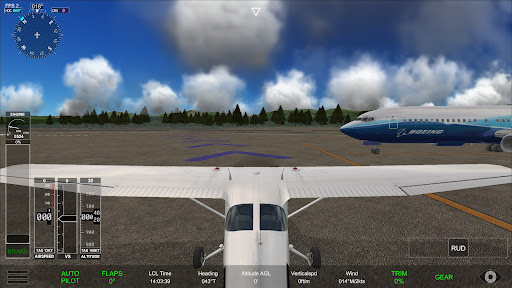
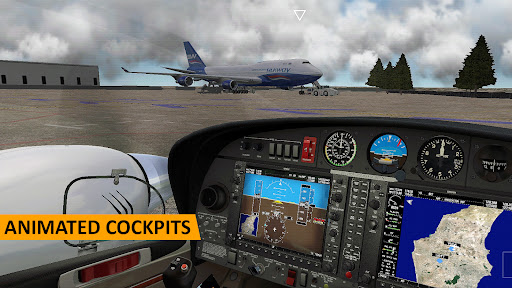
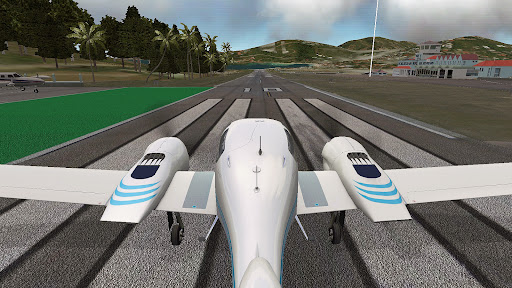
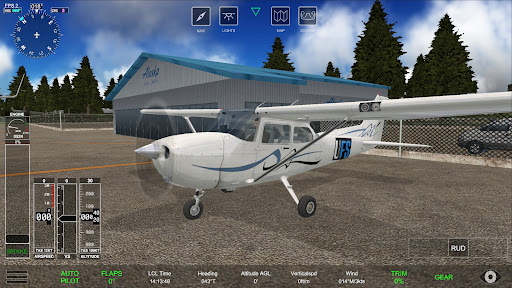
Uni Flight Simulator is one of the real flight simulator game that will show you how to fly a plane like a real pilot! This realistic plane sim teaches you how to pilot your aircraft safely from the ground into the sky and land back on the ground. Experience the exhilaration of being a pilot as you take control of airplane flight and soar through realistic, immersive environments.
Gamers who enjoy playing real flight simulator, flight aeroplane games, aviation games and pilot flight games really need to check out this Uni Flight Simulator.
Take off from iconic airports and explore breathtaking landscapes and cityscapes from a unique aerial perspective. Whether you want to fly over famous landmarks, traverse challenging weather conditions, or navigate through busy airspace, our simulator offers a diverse range of scenarios to test your skills.
This aircraft simulation game delivers everything that a dedicated flight simulator pilot could wish for. If you love real flight airplane games, takeoff and landing planes on different airfields then you need to try this newest 3D uni flight simulator game for sure.
Become an Airplane Pilot and experience all the thrills in the exciting new game, Uni Flight Simulator!
The flight controls are highly responsive and intuitive, allowing both novice and experienced pilots to enjoy the thrill of flying. Master the art of takeoff, landing, and maneuvering with precision as you progress through various missions and challenges.
In addition to the engaging gameplay, UFS - Uni Flight Simulator offers a Virtual Reality support to enhance your experience. Customize your aircraft with liveries and immerse yourself in realistic airplane cockpit views with realistic aeroplane instruments and controls.
Uni Flight Simulator Top Features:
- Realistic 3D graphics and flight controls to engage any simulation game fan.
- Intuitive mobile controls and immersive gameplay.
- Learn how to navigate an aeroplane safely and follow the flight control instruction.
- Beginner friendly. You don’t need to be a pilot to begin playing this exciting aircraft simulation game.
- Virtual Reality experience of real airplane
Whether you are a passionate aviation enthusiast, an aspiring pilot, or simply curious about the wonders of aviation games, Uni Flight Simulator is the perfect virtual playground to fulfill your dreams of flying. Strap in, buckle up, and get ready for an unforgettable airborne adventure!
Aircrafts:
- Cessna 172 (Mobile VR supported)
- Diamond DA42 Twin Star (Mobile VR Supported)
Scenery:
- PAJN, PAGS
- VNLK, VNPL, VNRT
- UBBB, UBTT
- TFFJ, TNCS, TNCE
Features:
- INSTRUMENTS -
PFD, MFD, Map, Engine, Altimeter, Heading, Air Speed
- INDICATORS -
Heading, Air Speed, Vertical Speed, Altitude AGL/MSL, Nearest Airport, LCL Time, Wind.
- CONTROLS -
Throttle, Trimmer, Flaps, Landing Gear, Brake, Rudder and Pushback.
- GROUND SYSTEMS -
Pushback.
- AIRCRAFT SYSTEMS -
Mixture, Magnetos Key, APU, Pushback, Window, Door.
- LIGHTS -
TAXI/NAV/BEACON/LANDING/STROBE.
- AUTOPILOT -
A/P, HDG, ALT.
- MAP -
Top view, Waypoints.
- NAVI -
Waypoints, distance/altitude.
- UFD - (Uni Flight Display)
Mirroring PFD(Primary Flight Display) to another device
Support: contact@bagor.co
Show more

1. Download MEmu installer and finish the setup

2. Start MEmu then open Google Play on the desktop

3. Search Uni Flight Simulator in Google Play
Install
4. Download and Install Uni Flight Simulator
5. On install completion click the icon to start

6. Enjoy playing Uni Flight Simulator on PC with MEmu
MEmu Play is the best Android emulator and 100 million people already enjoy its superb Android gaming experience. The MEmu virtualization technology empowers you to play thousands of Android games smoothly on your PC, even the most graphic-intensive ones.
Bigger screen with better graphics; Long duration, without limitation of battery or mobile data.
Full Keymapping support for precise control of keyboard and mouse or gamepad.
Multiple game accounts or tasks on single PC at one time with Multi-Instance manager.
Play Uni Flight Simulator on PC by following steps:















































