
XenoFeels
Updated
Current Version
Offered By

With your passion for XenoFeels, you shouldn’t have to limit yourself to the small screen of a phone. Play like a pro and take full control of the game using a keyboard and mouse. MEmu gives you everything you’re looking for. Download and play XenoFeels on PC. Play as long as you want — no more worries about battery life, mobile data, or unexpected calls. The all-new MEmu 9 is the best way to play XenoFeels on PC. With our expertly designed keymapping system, XenoFeels feels just like a real PC game. The MEmu multi-instance manager lets you run two or more accounts on the same device at the same time. Most importantly, our exclusive emulation engine unlocks your PC’s full potential, delivering smooth and seamless performance.
Show more
Download XenoFeels on PC with MEmu Android Emulator. Enjoy playing on big screen. XenoFeels places you on a tiny asteroid checkpoint where travelers arrive with stories, baggage, and pressure you must withstand.
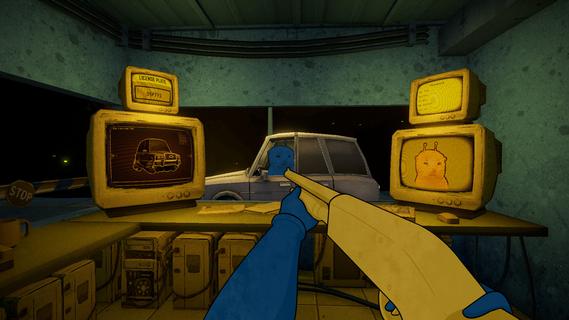



XenoFeels places you on a tiny asteroid checkpoint where travelers arrive with stories, baggage, and pressure you must withstand. The game focuses on everyday inspection work under stress, then steadily pushes your judgment as consequences stack up. You balance suspicion and mercy while the tone moves between dark humor and creeping dread. For Android installation, the XenoFeels APK is the package format used to set up the game. As a result, players who enjoy tense inspection games with narrative stakes can step into this watchpost and face tough calls.XenoFeels featuresInvestigate and compareYou examine photos, documents, license plates, and cargo, then cross-check them to find inconsistencies. Faces, names, numbers, and manifests do not always match what they should, so careful attention matters. XenoFeels rewards methodical review, since a missed mismatch can let an impostor slip by. Small details like altered portraits or concealed items can change your decision in a single glance.High-stakes decisionsEvery encounter ends with a clear choice. You approve the traveler, deny entry, or act on suspicion if evidence or instinct points that way. Your calls determine who passes, who waits, and who triggers consequences you must manage later. Over time, these small approvals and denials build a record, and that record shapes where the story goes next.Service shotgun authorityWhen a situation escalates, your service shotgun becomes part of the interaction. The tool is not for show, and using it changes outcomes immediately. XenoFeels uses a grim comedic tone when discussing collateral damage, yet it still treats the aftermath as part of your job. Because of this, you weigh force carefully as another form of paperwork with lasting fallout.Psychological unraveling over long shiftsAs shifts drag on, strange events creep into routine inspections. Inner voices question your choices, and reality begins to blur around the checkpoint. XenoFeels reflects fatigue and fear by distorting the familiar, turning ordinary tasks into moments that feel uncertain. This slow pressure tests your resolve while you keep stamping approvals and denials.Choices that branch into multiple endingsThe game tracks your cumulative decisions and uses them to branch the narrative. Who you let through, who you stop, and how you handle conflict all influence later scenes. XenoFeels is story-rich, so even minor discrepancies can ripple into different paths and final outcomes. This structure encourages careful play and makes replays reveal new consequences.Before you play XenoFeelsTone and themes include dark comedy and psychological horror that may feel intense.Content notices include violence and sexual content, aligned with common storefront tags for the game.The experience is designed for single-player users who prefer narrative choices with consequences.Release plans for XenoFeelsAccording to the developer, KotaMota Games, a full release is planned in 2026. A playable PC demo is available on Steam for early impressions, and details may change as development continues. This context helps set expectations for ongoing content and future updates as the project moves toward launch.How to play XenoFeels on AndroidAfter you download XenoFeels APK and install it, the first shift serves as a guided introduction to the inspection flow. The core loop remains simple to learn and grows in pressure as the day advances. Follow the steps below to move through a typical encounter without missing key checks.Start a new shift and read any briefing notes that explain current rules or known threats affecting your checkpoint.Call the next traveler, collect their documents, and compare photos, names, and license plates with what you see outside the window.Open the cargo view if available, scan for hidden items, and match declared goods with the actual contents you observe.When you spot a conflict or become unsure, recheck the details, then choose to approve, deny, or act on suspicion based on the evidence.Log the decision, proceed to the next traveler, and complete the shift to review outcomes that may influence future days.Get started with XenoFeelsXenoFeels delivers a focused inspection game where careful comparison and hard choices drive a branching story. Users who want tense, decision-led checks at a lonely space checkpoint can begin here and see where their calls lead. For version details and updates, check the XenoFeels latest version information before you play.
Show more

1. Download MEmu installer and finish the setup

2. Start MEmu then open Google Play on the desktop

3. Search XenoFeels in Google Play
Install
4. Download and Install XenoFeels
5. On install completion click the icon to start

6. Enjoy playing XenoFeels on PC with MEmu
MEmu Play is the best Android emulator and 100 million people already enjoy its superb Android gaming experience. The MEmu virtualization technology empowers you to play thousands of Android games smoothly on your PC, even the most graphic-intensive ones.
Bigger screen with better graphics; Long duration, without limitation of battery or mobile data.
Full Keymapping support for precise control of keyboard and mouse or gamepad.
Multiple game accounts or tasks on single PC at one time with Multi-Instance manager.
Play XenoFeels on PC by following steps:

















































