
iPair-Meet, Chat, Dating
Updated
Current Version
6.9.4
Offered By

Stop worrying about high battery drain when using iPair-Meet, Chat, Dating on your phone. Free yourself from the tiny screen and enjoy the app on a much larger display. From now on, get a full-screen experience of your app with the convenience of a keyboard and mouse. MEmu offers you all the surprising features you’d expect: quick installation and easy setup, intuitive controls, and no more worries about battery life, mobile data, or unexpected calls. The all-new MEmu 9 is the choice for using iPair-Meet, Chat, Dating on your computer. With the MEmu multi-instance manager, you can run two or more accounts at the same time. Most importantly, our exclusive emulation engine unlocks your PC’s full potential, delivering smooth and enjoyable performance.
Show more
Enjoy superb experience of using iPair-Meet, Chat, Dating on PC with MEMU App Player. It's a powerful free Android emulator which provides you with thousands of android apps for their desktop version. Enjoy connecting with friends and polishing your work with higher efficiency! iPair is a chat room app which has more than 10 million users that you can make friends easily here.


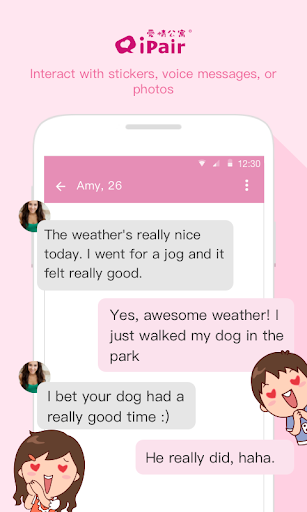

iPair is a chat room app which has more than 10 million users that you can make friends easily here. iPair provides the service of chatting, meeting, and dating. You can stop being lonely anytime and anywhere through the special matching system which developed by iPair.
The specialty of iPair app
More than 10 million male and female users.
●5 stars rating on App Store
●Safety guaranteed by IPO company
●24 hour review team
●Special matching system which raises the matching effect up to 300%
The feature of iPair app
●[Nearby] Find people nearby who also want to chat and date through GPS.
●[Meet Your Match] Through tapping Yes/No to easily meet your friends.
●[Chat] You can always find someone to chat with, sending pictures and stickers is available as well.
●[Search] You can search new friends by age and location filter.
Others you need to know
※Your privacy and safety come the first to us.
※We support many languages: Chinese, English, Japanese…
※7/24 customer services (http://goo.gl/pjnzBf)
※Need 5.0 above version &GPS
More introduction: http://goo.gl/L9pzW5
If you have any problems or suggestions for us, please go to our customer service website (http://goo.gl/by9qwK) and leave us some feedback; we will help you solve the problem and satisfy your needs as best as we possibly can. Thanks for your assistance and support!
Please note that with all subscriptions:
* Subscription automatically renews unless auto-renew is turned off at least 24-hours before the end of the current period.
* Account will be charged for renewal within 24-hours prior to the end of the current period, and identify the cost of the renewal.
* You can turn off the auto-renewal of your subscription through the Google Play Account on your Android device or through the Google Play on your computer. Once you turn off auto-renewal, your subscription will expire at the end of the current subscription period.
* By subscribing to our Monthly Subscription Service, you agree to the Conditions and Terms of use (http://goo.gl/6NK4EA)
-------------------------------------------------
iPair makes love simple and makes moments touching.
iPair makes friending faster, succinct and effective.
-------------------------------------------------
Show more

1. Download MEmu installer and finish the setup

2. Start MEmu then open Google Play on the desktop

3. Search iPair-Meet, Chat, Dating in Google Play
Install
4. Download and Install iPair-Meet, Chat, Dating
5. On install completion click the icon to start

6. Enjoy using iPair-Meet, Chat, Dating on PC with MEmu
MEmu Play is the best Android emulator, and 100 million users already enjoy its superb Android app experience. Powered by advanced virtualization technology, it lets you enjoy thousands of Android apps smoothly on your PC—including the most graphics-intensive ones.
Bigger screen with better graphics; Long duration, without limitation of battery or mobile data.
Full Keymapping support for precise control of keyboard and mouse or gamepad.
Multiple game accounts or tasks on single PC at one time with Multi-Instance manager.
Use iPair-Meet, Chat, Dating on PC by following steps: