포카마켓
Updated
Current Version
6.6.1
Offered By

Stop worrying about high battery drain when using 포카마켓 on your phone. Free yourself from the tiny screen and enjoy the app on a much larger display. From now on, get a full-screen experience of your app with the convenience of a keyboard and mouse. MEmu offers you all the surprising features you’d expect: quick installation and easy setup, intuitive controls, and no more worries about battery life, mobile data, or unexpected calls. The all-new MEmu 9 is the choice for using 포카마켓 on your computer. With the MEmu multi-instance manager, you can run two or more accounts at the same time. Most importantly, our exclusive emulation engine unlocks your PC’s full potential, delivering smooth and enjoyable performance.
Show more
Enjoy superb experience of using 포카마켓 on PC with MEMU App Player. It's a powerful free Android emulator which provides you with thousands of android apps for their desktop version. Enjoy connecting with friends and polishing your work with higher efficiency! 포카마켓은 원하는 포토카드를 쉽고 빠르게 찾고, 거래하고, 컬렉팅할 수 있는 서비스예요.
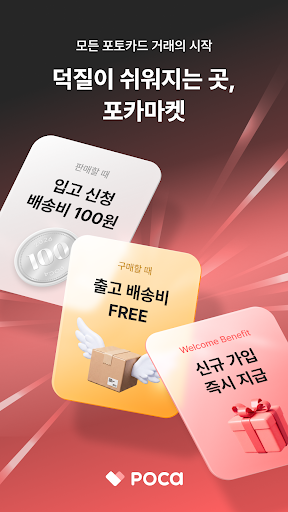
포카마켓은 원하는 포토카드를 쉽고 빠르게 찾고, 거래하고, 컬렉팅할 수 있는 서비스예요.
■ 새 포토카드, 가장 빠르게
최애의 새로운 포토카드를 놓치지 마세요.
업데이트되는 포토카드를 포카마켓에서 바로 확인할 수 있어요.
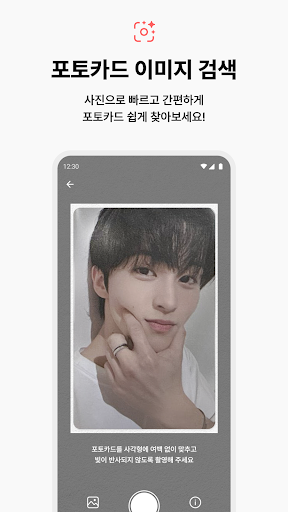
■ 이름 몰라도 찾는 AI 포카 검색
사진 한 장이면 원하는 포토카드를 찾아드려요.
팬들만 아는 서치어로도 쉽게 검색할 수 있어요.
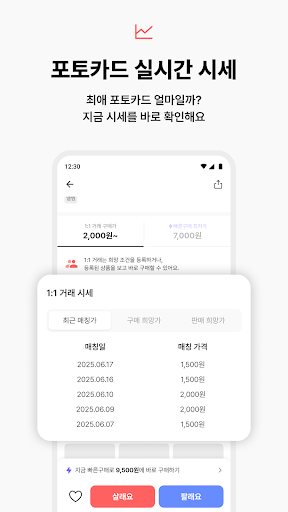
■ 실제 거래 데이터 기반 포토카드 시세
시세가 궁금할 땐 여러 곳을 찾아볼 필요 없어요.
거래 데이터를 기반으로 한 포토카드 시세를 확인해보세요.
■ 원하는 조건으로 자동 매칭되는 1:1 거래
원하는 가격과 배송 방법만 입력하면
조건에 맞는 거래 상대를 자동으로 찾아드려요.
매칭 후에는 포카톡으로 대화하며 안전하게 거래할 수 있어요.
■ 거래에 필요한 기능만 담은 포카톡
배송 정보부터 계좌번호, 영상 인증까지 편하게 공유하세요.
거래가 끝나면 개인정보는 자동으로 삭제되고,
상대방의 신고 이력도 확인할 수 있어 더욱 안전해요.
■ 귀찮을 땐 한 번에 파는 입고판매
판매가 번거롭다면 포카마켓에 맡기세요.
검수부터 판매, 배송까지 대신해드리니 정산만 받으면 끝!
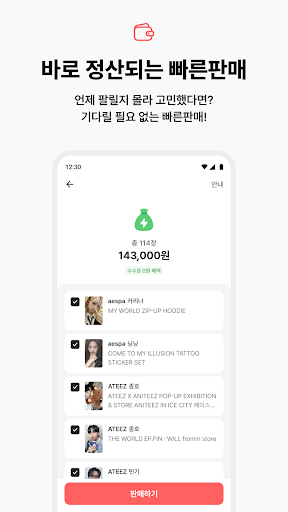
■ 1분 만에 정산받는 빠른판매
팔릴 때까지 기다리지 마세요.
버튼 한 번으로 바로 판매하고 정산받을 수 있어요.
■ 검수된 포토카드를 대화없이 내 손에, 빠른구매
검수된 포토카드를 쉽고 빠르게 구매하세요.
콜렉트북에 모아 한 번에 배송받을 수 있어요.
■ 서비스 접근 권한 안내
포카마켓은 서비스 제공을 위해 아래의 접근 권한을 요청해요.
- 필수 접근 권한: 없음
[선택 접근 권한]
- 카메라: 포토카드 검색·제보, 판매 등록, 채팅에서 사진·영상 촬영
- 사진 및 동영상: 포토카드 검색·제보, 판매 등록, 채팅에서 사진 불러오기
- 알림: 거래, 채팅, 공지사항 등 알림 수신
*위 접근 권한은 특정 기능을 사용할 때만 요청해요. 동의하지 않아도 서비스를 이용할 수 있으나 일부 기능 사용이 제한될 수 있어요.
■ 문의 및 제안
궁금한 점이나 제안하고 싶은 내용이 있다면 언제든지 알려주세요.
- 고객센터: 앱 내 고객센터 또는 1:1 문의하기
- 이메일: hello@infludeo.com
- 전화: 02-6014-8373
----
개발자 연락처 :
(주)인플루디오 대한민국 서울특별시 영등포구
영등포구 영중로 15 A동 20층 2001호 (영등포동4가,타임스퀘어)
07305 245-81-01708 2025-서울영등포-1360 대한민국
Show more

1. Download MEmu installer and finish the setup

2. Start MEmu then open Google Play on the desktop

3. Search 포카마켓 in Google Play
Install
4. Download and Install 포카마켓
5. On install completion click the icon to start

6. Enjoy using 포카마켓 on PC with MEmu
MEmu Play is the best Android emulator, and 100 million users already enjoy its superb Android app experience. Powered by advanced virtualization technology, it lets you enjoy thousands of Android apps smoothly on your PC—including the most graphics-intensive ones.
Bigger screen with better graphics; Long duration, without limitation of battery or mobile data.
Full Keymapping support for precise control of keyboard and mouse or gamepad.
Multiple game accounts or tasks on single PC at one time with Multi-Instance manager.
Use 포카마켓 on PC by following steps: