
تحويل الفيديو الى صوت MP3
Updated
Current Version
v4.2.convertvideotomp3
Offered By

Stop worrying about high battery drain when using تحويل الفيديو الى صوت MP3 on your phone. Free yourself from the tiny screen and enjoy the app on a much larger display. From now on, get a full-screen experience of your app with the convenience of a keyboard and mouse. MEmu offers you all the surprising features you’d expect: quick installation and easy setup, intuitive controls, and no more worries about battery life, mobile data, or unexpected calls. The all-new MEmu 9 is the choice for using تحويل الفيديو الى صوت MP3 on your computer. With the MEmu multi-instance manager, you can run two or more accounts at the same time. Most importantly, our exclusive emulation engine unlocks your PC’s full potential, delivering smooth and enjoyable performance.
Show more
Enjoy superb experience of using تحويل الفيديو الى صوت MP3 on PC with MEMU App Player. It's a powerful free Android emulator which provides you with thousands of android apps for their desktop version. Enjoy connecting with friends and polishing your work with higher efficiency! الآن باستخدام تطبيقنا ، يمكنك تحويل أي ملف فيديو إلى ملف صوتي بتنسيق MP3 باستخدام محول الفيديو إلى MP3.
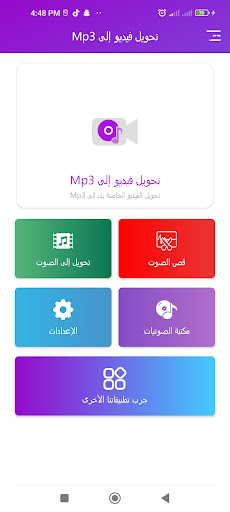
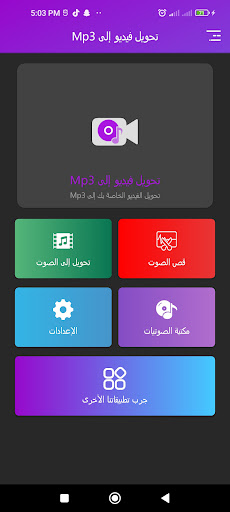
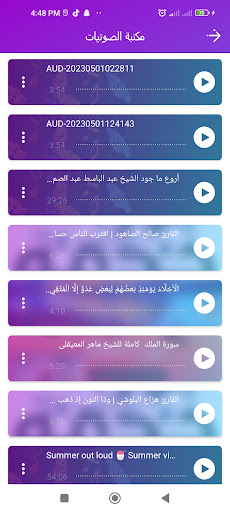
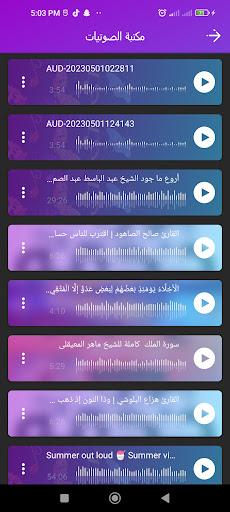
الآن باستخدام تطبيقنا ، يمكنك تحويل أي ملف فيديو إلى ملف صوتي بتنسيق MP3 باستخدام محول الفيديو إلى MP3. إزالة الصوت من الفيديو (إنشاء فيديو كتم الصوت). تقليم الفيديو بأي شكل وحجم ومدة بنفس جودة الإخراج. امزج الصوت مع الفيديو وأضف الصوت إلى الفيديو.
محول الفيديو إلى MP3 - يمكنه استخراج الصوت من الفيديو بأي تنسيق وحفظه كملف MP3 في جهازك. إنه محول mp3 ومحول الفيديو الأسهل استخدامًا. بسهولة تحويل الفيديو إلى mp3.
* كتم الفيديو - هل تريد إزالة الصوت من الفيديو؟ استخدم هذا التطبيق لكتم صوت الفيديو وكتم الصوت وإزالة الصوت غير المرغوب فيه من الفيديو الخاص بك. قم بإنشاء أفضل مقاطع الفيديو بجودة كتم الصوت.
حدد بسهولة جزء الفيديو الذي تريد قصه واحصل على نفس جودة إخراج الفيديو المقطوع باستخدام أداة تشذيب الفيديو هذه. استخدم أداة قص الفيديو سهلة الاستخدام.
* يدعم تنسيقات الفيديو بما في ذلك MP4 ، WMV ، 3GP ، AVI ، MPG ، M4V ، MPEG4 ، MOV ، MKV ، WEBM ، M2V ، إلخ.
* أفضل جودة إخراج mp3.
* معالجة سريعة. كتم الصوت وتقليم الفيديو تقريبًا. لا وقت. فيديو سريع لتحويل MP3.
* سهل الاستخدام مع Intractive UI.
الآن باستخدام محول الفيديو التطبيق الخاص بنا إلى mp3 ، يمكنك تحويل الفيديو إلى امتداد الموسيقى mp3
يمكن لـ محول الفيديو إلى mp3 عمل كل هذا:
Show more

1. Download MEmu installer and finish the setup

2. Start MEmu then open Google Play on the desktop

3. Search تحويل الفيديو الى صوت MP3 in Google Play
Install
4. Download and Install تحويل الفيديو الى صوت MP3
5. On install completion click the icon to start

6. Enjoy using تحويل الفيديو الى صوت MP3 on PC with MEmu
MEmu Play is the best Android emulator, and 100 million users already enjoy its superb Android app experience. Powered by advanced virtualization technology, it lets you enjoy thousands of Android apps smoothly on your PC—including the most graphics-intensive ones.
Bigger screen with better graphics; Long duration, without limitation of battery or mobile data.
Full Keymapping support for precise control of keyboard and mouse or gamepad.
Multiple game accounts or tasks on single PC at one time with Multi-Instance manager.
Use تحويل الفيديو الى صوت MP3 on PC by following steps: