Device Info HW
Updated
Current Version
5.25.0
Offered By

Stop worrying about high battery drain when using Device Info HW on your phone. Free yourself from the tiny screen and enjoy the app on a much larger display. From now on, get a full-screen experience of your app with the convenience of a keyboard and mouse. MEmu offers you all the surprising features you’d expect: quick installation and easy setup, intuitive controls, and no more worries about battery life, mobile data, or unexpected calls. The all-new MEmu 9 is the choice for using Device Info HW on your computer. With the MEmu multi-instance manager, you can run two or more accounts at the same time. Most importantly, our exclusive emulation engine unlocks your PC’s full potential, delivering smooth and enjoyable performance.
Show more
Enjoy superb experience of using Device Info HW on PC with MEMU App Player. It's a powerful free Android emulator which provides you with thousands of android apps for their desktop version. Enjoy connecting with friends and polishing your work with higher efficiency! Device Info HW is a hardware and software information app for Android devices.
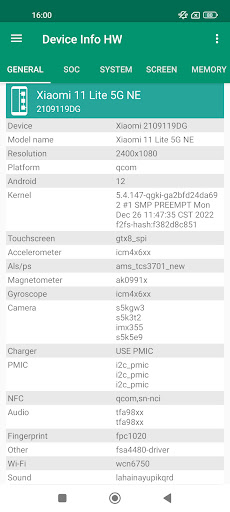
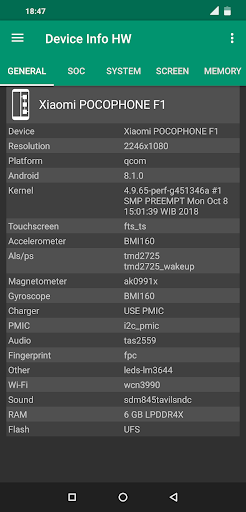
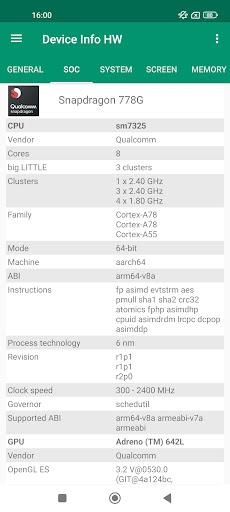
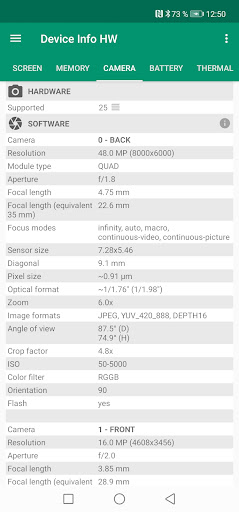
Device Info HW is a hardware and software information app for Android devices.
App trying detect components of your smartphone to provide complete information about device's hardware.
Now detection is supported for lcd, touchscreen, cameras, sensors, memory, flash, audio, nfc, charger, wi-fi and battery; if that possible for your device.
I think app is interesting and useful for users and developers who build kernels or android.
App has a quick navigation, fresh design. Also supports dark, black theme (in PRO version or 2 week in free)
You can switch by tab or use navigation panel. Many items are clickable and you can go to another tab or menu.
On recent devices reading some information is blocked.
App trying provide maximum information as possible. If you have root, app can read more (switch in settings)
Components
LCD - model. For recent android detection require root.
Also you can check the colors in lcd test.
Touchscreen - show model, also you can check how much fingers are supported in multi-touch test.
Camera - hardware info (model, vendor, resolution) and software info by API.
If can't detect camera model, sometimes available a list of supported cameras.
Detailed info about SoC in you device
CPU : model, cores, clusters, family, abi, governor, frequency
GPU : model, vendor, opengl, frequency, list of extensions
Click on the clock speed to open CPU monitor
System: complete info about your firmware build.
Memory: type lpddr and for some devices operating frequency.
Flash: chip and vendor emmc or ufs (scsi).
You can go to the memory tab and see usage of memory and storage.
Battery: base info and for some devices available extra info:
- Discharging speed is current consumption
- Charging speed is charge current minus current consumption
- Power profile - encoded by manufacturer for calculate consumption
* Kernel profile
* Model
Thermal: temperatures by thermal sensors
Sensors: availability of basic sensors and tests for them
Applications: you can quickly find apps and see info about it, also provided system apps
Drivers: you can find other chips used in your device.
Partitions: list of partition and their sizes.
PMIC: list of power regulator voltages which applied to the components.
Wi-Fi: info about connection
Bluetooth: supported features
Input devices: list of input devices.
Codecs: decoders and encoders, drm info
USB: connected devices by otg
Extra options:
- Show i2c address of the chip
- Open engineering menu for mtk and xiaomi
- List of CPU codenames for Qualcomm, mtk, HiSilicon
Devices database
You can find info for other devices, compare and check similar drivers. It available on web page: deviceinfohw.ru
Also you can upload your device info. See to the Info Center.
PRO VERSION
• Theme
Supports all a light, dark and black theme, choose what you like.
In the free version, black available 2 weeks for the test.
• Report
You can create a report with information about the device.
It will be saved in file HTML or PDF format.
You can open it or send to email by share button.
See example:
deviceinfohw.ru/data/report_example.html
• Copy text
Copy text by long press in info lists.
• New design of battery tab with charge / discharge chart
• Device list
List of i2c, spi devices.
It's useful when available many chips or they uncategorized.
Also this supports development to improve app.
Note:
Not for all devices can read drivers info, it's depend on soc, vendor. If you want help, then upload your device info.
If you want translate app for your language or have interesting ideas or found bugs, write me to email or forum.
Requirements :
- Android 4.0.3 and above
Permissions :
- INTERNET is required for upload device info. It's use only for manual upload.
- CAMERA is required for getting camera software characteristics for old camera api.
- ACCESS_WIFI_STATE is required for info about wi-fi connection.
Show more

1. Download MEmu installer and finish the setup

2. Start MEmu then open Google Play on the desktop

3. Search Device Info HW in Google Play
Install
4. Download and Install Device Info HW
5. On install completion click the icon to start

6. Enjoy using Device Info HW on PC with MEmu
MEmu Play is the best Android emulator, and 100 million users already enjoy its superb Android app experience. Powered by advanced virtualization technology, it lets you enjoy thousands of Android apps smoothly on your PC—including the most graphics-intensive ones.
Bigger screen with better graphics; Long duration, without limitation of battery or mobile data.
Full Keymapping support for precise control of keyboard and mouse or gamepad.
Multiple game accounts or tasks on single PC at one time with Multi-Instance manager.
Use Device Info HW on PC by following steps: