Video downloader & Save Videos
Updated
Current Version
Varies with device
Offered By

Stop worrying about high battery drain when using Video downloader & Save Videos on your phone. Free yourself from the tiny screen and enjoy the app on a much larger display. From now on, get a full-screen experience of your app with the convenience of a keyboard and mouse. MEmu offers you all the surprising features you’d expect: quick installation and easy setup, intuitive controls, and no more worries about battery life, mobile data, or unexpected calls. The all-new MEmu 9 is the choice for using Video downloader & Save Videos on your computer. With the MEmu multi-instance manager, you can run two or more accounts at the same time. Most importantly, our exclusive emulation engine unlocks your PC’s full potential, delivering smooth and enjoyable performance.
Show more
Enjoy superb experience of using Video downloader & Save Videos on PC with MEMU App Player. It's a powerful free Android emulator which provides you with thousands of android apps for their desktop version. Enjoy connecting with friends and polishing your work with higher efficiency! Video downloader is a video downloading app that helps you download video from top social media sites and supports 1000+ more websites.
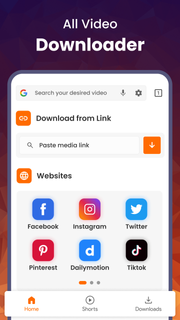
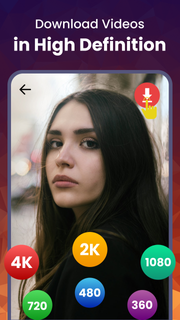
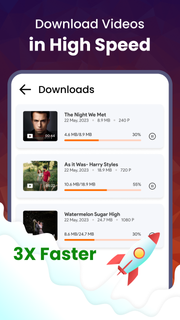
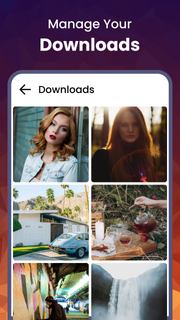
Video downloader is a video downloading app that helps you download video from top social media sites and supports 1000+ more websites.Why this video downloader?This Video downloader offers you,1. 99.9% uptime of your video downloader service and free video downloading.2. Video player, basic video editor and reshare support.3. Enjoy tons of Videos in our app aligned with your interests, download and share it with your friends, family. 4. Video downloading from more than 1000+ video sites and web sources.5. We continuously add more and more website to download video from. 6. Get premium support, more downloading services, fast downloading with easy to get subscription plans. How to use this video downloader?This Video downloader is all video downloader that offers you the simplest way to download videos, download audios, download images and download files.It support downloading videos from 3 simple methods.1. Download videos from a link: a. Copy link from the browser or your favorite website. b. Open the app and paste the link. c. Select Video Quality you prefer. d. Download Video with blazing fast video downloader.2. Download videos from Sharing options: a. Browse video on any platform you like. b. Click share options of the video. c. Select open with Video Downloader. (search for this app's icon). d. this video downloader will get open and starts your video downloading.3. Browse in-app videos: a. Browse video on our free video downloader app. b. Click Download button which ever video you like. c. Select Video Quality you prefer. d. Download Video with all video downloader.yes, we have provided all video downloading solutions, you have learned it, Download and Enjoy the best video downloader.Which videos quality are available?Video quality totally depends on the video link you provide. our video downloader app supports video with all the qualities, upto 4K videos.144p, 240p, 360p, 480, 640p, 720p, 1080p, 1440p, 2K, 4k video downloading.Are my videos Secure, where they go after downloading??Video downloader allows you to choose any folder of you choice from the phone or SD card to download videos. Videos will remain save even after you delete the application.Free Video downloader also supports private folder with lock functionality, you can transfer your video to private folder and secure them so no one can find them. Those downloaded videos will also get deleted upon deleting the app. So Private browser and private video downloading is supported.How can I manage my videos?All video downloader is also a download manager. Download manager helps you with;1. Schedule video downloading, 2. Play or pause video downloading.3. Resume downloading if you internet connection get lost.4. Prioritize speed of downloading videos.5. Keep track of progress of downloading video.6. Save storage from downloaded videos by removing old and useless videos.Does it support Fast video downloader?Our developers keeps working on video downloader downloading videos speed. As of now we provide the fast video downloading, and we will keep improving it over time. Fast video downloader will support fast video downloading according to backend servers.Can I download videos from Youtube?Video Downloader is not a Youtube downloader or Youtube video downloader, Downloading videos from Youtube is not allowed according to Google Play Policies.⚠️ Disclaimer: ⚠️ Please get permission from the content owner before you repost videos.⚠️ We are not responsible for any intellectual property violation that results from unauthorized reposts of videos.⚠️ Downloading files protected by copyright is prohibited and regulated by the law of the country.⚠️ This app doesn't support downloading Youtube videos due to the policy of Play Store.
Show more

1. Download MEmu installer and finish the setup

2. Start MEmu then open Google Play on the desktop

3. Search Video downloader & Save Videos in Google Play
Install
4. Download and Install Video downloader & Save Videos
5. On install completion click the icon to start

6. Enjoy using Video downloader & Save Videos on PC with MEmu
MEmu Play is the best Android emulator, and 100 million users already enjoy its superb Android app experience. Powered by advanced virtualization technology, it lets you enjoy thousands of Android apps smoothly on your PC—including the most graphics-intensive ones.
Bigger screen with better graphics; Long duration, without limitation of battery or mobile data.
Full Keymapping support for precise control of keyboard and mouse or gamepad.
Multiple game accounts or tasks on single PC at one time with Multi-Instance manager.
Use Video downloader & Save Videos on PC by following steps: