MetaTrader 4 Forex Trading
Updated
Current Version
400.1493
Offered By

Stop worrying about high battery drain when using MetaTrader 4 Forex Trading on your phone. Free yourself from the tiny screen and enjoy the app on a much larger display. From now on, get a full-screen experience of your app with the convenience of a keyboard and mouse. MEmu offers you all the surprising features you’d expect: quick installation and easy setup, intuitive controls, and no more worries about battery life, mobile data, or unexpected calls. The all-new MEmu 9 is the choice for using MetaTrader 4 Forex Trading on your computer. With the MEmu multi-instance manager, you can run two or more accounts at the same time. Most importantly, our exclusive emulation engine unlocks your PC’s full potential, delivering smooth and enjoyable performance.
Show more
Enjoy superb experience of using MetaTrader 4 Forex Trading on PC with MEMU App Player. It's a powerful free Android emulator which provides you with thousands of android apps for their desktop version. Enjoy connecting with friends and polishing your work with higher efficiency! Trade Forex from your smartphone or tablet!
Trade Forex from your smartphone or tablet!
MetaTrader 4 (MT4) is the world's most popular Forex trading platform. Choose from hundreds of brokers and thousands of servers to trade using your MetaTrader (MT4) 4 Android app. Control your account, trade and analyze the Forex market using technical indicators and graphical objects.
Risk Warning: Our programs may involve real trading with a high risk of losing money rapidly. Most retail investor accounts lose money when trading financial products. You should consider whether you understand how various financial products work and whether you can afford to take the high risk of losing money.
TRADING
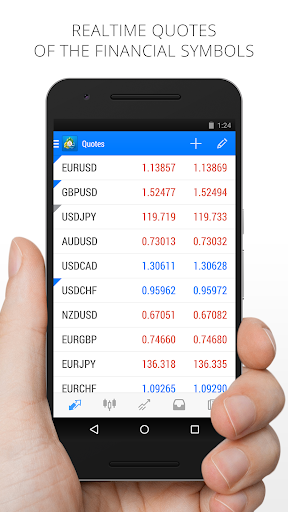
* Real-time quotes of Forex market
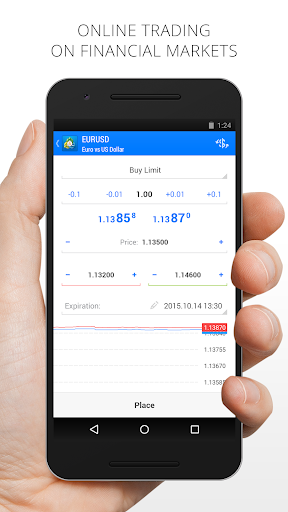
* Full set of trade orders, including pending orders
* All types of trade execution
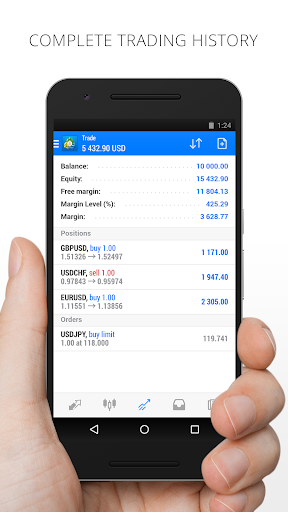
* Detailed online trading history
ADVANCED TRADING
* Fast switching between financial instruments on charts
* Sound notifications assisting trading
* Customizable Forex chart color schemes
* Trade levels visualizing the prices of pending orders, as well as SL and TP values on the chart
* Free financial news — dozens of materials daily
* Chat with any registered MQL5.community trader
* Support of push notifications from the desktop MetaTrader 4 (MT4) platform and MQL5.community services
* Connection with hundreds of Forex Brokers
TECHNICAL ANALYSIS
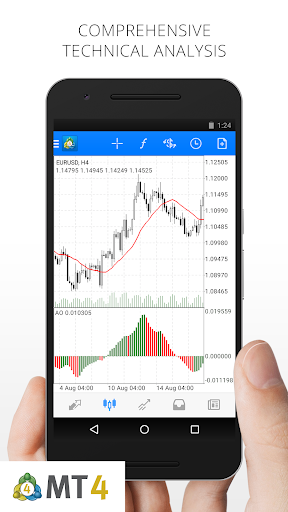
* Interactive real-time Forex charts with zoom and scroll options
* 30 of the most popular technical indicators among traders
* 24 analytical objects: lines, channels, geometric shapes, as well as Gann, Fibonacci and Elliott tools
* 9 timeframes: M1, M5, M15, M30, H1, H4, D1, W1 and MN
* 3 types of charts: bars, Japanese candlesticks and broken line for efficient trading
Download MetaTrader 4 (MT4) for Android on your smartphone or tablet and trade Forex anytime and anywhere in the world!
To trade using real money, you need to open a real trading account by entering into a separate agreement with a financial company (broker), which has installed the server component of the MetaTrader 4 trading platform. MetaQuotes is a software company and does not provide financial services, nor it has access to MetaTrader 4 platform servers and databases managed by financial companies.
Show more

1. Download MEmu installer and finish the setup

2. Start MEmu then open Google Play on the desktop

3. Search MetaTrader 4 Forex Trading in Google Play
Install
4. Download and Install MetaTrader 4 Forex Trading
5. On install completion click the icon to start

6. Enjoy using MetaTrader 4 Forex Trading on PC with MEmu
MEmu Play is the best Android emulator, and 100 million users already enjoy its superb Android app experience. Powered by advanced virtualization technology, it lets you enjoy thousands of Android apps smoothly on your PC—including the most graphics-intensive ones.
Bigger screen with better graphics; Long duration, without limitation of battery or mobile data.
Full Keymapping support for precise control of keyboard and mouse or gamepad.
Multiple game accounts or tasks on single PC at one time with Multi-Instance manager.
Use MetaTrader 4 Forex Trading on PC by following steps: