MotorData OBD2 ELM car scanner
Updated
Current Version
1.28.11.2036
Offered By

Stop worrying about high battery drain when using MotorData OBD2 ELM car scanner on your phone. Free yourself from the tiny screen and enjoy the app on a much larger display. From now on, get a full-screen experience of your app with the convenience of a keyboard and mouse. MEmu offers you all the surprising features you’d expect: quick installation and easy setup, intuitive controls, and no more worries about battery life, mobile data, or unexpected calls. The all-new MEmu 9 is the choice for using MotorData OBD2 ELM car scanner on your computer. With the MEmu multi-instance manager, you can run two or more accounts at the same time. Most importantly, our exclusive emulation engine unlocks your PC’s full potential, delivering smooth and enjoyable performance.
Show more
Enjoy superb experience of using MotorData OBD2 ELM car scanner on PC with MEMU App Player. It's a powerful free Android emulator which provides you with thousands of android apps for their desktop version. Enjoy connecting with friends and polishing your work with higher efficiency! Looking for a powerful app for car scanning?
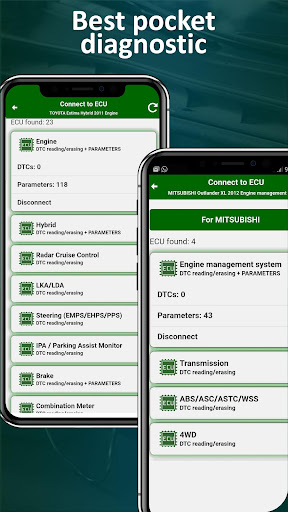
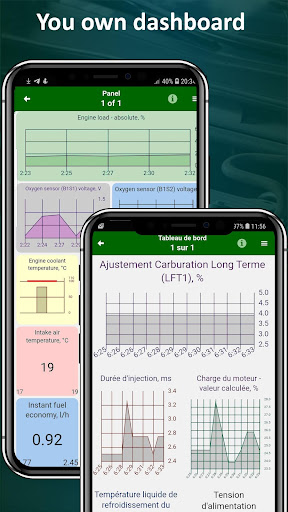
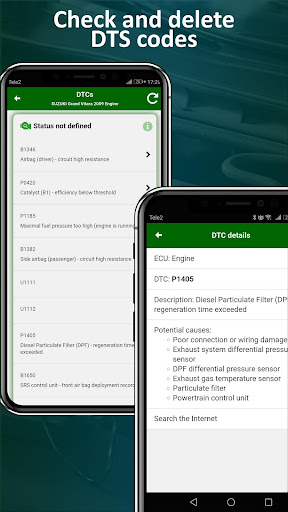
Looking for a powerful app for car scanning? MOTORDATA OBD is here!
Our elm327 car scanner offers expert car diagnostics in accordance with manufacturer protocols.
Free engine diagnostics are included. Advanced car diagnostics are available for purchase.
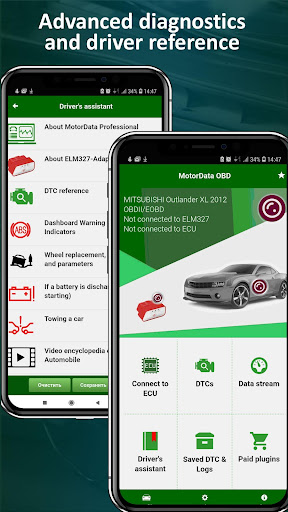
The car scanner allows you to read and clear error codes from up to 25 electronic control units (ECUs), including the engine, transmission, ABS, SRS, ESP, AC, and more.
MOTORDATA OBD expands the capabilities of the OBD2 scanner:
• Car scanner - reads and clears error codes from control units. With our paid plugins, you can read up to 25 ECUs depending on the car make, model, year, and your scanner. You can read codes from the automatic transmission, CVT, ABS, SRS, ESP, AC, and other ECUs.
• Decodes malfunction codes (DTC P0 and P2 OBD2) and provides information on the causes of common malfunctions. It also allows you to reset the Check Engine indicator.
• Provides live data from the engine and other systems, such as speed, RPM, temperature, pressure, oxygen sensor readings, short-term and long-term fuel trims, torque, and more.
• Offers a customizable dashboard with 18 templates and the ability to change font sizes, display types, and colors.
• Offers a data logging feature that allows you to record and play back car sensor readings, malfunction codes, and freeze-frame data (parameters recorded at the time of the malfunction) for offline analysis and identification of recurring issues.
• Provides a plug-in dashboard that shows information about the car's systems, signal lamp values and indicators, as well as actions to take when the signal lamps light up.
• Offers real-time fuel consumption monitoring.
• Provides useful driver information through the driver assistant feature.
MOTORDATA OBD supports the OBDII protocol for the following cars:
• USA from 1996 • Japan from 1998 • Europe from 2000
Advanced diagnostic plugins are available and can be purchased for the following cars:
• Toyota, Lexus including HYBRID: RX, NX, Camry, Corolla, Highlander, Rav4, Tacoma, Tundra, 4Runner, Venza, Prius
• Ford: Escape, Explorer, F-Series, Bronco, Bronco Sport, Transit, Edge, Maverick, Expedition, Ranger, Mustang,
• Chevrolet (Chevy): Silverado, Equinox, Malibu, Tahoe, Traverse, Colorado, Blazer, TrailBlazer, Express, Suburban, Corvette
• GMC: Sierra, Terrain, Yukon, Acadia
• Nissan: Altima, Rogue, Sentra, Frontier, Pathfinder, Kicks, Murano
• Honda, Acura: Accord, Civic, CR-V, HR-V, Pilot, Odyssey, Ridgeline, Passport
• Cadillac Escalade
• Mazda: CX-5, CX-9, CX-30, Mazda3,
• Mitsubishi: Outlander, ASX, L200
• Subaru: Outback, Crosstrek, Impreza
• Hyundai: Tucson, Elantra, Palisade, Santa Cruz, Santa Fe, Sonata, Kona, Corvette,
• KIA: Sportage, Telluride, Forte, Sorento, K5, Soul, Seltos
• BMW: BMW3, BMW5, BMW7, X3, X5, X7
• Suzuki: Grand Vitara, SX4, Swift, Jimny.
The car scanner app requires an adapter compatible with Wi-Fi, Bluetooth, and Bluetooth 4.0 LE, or USB OBD2 ELM327. Please note that reliable scanner operation is not guaranteed when using Chinese ELM 327 v2.1 adapters. We recommend using high-quality v1.5 adapters such as OBDLink, Viecar, Konnwei KW903, and UniCarScan.
Download MOTORDATA OBD today to take control of your car diagnostics with a powerful car scanner and diagnostic tool!
Your feedback is always welcome: elm@motordata.net.
More info: https://motordata-obd.com/
Show more

1. Download MEmu installer and finish the setup

2. Start MEmu then open Google Play on the desktop

3. Search MotorData OBD2 ELM car scanner in Google Play
Install
4. Download and Install MotorData OBD2 ELM car scanner
5. On install completion click the icon to start

6. Enjoy using MotorData OBD2 ELM car scanner on PC with MEmu
MEmu Play is the best Android emulator, and 100 million users already enjoy its superb Android app experience. Powered by advanced virtualization technology, it lets you enjoy thousands of Android apps smoothly on your PC—including the most graphics-intensive ones.
Bigger screen with better graphics; Long duration, without limitation of battery or mobile data.
Full Keymapping support for precise control of keyboard and mouse or gamepad.
Multiple game accounts or tasks on single PC at one time with Multi-Instance manager.
Use MotorData OBD2 ELM car scanner on PC by following steps: