MX Player Beta
Updated
Current Version
2.23.1
Offered By

Stop worrying about high battery drain when using MX Player Beta on your phone. Free yourself from the tiny screen and enjoy the app on a much larger display. From now on, get a full-screen experience of your app with the convenience of a keyboard and mouse. MEmu offers you all the surprising features you’d expect: quick installation and easy setup, intuitive controls, and no more worries about battery life, mobile data, or unexpected calls. The all-new MEmu 9 is the choice for using MX Player Beta on your computer. With the MEmu multi-instance manager, you can run two or more accounts at the same time. Most importantly, our exclusive emulation engine unlocks your PC’s full potential, delivering smooth and enjoyable performance.
Show more
Enjoy superb experience of using MX Player Beta on PC with MEMU App Player. It's a powerful free Android emulator which provides you with thousands of android apps for their desktop version. Enjoy connecting with friends and polishing your work with higher efficiency! MX Player, the most powerful video player now brings you a FREE streaming service offering more than 100,000+ hours of content including Original & Exclusive Shows, Movies, TV Shows, Web Series & a dual Music experience with videos and audio.
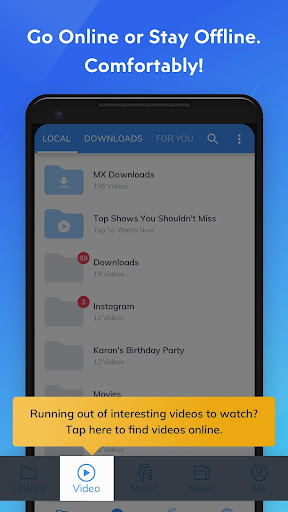
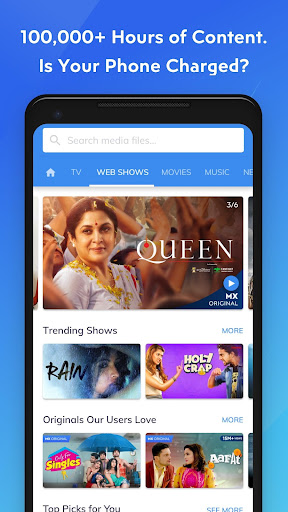

MX Player, the most powerful video player now brings you a FREE streaming service offering more than 100,000+ hours of content including Original & Exclusive Shows, Movies, TV Shows, Web Series & a dual Music experience with videos and audio.
We have also added ‘Downloads’ tab & functionality to make it easy for you to manage your downloaded content and find new content to download with a single click.
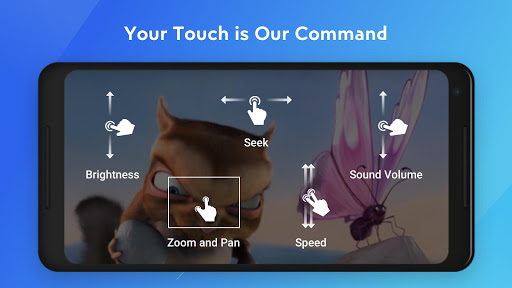
The same powerful video player now plays online videos with all the gestures that you already love!
Powerful video player with advanced hardware acceleration and subtitle support.
a) HARDWARE ACCELERATION - Hardware acceleration can be applied to more videos with the help of new HW+ decoder.
b) MULTI-CORE DECODING - MX Player is the first Android video player which supports multi-core decoding. Test result proved that dual-core device's performance is up to 70% better than single-core devices.
c) PINCH TO ZOOM, ZOOM AND PAN - Easily zoom in and out by pinching and swiping across the screen. Zoom and Pan is also available by option.
d) SUBTITLE GESTURES - Scroll forward/backward to move to next/previous text, Up/down to move text up and down, Zoom in/out to change text size.
e) KIDS LOCK - Keep your kids entertained without having to worry that they can make calls or touch other apps. (plugin required)
Subtitle formats:
- DVD, DVB, SSA/ASS subtitle tracks.
- SubStation Alpha(.ssa/.ass) with full styling.
- SAMI(.smi) with Ruby tag support.
- SubRip(.srt)
- MicroDVD(.sub)
- VobSub(.sub/.idx)
- SubViewer2.0(.sub)
- MPL2(.mpl)
- TMPlayer(.txt)
- Teletext
- PJS(.pjs)
- WebVTT(.vtt)
******
About "Draw over other apps" permission: This permission is required to block system buttons when input blocking is activated on the playback screen.
About "Pair with Bluetooth devices" permission: This permission is required to improve AV sync when Bluetooth headset is connected.
About "Disable screen lock" permission: This permission is required to remove screen lock temporarily when Kids lock mode is used. Nevertheless, secure screen lock will not be disabled.
About "Control vibration", "Prevent device from sleeping" permissions: These permissions are required for media playback on some devices.
******
If you are facing "package file is invalid" error, please install it again from product home page (https://sites.google.com/site/mxvpen/download)
******
If you have any questions, please visit our Facebook Page:
https://www.facebook.com/MXPlayer/
Some of the screens are from the Elephants Dreams licensed under the Creative Commons Attribution 2.5.
(c) copyright 2006, Blender Foundation / Netherlands Media Art Institute / www.elephantsdream.org
Some of the screens are from the Big Buck Bunny licensed under the Creative Commons Attribution 3.0 Unported.
(c) copyright 2008, Blender Foundation / www.bigbuckbunny.org
Some contents in App are provided by YouTube services and API, please follow these:
https://www.youtube.com/t/terms
https://www.youtube.com/yt/copyright/
https://www.youtube.com/yt/policyandsafety/
Show more

1. Download MEmu installer and finish the setup

2. Start MEmu then open Google Play on the desktop

3. Search MX Player Beta in Google Play
Install
4. Download and Install MX Player Beta
5. On install completion click the icon to start

6. Enjoy using MX Player Beta on PC with MEmu
MEmu Play is the best Android emulator, and 100 million users already enjoy its superb Android app experience. Powered by advanced virtualization technology, it lets you enjoy thousands of Android apps smoothly on your PC—including the most graphics-intensive ones.
Bigger screen with better graphics; Long duration, without limitation of battery or mobile data.
Full Keymapping support for precise control of keyboard and mouse or gamepad.
Multiple game accounts or tasks on single PC at one time with Multi-Instance manager.
Use MX Player Beta on PC by following steps: