
National Bank of Canada
Updated
Current Version
5.56.2
Offered By

Stop worrying about high battery drain when using National Bank of Canada on your phone. Free yourself from the tiny screen and enjoy the app on a much larger display. From now on, get a full-screen experience of your app with the convenience of a keyboard and mouse. MEmu offers you all the surprising features you’d expect: quick installation and easy setup, intuitive controls, and no more worries about battery life, mobile data, or unexpected calls. The all-new MEmu 9 is the choice for using National Bank of Canada on your computer. With the MEmu multi-instance manager, you can run two or more accounts at the same time. Most importantly, our exclusive emulation engine unlocks your PC’s full potential, delivering smooth and enjoyable performance.
Show more
Enjoy superb experience of using National Bank of Canada on PC with MEMU App Player. It's a powerful free Android emulator which provides you with thousands of android apps for their desktop version. Enjoy connecting with friends and polishing your work with higher efficiency! It's easy to manage your finances with the National Bank app.
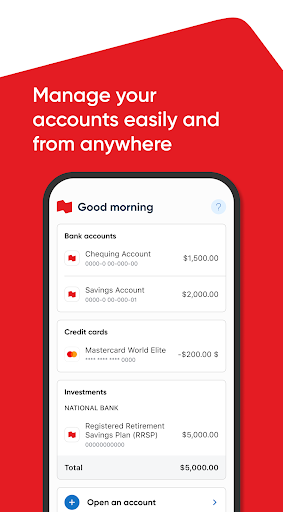
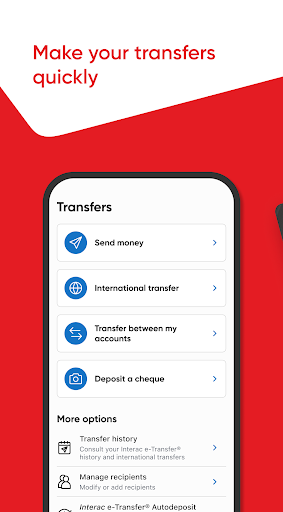
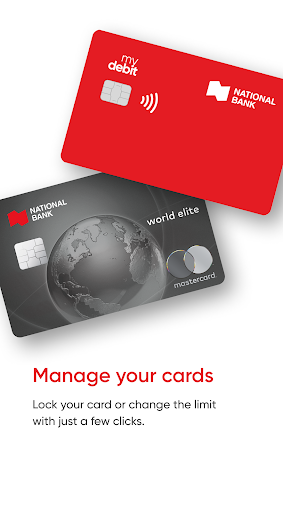
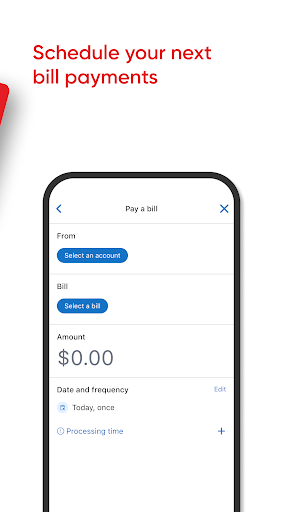
It's easy to manage your finances with the National Bank app.
Accept a transfer on the train, transfer money at the restaurant, pay employees from the cottage... The National Bank app meets your personal banking needs, as well as the specific requirements of your business. Manage your accounts separately - all from one app!
Personal needs:
- Use your smartphone to pay for a meal with Google PayTM
- Send money in seconds with Interac e-Transfer® service
- Let us know when you're travelling and use your credit card wherever you are
Business requirements:
- Manage your company's cash
- Deposit client cheques without going to a branch
- Pay suppliers quickly with Interac e-Transfer® service
The National Bank app - for all your banking needs!
National Bank
Powering your ideasTM
The National Bank app offers endless possibilities to help manage your personal and professional finances:
Katy, a 25-year-old student, quickly opens a session with her fingerprint and applies for a credit card to deal with unexpected events while she's travelling in Peru.
43-year-old Michelle, a marketing coordinator, cashes a cheque
in the subway on her way to go shopping downtown.
Sergio, a 36-year-old plumber, buys a new fishing rod on his lunch break and pays for it directly from his smartphone thanks to Google Pay.
Mike's just landed his dream job. He signs up for direct deposit to receive his pay by generating a sample cheque directly from the National Bank app.
Alberta entrepreneur Christian always pays his suppliers on time thanks to Interac e Transfer® service available in the new National Bank app.
Samira keeps her shop's finances under control thanks to the National Bank app's cash management service.
* Some features may not be available on tablet.
Location data
We use location data obtained from your mobile device to help you find the closest branch or ABM using the App Locator.
Security
Part of our security measures includes collecting information about your device, such as the model and operating system to help better protect you from unauthorized transactions.
Please read the installation terms and conditions below:
By installing the National Bank App on your device, you also agree to the installation of any of its automatic updates or upgrades, including but not limited to updates designed to correct a failure, protect the security of our network, enhance performance or user experience, or add functionalities. You may deactivate the automatic update/upgrade option on your device so you can install the updates/upgrades manually.
Privacy policy
See our Privacy Policy to know the measures taken by National Bank to protect your personal information.
Peace of mind guarantee
All transactions carried out through our Mobile Banking Solutions are fully protected against fraud by our Peace of Mind Guarantee. It's guaranteed and it's free!
You can therefore bank online securely thanks to our Peace of Mind Guarantee, which protects your interests.
TM Google Pay is a trademark of Google Inc.
® Trademark of Interac Inc. Used under license.
© 2018 National Bank of Canada. All rights reserved. Any reproduction in whole or in part without prior written consent of National Bank of Canada is strictly prohibited.
Show more

1. Download MEmu installer and finish the setup

2. Start MEmu then open Google Play on the desktop

3. Search National Bank of Canada in Google Play
Install
4. Download and Install National Bank of Canada
5. On install completion click the icon to start

6. Enjoy using National Bank of Canada on PC with MEmu
MEmu Play is the best Android emulator, and 100 million users already enjoy its superb Android app experience. Powered by advanced virtualization technology, it lets you enjoy thousands of Android apps smoothly on your PC—including the most graphics-intensive ones.
Bigger screen with better graphics; Long duration, without limitation of battery or mobile data.
Full Keymapping support for precise control of keyboard and mouse or gamepad.
Multiple game accounts or tasks on single PC at one time with Multi-Instance manager.
Use National Bank of Canada on PC by following steps: