OpusClip - AI Video Clipping
Updated
Current Version
1.1.1
Offered By

Stop worrying about high battery drain when using OpusClip - AI Video Clipping on your phone. Free yourself from the tiny screen and enjoy the app on a much larger display. From now on, get a full-screen experience of your app with the convenience of a keyboard and mouse. MEmu offers you all the surprising features you’d expect: quick installation and easy setup, intuitive controls, and no more worries about battery life, mobile data, or unexpected calls. The all-new MEmu 9 is the choice for using OpusClip - AI Video Clipping on your computer. With the MEmu multi-instance manager, you can run two or more accounts at the same time. Most importantly, our exclusive emulation engine unlocks your PC’s full potential, delivering smooth and enjoyable performance.
Show more
Enjoy superb experience of using OpusClip - AI Video Clipping on PC with MEMU App Player. It's a powerful free Android emulator which provides you with thousands of android apps for their desktop version. Enjoy connecting with friends and polishing your work with higher efficiency! OpusClip is the #1 AI video clipping app, now on Android!
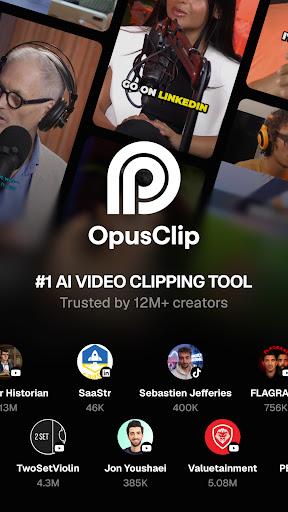
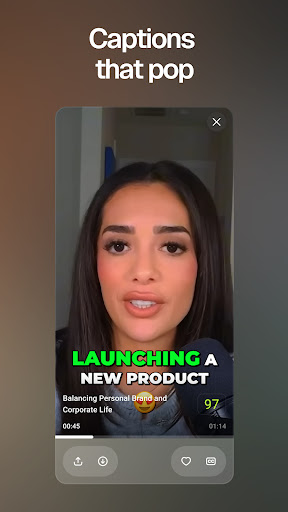

OpusClip is the #1 AI video clipping app, now on Android! It turns long videos into viral-ready short videos in minutes, so you can post more and grow faster on TikTok, Instagram Reels, and YouTube Shorts. This AI video editor is smarter than a basic editing app and faster than editing by hand.
KEY FEATURES
AI Video Clipping
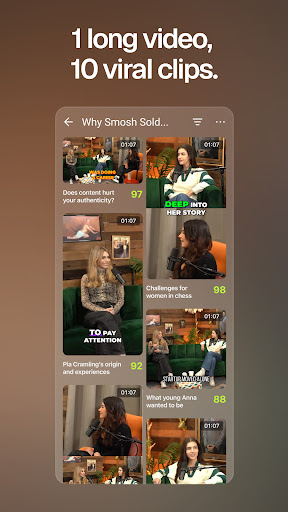
Turn one long video into 10+ short clips automatically. Our AI clipping and smart highlighting find the best moments, the gold-nugget hooks people actually watch, and turn them into share-worthy short videos for TikTok, Instagram Reels, and YouTube Shorts. The fastest AI clip maker and video clipper for creators.
Virality Score
Every clip gets a Virality Score before you post. Our AI scores each short on Hook, Flow, and Trend, so you know which clips will go viral and can post with confidence.
Animated Captions
Get auto-generated captions and subtitles with high accuracy. Animated, easy-to-read auto subtitles keep viewers watching to the end. No manual subtitling and no extra captions app.
AI Reframe to Different Ratio
Auto-reframe any video to the size you need: vertical 9:16 for TikTok, Instagram Reels, and YouTube Shorts, square 1:1 and 4:5 for Instagram and Facebook feeds, and landscape 16:9 for YouTube. AI keeps your subject centered and in frame on every aspect ratio, so your video always looks made for the platform.
Import by URL or Upload
Bring in long videos, podcasts, interviews, webinars, and livestreams. Paste a YouTube link or upload straight from your camera roll.
Share Everywhere
Download clips to your phone or post to TikTok, Instagram Reels, YouTube Shorts, and all your social platforms in one tap. Repurpose one long video into a week of short-form content.
HOW IT WORKS
1. Paste a YouTube URL or upload a video from your phone.
2. AI clips your long video into multiple ready-to-post shorts.
3. Download or share to TikTok, Instagram, and YouTube in one tap.
BUILT FOR EVERY CREATOR
OpusClip is the AI video clipping app and short video maker for everyone:
- Content creators, YouTubers, and streamers who want to post more shorts
- Podcasters turning long episodes into clips
- Coaches and educators sharing bite-size lessons
- Marketers, social media managers, and agencies scaling content
- Professional video editors who want to clip and caption faster
- Beginners, hobbyists, and first-time creators
From pros to total beginners, OpusClip helps you grow on TikTok, Instagram, and YouTube without spending hours on video editing. Join 16M+ creators and businesses already growing faster with OpusClip.
FREE TO START
Get started for free with monthly credits. No credit card required. Upgrade to Pro to remove the watermark and unlock more clipping.
Long videos in, viral shorts out. Download OpusClip, the AI video clipping app and AI clip maker for creators, and turn one video into a week of content!
Terms of Use: https://www.opus.pro/terms-of-service
Privacy Policy: https://www.opus.pro/privacy-policy
Show more

1. Download MEmu installer and finish the setup

2. Start MEmu then open Google Play on the desktop

3. Search OpusClip - AI Video Clipping in Google Play
Install
4. Download and Install OpusClip - AI Video Clipping
5. On install completion click the icon to start

6. Enjoy using OpusClip - AI Video Clipping on PC with MEmu
MEmu Play is the best Android emulator, and 100 million users already enjoy its superb Android app experience. Powered by advanced virtualization technology, it lets you enjoy thousands of Android apps smoothly on your PC—including the most graphics-intensive ones.
Bigger screen with better graphics; Long duration, without limitation of battery or mobile data.
Full Keymapping support for precise control of keyboard and mouse or gamepad.
Multiple game accounts or tasks on single PC at one time with Multi-Instance manager.
Use OpusClip - AI Video Clipping on PC by following steps: