Pampers Club - Treueprogramm
Updated
Current Version
3.2441.0
Offered By

Stop worrying about high battery drain when using Pampers Club - Treueprogramm on your phone. Free yourself from the tiny screen and enjoy the app on a much larger display. From now on, get a full-screen experience of your app with the convenience of a keyboard and mouse. MEmu offers you all the surprising features you’d expect: quick installation and easy setup, intuitive controls, and no more worries about battery life, mobile data, or unexpected calls. The all-new MEmu 9 is the choice for using Pampers Club - Treueprogramm on your computer. With the MEmu multi-instance manager, you can run two or more accounts at the same time. Most importantly, our exclusive emulation engine unlocks your PC’s full potential, delivering smooth and enjoyable performance.
Show more
Enjoy superb experience of using Pampers Club - Treueprogramm on PC with MEMU App Player. It's a powerful free Android emulator which provides you with thousands of android apps for their desktop version. Enjoy connecting with friends and polishing your work with higher efficiency! Jetzt App downloaden, 1.
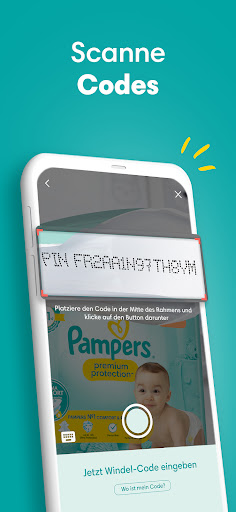
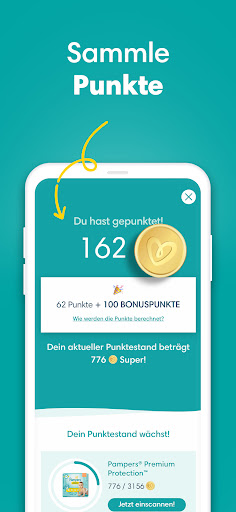
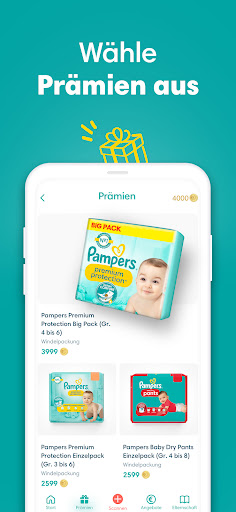
Jetzt App downloaden, 1. Code in der Pampers Packung scannen und einen Bonus von 200 Treuepunkten erhalten!
Jetzt Pampers Treuepunkte sammeln und gegen tolle Prämien eintauschen!
Und so geht’s:
• Lade die Pampers Club-App herunter.
• Erstelle ein Konto oder melde dich mit deinem Pampers Passwort an.
• Scanne deine Codes aus den Pampers Packungen ein.
• Erhalte dafür Treuepunkte.
• Löse die gesammelten Treuepunkte für tolle Prämien ein! Erhalte Pampers Coupons, Rabatte für Windeln oder Pampers Packungen.
• Für jede Windel aus einer eingescannten Packung erhältst du einen Punkt (1 Windel = 1 Punkt). Zudem bekommst du regelmäßig Punkte von uns geschenkt, z. B. 200 Extrapunkte für deinen 1. Scan. Je mehr du scannst, desto mehr Punkte schenken wir dir.
• Einfach Bonuspunkte mit unserer App sammeln und Geld sparen!
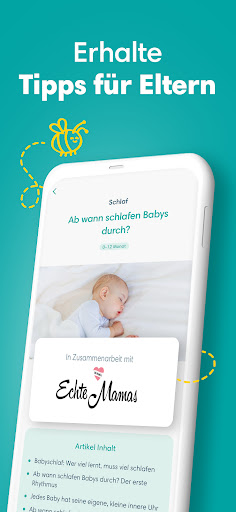
• Lies zudem hilfreiche Artikel, zum Beispiel über Schwangerschaft, Baby-Gesundheit und Baby-Entwicklung.
Hier die neusten Angebote aus unserem Prämienkatalog:
• Pampers Windeln (verschiedene Windelsorten)
• Windel-Coupons
Mehr zu unserem neuen Prämien-Katalog
Wir haben vor Kurzem unseren Prämien-Katalog angepasst und bieten jetzt ein breites Sortiment unserer Pampers Packungen und Pampers Coupons an. Wir hoffen, dass wir damit eurem oft geäußerten Wunsch nach noch mehr Pampers Produkten nachkommen. Wir haben von euch erfahren, dass ihr diese Prämien am meisten schätzt.
Lade die Pampers Baby-App am besten gleich herunter und sichere dir tolle Prämien wie unseren 3-Euro-Gutschein für frischgebackene Eltern. Damit kannst du drei Euro beim Kauf von zwei Einzelpackungen oder einer großen Windelpackung sparen. So kannst du einfach Windeln für Neugeborene, Babys oder Kleinkinder zu einem reduzierten Preis erhalten!
Scanne die PIN-Codes aus deinen Pampers Packungen, sichere dir Windelgutscheine für Babywindeln oder andere Prämien, die du wirklich brauchst!
Außerdem gibt’s in der App viele wertvolle Infos zu Elternschaft und Schwangerschaft sowie unseren Elternratgeber – von Schwangerschaftstipps über Ideen für eine Babyparty, Babynamen, Geschenke für Babys, Kindersicherheit, Babyartikel, die Entwicklung vom Baby zum Kleinkind bis hin zu Fingerspielen und Tipps zum Zahnen.
Verwende unseren kostenlosen Windelgrößenrechner, um herauszufinden, welche Windelgröße dein Baby braucht und wie viele Windeln es benötigt.
Egal, ob du gerade schwanger bist oder dein kleiner Sonnenschein bereits auf der Welt ist: Der Pampers Club steht dir zu Seite – mit den Infos, die du wirklich brauchst.
Also, worauf wartest du? Werde jetzt Mitglied, sammle Treuepunkte und wähle aus einer Vielzahl von großartigen Prämien und Babyartikeln!
❤️-liche Grüße
Dein Pampers Club
AGB: https://www.pampers.de/geschaeftsbedingungen
Website: https://www.pampers.de/pampers-club
Show more

1. Download MEmu installer and finish the setup

2. Start MEmu then open Google Play on the desktop

3. Search Pampers Club - Treueprogramm in Google Play
Install
4. Download and Install Pampers Club - Treueprogramm
5. On install completion click the icon to start

6. Enjoy using Pampers Club - Treueprogramm on PC with MEmu
MEmu Play is the best Android emulator, and 100 million users already enjoy its superb Android app experience. Powered by advanced virtualization technology, it lets you enjoy thousands of Android apps smoothly on your PC—including the most graphics-intensive ones.
Bigger screen with better graphics; Long duration, without limitation of battery or mobile data.
Full Keymapping support for precise control of keyboard and mouse or gamepad.
Multiple game accounts or tasks on single PC at one time with Multi-Instance manager.
Use Pampers Club - Treueprogramm on PC by following steps: