Ventusky: Weather Maps & Radar
Updated
Current Version
1735124496
Offered By

Stop worrying about high battery drain when using Ventusky: Weather Maps & Radar on your phone. Free yourself from the tiny screen and enjoy the app on a much larger display. From now on, get a full-screen experience of your app with the convenience of a keyboard and mouse. MEmu offers you all the surprising features you’d expect: quick installation and easy setup, intuitive controls, and no more worries about battery life, mobile data, or unexpected calls. The all-new MEmu 9 is the choice for using Ventusky: Weather Maps & Radar on your computer. With the MEmu multi-instance manager, you can run two or more accounts at the same time. Most importantly, our exclusive emulation engine unlocks your PC’s full potential, delivering smooth and enjoyable performance.
Show more
Enjoy superb experience of using Ventusky: Weather Maps & Radar on PC with MEMU App Player. It's a powerful free Android emulator which provides you with thousands of android apps for their desktop version. Enjoy connecting with friends and polishing your work with higher efficiency! The app combines highly accurate weather forecast for your location with a 3D map showing development of weather in a broader area in a very interesting way.
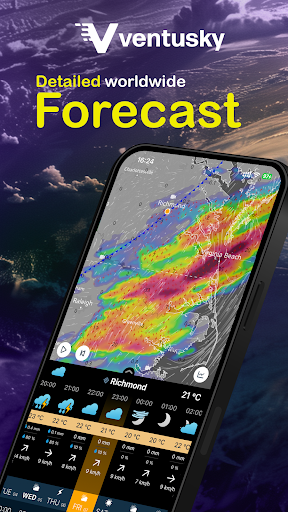
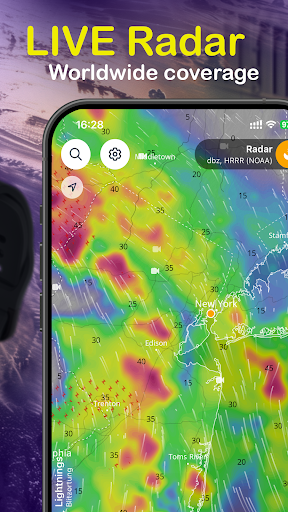
The app combines highly accurate weather forecast for your location with a 3D map showing development of weather in a broader area in a very interesting way. This allows you to see where precipitation is going to come from or where the wind is blowing from. The uniqueness of the app comes from the amount of data displayed. Forecast of weather, precipitation, wind, cloud cover, atmospheric pressure, snow cover and other meteorological data for different altitudes is available for the whole world. Moreover, the app is completely free of ads.
WIND ANIMATION
The Ventusky application solves weather displaying in an interesting way. Wind is displayed using streamlines which clearly portray the continuous development of weather. Airflow on Earth is always in motion and the streamlines depict this motion in an amazing way. This makes the interconnection of all atmospheric phenomena obvious.
WEATHER FORECAST
Weather forecast for the first three days is available in the app in one-hour steps. For other days, it’s available in three-hour steps. Users can also look up sunrise and sunrise times in a given place.
WEATHER MODELS
Thanks to the Ventusky application, visitors get data directly from the numerical models that, just a few years ago, were used solely by meteorologists. The app collects data from the most accurate numerical models. Besides the well-known data from the American GFS and HRRR models, it also displays data from the Canadian GEM model and the German ICON model, which is unique thanks to its high resolution for the whole world. Two models, EURAD and USRAD, are based on current radar and satellite readings. These models are able to show precisely current precipitation in US and Europe.
WEATHER FRONTS
You can also display weather fronts. We have created a neural network that predicts the positions of cold, warm, occluded, and stationary fronts based on data from weather models. This algorithm is unique, and we are the first on the world who makes global fronts forecast available to users.
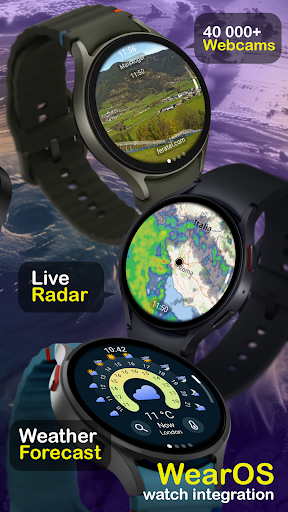
Wear OS
Get quick access to weather updates, including precipitation forecasts, temperatures, and wind conditions, right on your wrist.
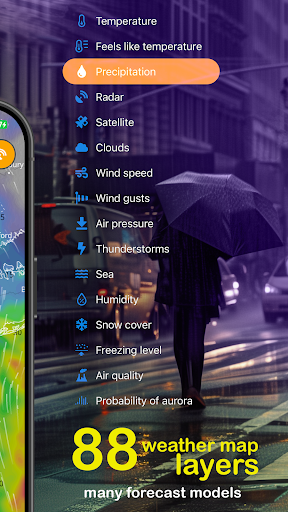
LIST OF WEATHER MAPS
• Temperature (15 levels)
• Perceived temperature
• Temperature anomaly
• Precipitation (1 hour, 3 hour, long time accumulation)
• Radar
• Satellite
• Air quality (AQI, NO2, SO2, PM10, PM2.5, O3, dust or CO)
• Probability of aurora
LIST OF PREMIUM WEATHER MAPS - PAID CONTENT
• Wind (16 levels)
• Wind gusts (1 hour, long time maximum)
• Cloud cover (high, middle, low, total)
• Snow cover (total, new)
• Humidity
• Dew point
• Air pressure
• CAPE, CIN, LI, Helicity (SRH)
• Freezing level
• Wave forecast
• Ocean currents
Do you have questions or suggestions?
Follow us on social media
• Facebook: https://www.facebook.com/ventusky/
• Twitter: https://twitter.com/Ventuskycom
• YouTube: https://www.youtube.com/c/Ventuskycom
Visit our website on: https://www.ventusky.com
Show more

1. Download MEmu installer and finish the setup

2. Start MEmu then open Google Play on the desktop

3. Search Ventusky: Weather Maps & Radar in Google Play
Install
4. Download and Install Ventusky: Weather Maps & Radar
5. On install completion click the icon to start

6. Enjoy using Ventusky: Weather Maps & Radar on PC with MEmu
MEmu Play is the best Android emulator, and 100 million users already enjoy its superb Android app experience. Powered by advanced virtualization technology, it lets you enjoy thousands of Android apps smoothly on your PC—including the most graphics-intensive ones.
Bigger screen with better graphics; Long duration, without limitation of battery or mobile data.
Full Keymapping support for precise control of keyboard and mouse or gamepad.
Multiple game accounts or tasks on single PC at one time with Multi-Instance manager.
Use Ventusky: Weather Maps & Radar on PC by following steps: