Video Compressor - Reduce Size
Updated
Current Version
1.0
Offered By

Stop worrying about high battery drain when using Video Compressor - Reduce Size on your phone. Free yourself from the tiny screen and enjoy the app on a much larger display. From now on, get a full-screen experience of your app with the convenience of a keyboard and mouse. MEmu offers you all the surprising features you’d expect: quick installation and easy setup, intuitive controls, and no more worries about battery life, mobile data, or unexpected calls. The all-new MEmu 9 is the choice for using Video Compressor - Reduce Size on your computer. With the MEmu multi-instance manager, you can run two or more accounts at the same time. Most importantly, our exclusive emulation engine unlocks your PC’s full potential, delivering smooth and enjoyable performance.
Show more
Enjoy superb experience of using Video Compressor - Reduce Size on PC with MEMU App Player. It's a powerful free Android emulator which provides you with thousands of android apps for their desktop version. Enjoy connecting with friends and polishing your work with higher efficiency! Video Compressor and Reduce Size, Video Editor App.
Video Compressor and Reduce Size, Video Editor App
I'm ready to help you compress your videos without sacrificing quality!
Quickly compress video, convert to MP4 and MKV, cut video, extract MP3 audio from this app.
Video Compressor - Video Converter, ensures automatic compression of your videos without compromising quality, and it supports nearly all video formats. Our priority is maintaining high-quality resolution in every compressed video, ensuring you never have to compromise on clarity.
As the most powerful video compressor in the market, our app is perfect for creating WhatsApp status videos and more. Download now to experience the best video compression solution available
Unlock the full potential of your video content with our state-of-the-art Video Compressor and Converter App, trusted by a community of over 1 million users worldwide! 馃殌
Experience top-notch compression technology that automatically reduces video sizes without compromising quality. Whether you're compressing MP4, MKV, AVI, MOV, 3GP, FLV, MTS, MPEG, MPG, WMV, M4V, VOB, or any other format, our app provides custom and default options to meet your specific needs.
鉁� High-Quality Resolution
Never compromise on quality! Our Video Compressor ensures your videos maintain exceptional resolution even after compression. Perfect for WhatsApp status videos, this app is the ultimate solution for fast compression, conversion, and resizing.
鈴� Accelerate Your Videos
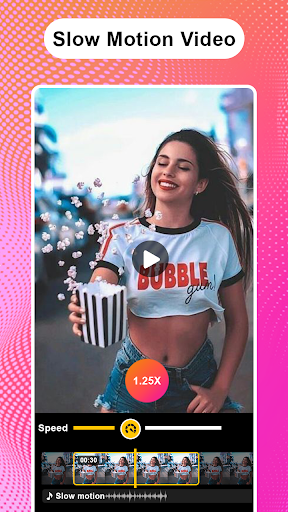
Adjust playback speed from 1x to 10x, unlocking the potential to create captivating visual experiences. Accelerate your videos for a dynamic viewing adventure.
馃攧 Flip & Rotate Video
Easily flip videos horizontally or vertically and rotate them to any desired angle, adding a creative twist to your content.
馃幍 Video to MP3 Converter
Convert videos to high-quality MP3 songs quickly. Enjoy the flexibility of saving your favorite moments as music with our fast MP4 to MP3 conversion feature.
馃攧 Video Looper
Create mesmerizing loops or extend the duration of specific scenes, adding an artistic touch to your videos.
鉁傦笍 Video Crop
Crop your videos to any ratio you desire with our easy-to-use video crop feature. The best app for quick and precise video cutting!
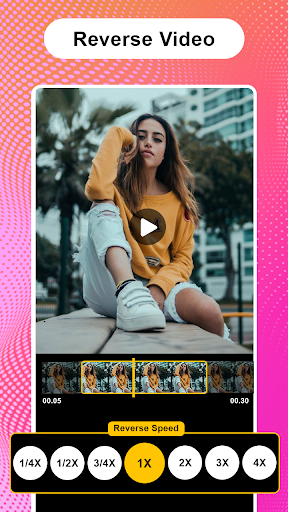
鈴� Reverse Video
Showcase a unique perspective by playing your videos in reverse, creating captivating visual effects effortlessly.
馃寑 Video to GIF and GIF to Video
Effortlessly convert your favorite moments into shareable GIFs. Convert existing GIFs back into video format seamlessly with our versatile GIF features.
馃攪 Mute Video
Remove unwanted audio, creating a seamless and silent visual experience that allows your content to speak for itself.
鉁傦笍 Video Trimmer & Video Cutter
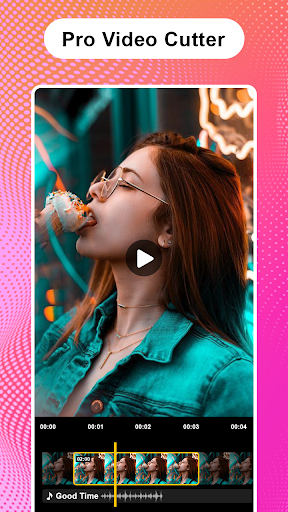
Cut and trim videos to your desired length with our user-friendly video cutter. Perfect for Instagram stories, export your videos in HD quality effortlessly.
- Support for various android devices.
- Compress uncompressed videos while maintaining original quality
- Compress videos with high/normal/low quality
- High compression without quality loss
- Maintain the original audio quality and support videos with multiple audio tracks.
- All multiple subtitle tracks in the original video.
- Allow users to select and compress multiple videos simultaneously.
- Compress video file size and email video.
- High-quality and low-quality compression options.
- Support for various video formats like MP4, MKV, AVI, MOV, etc..
- Enable users to play compressed and converted videos directly within the app.
- Allow users to share compressed, converted, and size-reduced videos to various social media platforms.
Transform your videos today with the most powerful video compressor, converter, and editor in the Play Store! Download now and elevate your video content to new heights.
Show more

1. Download MEmu installer and finish the setup

2. Start MEmu then open Google Play on the desktop

3. Search Video Compressor - Reduce Size in Google Play
Install
4. Download and Install Video Compressor - Reduce Size
5. On install completion click the icon to start

6. Enjoy using Video Compressor - Reduce Size on PC with MEmu
MEmu Play is the best Android emulator, and 100 million users already enjoy its superb Android app experience. Powered by advanced virtualization technology, it lets you enjoy thousands of Android apps smoothly on your PC—including the most graphics-intensive ones.
Bigger screen with better graphics; Long duration, without limitation of battery or mobile data.
Full Keymapping support for precise control of keyboard and mouse or gamepad.
Multiple game accounts or tasks on single PC at one time with Multi-Instance manager.
Use Video Compressor - Reduce Size on PC by following steps: