XBPlayer: Remote Play & Cloud
Updated
Current Version
26.11.1
Offered By

Stop worrying about high battery drain when using XBPlayer: Remote Play & Cloud on your phone. Free yourself from the tiny screen and enjoy the app on a much larger display. From now on, get a full-screen experience of your app with the convenience of a keyboard and mouse. MEmu offers you all the surprising features you’d expect: quick installation and easy setup, intuitive controls, and no more worries about battery life, mobile data, or unexpected calls. The all-new MEmu 9 is the choice for using XBPlayer: Remote Play & Cloud on your computer. With the MEmu multi-instance manager, you can run two or more accounts at the same time. Most importantly, our exclusive emulation engine unlocks your PC’s full potential, delivering smooth and enjoyable performance.
Show more
Enjoy superb experience of using XBPlayer: Remote Play & Cloud on PC with MEMU App Player. It's a powerful free Android emulator which provides you with thousands of android apps for their desktop version. Enjoy connecting with friends and polishing your work with higher efficiency! XBPlayer streams games from your own Xbox console or Xbox Cloud Gaming to your Android phone, tablet or TV.
XBPlayer streams games from your own Xbox console or Xbox Cloud Gaming to your Android phone, tablet or TV. It does not run Xbox games locally.
A Microsoft account is required. Games, Game Pass and cloud-service access are not included with XBPlayer.
Two ways to play
Remote Play from your console
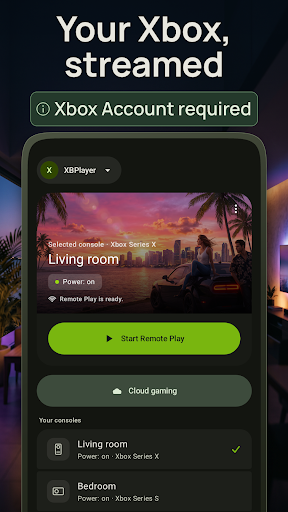
Use your own Xbox One or Xbox Series X|S with remote features enabled and games you can access. Game Pass is not required for Remote Play itself; individual games and online multiplayer may have their own requirements. Play over your home network or away from home when your console and network support remote access.
Xbox Cloud Gaming
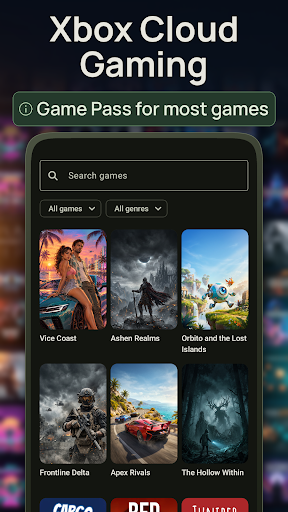
No console is needed. Sign in with a Microsoft account that has access to the game through Xbox Cloud Gaming. Most games require an eligible Xbox Game Pass subscription. Availability depends on the game, your account, region and the service. XBPlayer does not provide a subscription or unlock games you cannot access.
Your controls, your screen
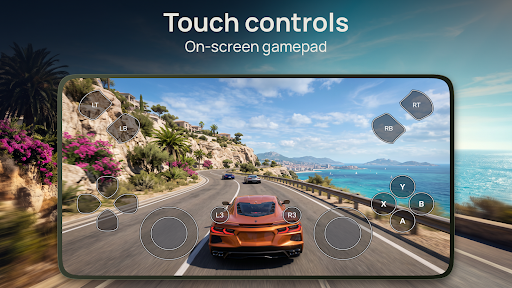
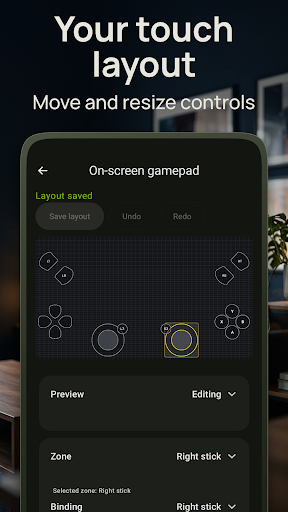
Use the on-screen gamepad on your phone or tablet, or connect a compatible physical controller. Move and resize touch controls, save layouts and remap controller buttons. Use a compatible gamepad on Android TV. Switch between your consoles and Microsoft accounts in one app.
Find games and adjust your stream
Browse, search and filter the cloud library available to your account. Choose video quality, including 1080p where supported, and adjust the bitrate. View stream statistics and use guided network checks for play away from home. Quality and responsiveness depend on your device, connection, console and cloud service.
Free mode and optional Pro
Start with a 60-minute XBPlayer play-time balance. Each completed optional rewarded ad adds 30 minutes. Saved time does not expire. The balance decreases only during active streaming. Reaching zero never interrupts your current session; add time before starting another or upgrade to Pro. XBPlayer does not show ads during gameplay.
These minutes cover use of XBPlayer only. They do not provide game licences, a Game Pass subscription or access to Microsoft's cloud service.
XBPlayer Pro removes XBPlayer's ads and play-time balance requirement. It does not include games, Game Pass or cloud-service access. Microsoft service limits still apply.
A stable, high-speed connection is required. Mobile data and internet charges may apply. Games and subscriptions are separate.
Independent app
XBPlayer is an independent third-party app, not affiliated with, endorsed, sponsored or approved by Microsoft Corporation. Microsoft, Xbox, Xbox Cloud Gaming, Xbox Game Pass, Xbox One and Xbox Series X|S are trademarks of the Microsoft group of companies.
Show more

1. Download MEmu installer and finish the setup

2. Start MEmu then open Google Play on the desktop

3. Search XBPlayer: Remote Play & Cloud in Google Play
Install
4. Download and Install XBPlayer: Remote Play & Cloud
5. On install completion click the icon to start

6. Enjoy using XBPlayer: Remote Play & Cloud on PC with MEmu
MEmu Play is the best Android emulator, and 100 million users already enjoy its superb Android app experience. Powered by advanced virtualization technology, it lets you enjoy thousands of Android apps smoothly on your PC—including the most graphics-intensive ones.
Bigger screen with better graphics; Long duration, without limitation of battery or mobile data.
Full Keymapping support for precise control of keyboard and mouse or gamepad.
Multiple game accounts or tasks on single PC at one time with Multi-Instance manager.
Use XBPlayer: Remote Play & Cloud on PC by following steps: