Arad: Idle RPG
Aggiornata
Versione corrente
0.01.28196
Offerta da

Vista tutta la passione dimostrata nel giocare a Arad: Idle RPG, le tue mani non dovrebbero essere limitate al minuscolo schermo di un telefono. Gioca come un professionista e ottieni il pieno controllo del gioco con tastiera e mouse. MEmu ti offre tutto ciò che ti aspetti. Scarica e gioca a Arad: Idle RPG su PC. Gioca quanto vuoi, niente più limitazioni di batteria, dati mobili e chiamate inquietanti. Il nuovissimo MEmu 9 è la scelta migliore per giocare a Arad: Idle RPG su PC. Realizzato sulla base della nostra esperienza, lo squisito sistema di mappatura dei tasti preimpostati rende Arad: Idle RPG un vero e proprio gioco per PC. MEmu è un gestore multi-instanza che permette di giocare con 2 o più account sullo stesso dispositivo. E la cosa più importante, il nostro esclusivo motore di emulazione può liberare tutto il potenziale del tuo PC, rendendo tutto fluido.
Mostra altro
Scarica Arad: Idle RPG su PC con MEmu Android Emulator. Divertiti giocando sul grande schermo. Dungeon & Fighter returns, now as an idle RPG!
Dungeon & Fighter returns, now as an idle RPG!
Experience the rush of growing stronger and collecting new characters in Arad: Idle RPG!
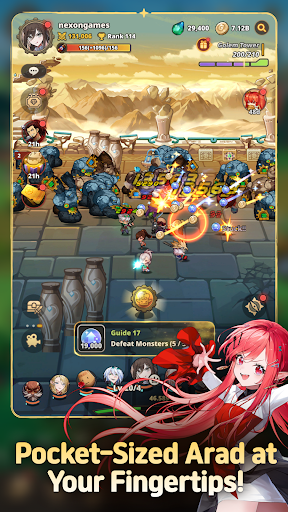
▶ Pocket-Sized Arad at Your Fingertips!
Dungeon & Fighter is now an idle RPG!
Explore Arad and grow stronger, even while you're away!
Experience nonstop progression in Arad!
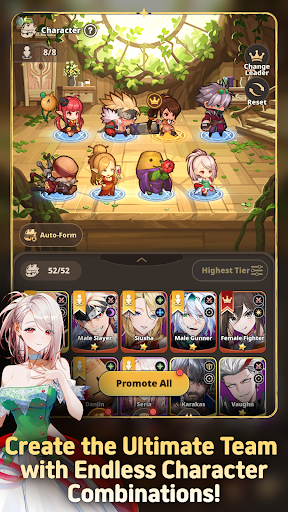
▶ Familiar NPCs Join as Playable Characters!
Fan-favorite NPCs like Seria, Aganzo, and Danjin now take center stage on the battlefield!
Collect and combine a variety of characters to create your ultimate team.
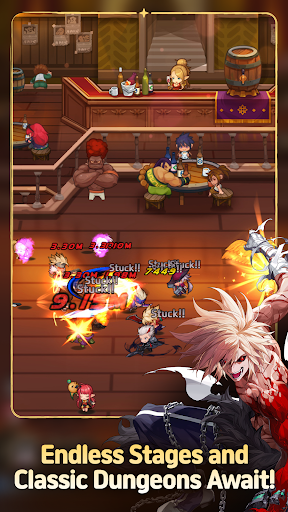
▶ Endless Stages and Dungeons
Return to classic dungeons like the Tower of the Dead and the King's Ruin, along with all-new stories!
Defeat powerful bosses and conquer every corner of Arad!
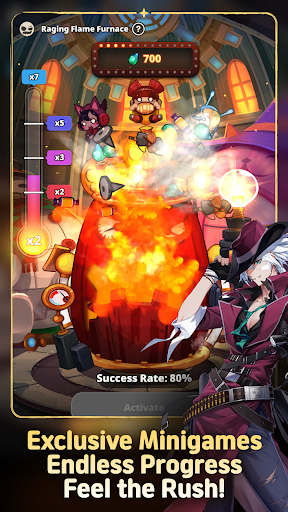
▶ Minigames Found Only in Arad: Idle RPG!
Experience the thrill of nonstop progression with a variety of minigames,
including the Dorniar, Supply Drop, Item Vending Machine, and more!
▶ Arad: Idle RPG Official Discord: https://discord.gg/aradidle
▶ Arad: Idle RPG Official Website: https://aradidle.nexon.com
[App Permissions Guide]
To provide certain features, the app may request the following permissions.
[Optional Permissions]
- Camera: Required for taking photos or videos to attach and submit reference materials to Customer Support.
- Storage: Required for saving videos and uploading photos and videos.
- Notifications: Required to receive service notifications.
* You can still use the service even if you do not consent to optional permissions.
[How to Revoke Access Permissions]
- Android 6.0 and higher: Settings > Apps > Select the app > Permissions > Select the permission to revoke > Select Don't allow
* The app may not provide individual consent options, and permissions can be revoked using the method above.
----
Nexon Korea Corporation
7, Pangyo-ro 256beon-gil (Sampyeong-dong), Bundang-gu, Seongnam-si, Gyeonggi-do 13487, Republic of Korea
South Korea 220-87-17483 2013-Gyeonggi Seongnam-1659 Seongnam City Hall
Mostra altro

1. Scarica il programma di installazione di MEmu e completa l'installazione

2. Avvia il Memu e apri il Google Play sulla homepage

3. Cerca Arad: Idle RPG in Google Play
Install
4. Scarica e installa Arad: Idle RPG
5. Al termine dell'installazione, fai clic sull'icona per avviar

6. Divertiti giocando a Arad: Idle RPG su PC con MEmu
MEmu App Player è il miglior emulatore Android gratuito, utilizzato da 50 milioni di persone per ottenere un'esperienza di gioco Android superba. La tecnilogia di virtualizzazione MEmu ti permette di giocare a migliaia di giochi Android con semplicità sul tuo computer, anche i giochi con la grafica più esigente.
Schermo più grande con una grafica migliore; Lunga durata, senza limitazione di batteria o dati mobili.
Supporto completo per mappa di tastiera per un controllo preciso di tastiera e mouse o gamepad.
Multipli account di gioco o attività su un singolo PC contemporaneamente con il gestore di multi istanza.
Play Arad: Idle RPG on PC by following steps: