Arad: Idle RPG
Aktualisiert
Aktuelle Version
0.01.28196
Angeboten von

Bei all Ihrer Leidenschaft für das Spielen von Arad: Idle RPG sollten Ihre Hände nicht auf einen winzigen Bildschirm Ihres Telefons beschränkt sein. Spielen Sie wie ein Profi und übernehmen Sie die volle Kontrolle über Ihr Spiel mit Tastatur und Maus. MEmu bietet Ihnen all die Dinge, die Sie erwarten. Laden Sie Arad: Idle RPG herunter und spielen Sie es auf dem PC. Spielen Sie so lange, wie Sie wollen, ohne Grenzwerte für Akku, mobile Daten und störende Anrufe. Das brandneue MEmu 9 ist die beste Wahl, um Arad: Idle RPG auf dem PC zu spielen. Das exquisite voreingestellte Tastaturbelegungssystem, das mit unserem Fachwissen vorbereitet wurde, macht Arad: Idle RPG zu einem echten PC-Spiel. Der MEmu Multi-Instanz-Manager ermöglicht das Spielen von 2 oder mehr Konten auf demselben Gerät. Und das Wichtigste: Unsere exklusive Emulations-Engine kann das volle Potenzial Ihres PCs freisetzen und für reibungslose Abläufe sorgen.
Mehr anzeigen
Laden Sie Play Arad: Idle RPG auf dem PC mit MEmu Android Emulator. Viel Spaß beim Spielen auf großmundieren. Dungeon & Fighter returns, now as an idle RPG!
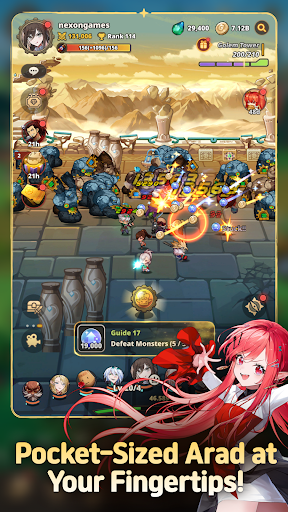



Dungeon & Fighter returns, now as an idle RPG!
Experience the rush of growing stronger and collecting new characters in Arad: Idle RPG!
▶ Pocket-Sized Arad at Your Fingertips!
Dungeon & Fighter is now an idle RPG!
Explore Arad and grow stronger, even while you're away!
Experience nonstop progression in Arad!
▶ Familiar NPCs Join as Playable Characters!
Fan-favorite NPCs like Seria, Aganzo, and Danjin now take center stage on the battlefield!
Collect and combine a variety of characters to create your ultimate team.
▶ Endless Stages and Dungeons
Return to classic dungeons like the Tower of the Dead and the King's Ruin, along with all-new stories!
Defeat powerful bosses and conquer every corner of Arad!
▶ Minigames Found Only in Arad: Idle RPG!
Experience the thrill of nonstop progression with a variety of minigames,
including the Dorniar, Supply Drop, Item Vending Machine, and more!
▶ Arad: Idle RPG Official Discord: https://discord.gg/aradidle
▶ Arad: Idle RPG Official Website: https://aradidle.nexon.com
[App Permissions Guide]
To provide certain features, the app may request the following permissions.
[Optional Permissions]
- Camera: Required for taking photos or videos to attach and submit reference materials to Customer Support.
- Storage: Required for saving videos and uploading photos and videos.
- Notifications: Required to receive service notifications.
* You can still use the service even if you do not consent to optional permissions.
[How to Revoke Access Permissions]
- Android 6.0 and higher: Settings > Apps > Select the app > Permissions > Select the permission to revoke > Select Don't allow
* The app may not provide individual consent options, and permissions can be revoked using the method above.
----
Nexon Korea Corporation
7, Pangyo-ro 256beon-gil (Sampyeong-dong), Bundang-gu, Seongnam-si, Gyeonggi-do 13487, Republic of Korea
South Korea 220-87-17483 2013-Gyeonggi Seongnam-1659 Seongnam City Hall
Mehr anzeigen

1. Laden das MEmu-Installationsprogramm herunter und beenden die Installation

2. MEmu starten und Google Play auf der Homepage öffnen

3. Suchen Arad: Idle RPG in Google Play
Install
4. Herunterladen und Installieren Arad: Idle RPG
5. Klicken nach Abschluss der Installation auf das Symbol, um es zu starten

6. Viel Spaß beim Spielen von Arad: Idle RPG auf dem PC mit MEmu
MEmu App Player ist der beste kostenlose Android-Emulator und 50 Millionen Menschen genießen bereits seine hervorragende Android-Gaming-Erfahrung. Mit der MEmu-Virtualisierungstechnologie können Sie Tausende von Android-Spielen problemlos auf Ihrem PC spielen, selbst bei grafikintensiven Spielen.
BGrößeres Bild mit besserer Grafik; Keine unterbrechungen, keine sorgen um Akku
Komplette Tastenbelegung unterstützt mit Maus und Tastatur oder Controller
Mit dem „Multi-Instance-Manager“ können Sie mehrere Spielkonten oder Spiele gleichzeitig auf einem PC ausführen.
Play Arad: Idle RPG on PC by following steps: