Arad: Idle RPG
Оновлено
Поточна версія
0.01.28196
Постачальник

Перестаньте турбуватися про надмірні витрати, використовуючи ххх на своєму мобільному телефоні, звільніться від крихітного екрану і насолоджуйтеся використанням програми на набагато більшому дисплеї. Відтепер отримуйте повний екран свого додатка за допомогою клавіатури та миші. MEmu пропонує вам усі дивовижні функції, які ви очікували: швидка установка та просте налаштування, інтуїтивно зрозумілі елементи керування, більше обмежень від акумулятора, мобільних даних та тривожних дзвінків. Новий MEmu 9 - найкращий вибір використання Arad: Idle RPG на вашому комп’ютері. За допомогою нашого поглинання менеджер із кількома примірниками одночасно дозволяє відкрити 2 або більше рахунків. І найголовніше, наш ексклюзивний емуляційний двигун може вивільнити весь потенціал вашого ПК, зробити все гладким і приємним.
Show more
Насолоджуйтесь чудовим досвідом Arad: Idle RPG гри на ПК за допомогою програми MEMU App Player. Це потужний безкоштовний емулятор Android, який дозволяє вам грати в тисячі ігор Android. Dungeon & Fighter returns, now as an idle RPG!
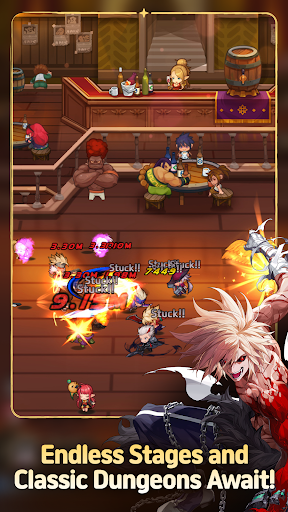
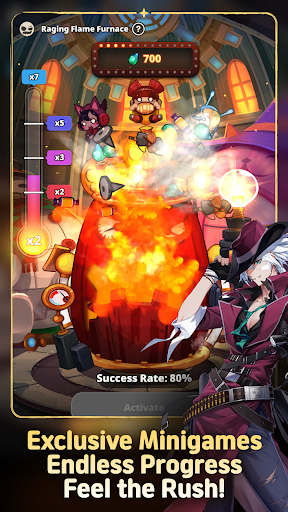
Dungeon & Fighter returns, now as an idle RPG!
Experience the rush of growing stronger and collecting new characters in Arad: Idle RPG!
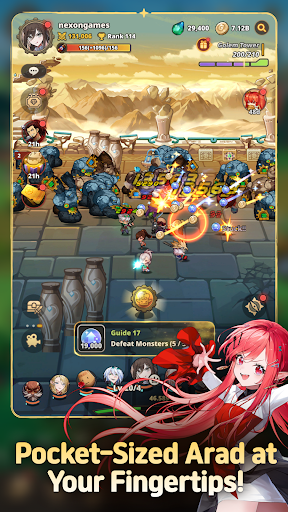
▶ Pocket-Sized Arad at Your Fingertips!
Dungeon & Fighter is now an idle RPG!
Explore Arad and grow stronger, even while you're away!
Experience nonstop progression in Arad!
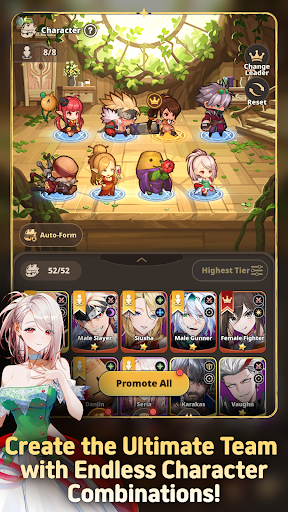
▶ Familiar NPCs Join as Playable Characters!
Fan-favorite NPCs like Seria, Aganzo, and Danjin now take center stage on the battlefield!
Collect and combine a variety of characters to create your ultimate team.
▶ Endless Stages and Dungeons
Return to classic dungeons like the Tower of the Dead and the King's Ruin, along with all-new stories!
Defeat powerful bosses and conquer every corner of Arad!
▶ Minigames Found Only in Arad: Idle RPG!
Experience the thrill of nonstop progression with a variety of minigames,
including the Dorniar, Supply Drop, Item Vending Machine, and more!
▶ Arad: Idle RPG Official Discord: https://discord.gg/aradidle
▶ Arad: Idle RPG Official Website: https://aradidle.nexon.com
[App Permissions Guide]
To provide certain features, the app may request the following permissions.
[Optional Permissions]
- Camera: Required for taking photos or videos to attach and submit reference materials to Customer Support.
- Storage: Required for saving videos and uploading photos and videos.
- Notifications: Required to receive service notifications.
* You can still use the service even if you do not consent to optional permissions.
[How to Revoke Access Permissions]
- Android 6.0 and higher: Settings > Apps > Select the app > Permissions > Select the permission to revoke > Select Don't allow
* The app may not provide individual consent options, and permissions can be revoked using the method above.
----
Nexon Korea Corporation
7, Pangyo-ro 256beon-gil (Sampyeong-dong), Bundang-gu, Seongnam-si, Gyeonggi-do 13487, Republic of Korea
South Korea 220-87-17483 2013-Gyeonggi Seongnam-1659 Seongnam City Hall
Show more

1. Download MEmu installer and finish the setup

2. Start MEmu then open Google Play on the desktop

3. Search Arad: Idle RPG in Google Play
Install
4. Download and Install Arad: Idle RPG
5. On install completion click the icon to start

6. Enjoy playing Arad: Idle RPG on PC with MEmu
MEmu App Player є кращим безкоштовним емулятором Android, і 50 мільйонів людей вже користуються його чудовим ігровим досвідом Android. Технологія віртуалізації MEmu дає вам змогу відтворювати тисячі ігор Android на вашому комп'ютері, навіть найбільш насичених графікою.
Bigger screen with better graphics; Long duration, without limitation of battery or mobile data.
Full Keymapping support for precise control of keyboard and mouse or gamepad.
Multiple game accounts or tasks on single PC at one time with Multi-Instance manager.
Play Arad: Idle RPG on PC by following steps: