
Arad: Idle RPG
Updated
Current Version
0.01.28196
Offered By

With your passion for Arad: Idle RPG, you shouldn’t have to limit yourself to the small screen of a phone. Play like a pro and take full control of the game using a keyboard and mouse. MEmu gives you everything you’re looking for. Download and play Arad: Idle RPG on PC. Play as long as you want — no more worries about battery life, mobile data, or unexpected calls. The all-new MEmu 9 is the best way to play Arad: Idle RPG on PC. With our expertly designed keymapping system, Arad: Idle RPG feels just like a real PC game. The MEmu multi-instance manager lets you run two or more accounts on the same device at the same time. Most importantly, our exclusive emulation engine unlocks your PC’s full potential, delivering smooth and seamless performance.
Show more
Download Arad: Idle RPG on PC with MEmu Android Emulator. Enjoy playing on big screen. Dungeon & Fighter returns, now as an idle RPG!
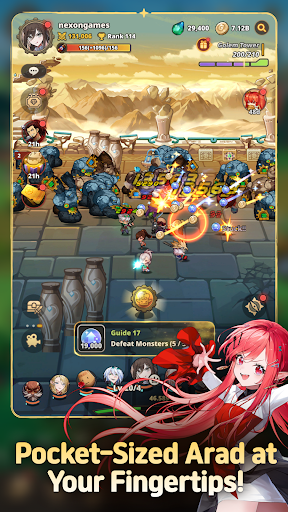


Dungeon & Fighter returns, now as an idle RPG!
Experience the rush of growing stronger and collecting new characters in Arad: Idle RPG!
▶ Pocket-Sized Arad at Your Fingertips!
Dungeon & Fighter is now an idle RPG!
Explore Arad and grow stronger, even while you're away!
Experience nonstop progression in Arad!
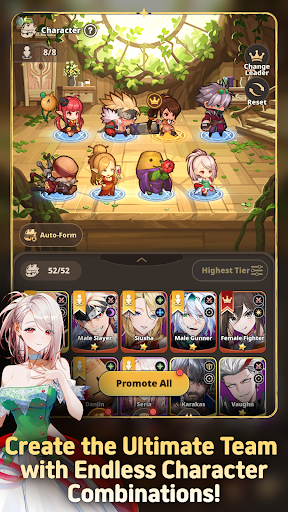
▶ Familiar NPCs Join as Playable Characters!
Fan-favorite NPCs like Seria, Aganzo, and Danjin now take center stage on the battlefield!
Collect and combine a variety of characters to create your ultimate team.
▶ Endless Stages and Dungeons
Return to classic dungeons like the Tower of the Dead and the King's Ruin, along with all-new stories!
Defeat powerful bosses and conquer every corner of Arad!
▶ Minigames Found Only in Arad: Idle RPG!
Experience the thrill of nonstop progression with a variety of minigames,
including the Dorniar, Supply Drop, Item Vending Machine, and more!
▶ Arad: Idle RPG Official Discord: https://discord.gg/aradidle
▶ Arad: Idle RPG Official Website: https://aradidle.nexon.com
[App Permissions Guide]
To provide certain features, the app may request the following permissions.
[Optional Permissions]
- Camera: Required for taking photos or videos to attach and submit reference materials to Customer Support.
- Storage: Required for saving videos and uploading photos and videos.
- Notifications: Required to receive service notifications.
* You can still use the service even if you do not consent to optional permissions.
[How to Revoke Access Permissions]
- Android 6.0 and higher: Settings > Apps > Select the app > Permissions > Select the permission to revoke > Select Don't allow
* The app may not provide individual consent options, and permissions can be revoked using the method above.
----
Nexon Korea Corporation
7, Pangyo-ro 256beon-gil (Sampyeong-dong), Bundang-gu, Seongnam-si, Gyeonggi-do 13487, Republic of Korea
South Korea 220-87-17483 2013-Gyeonggi Seongnam-1659 Seongnam City Hall
Show more

1. Download MEmu installer and finish the setup

2. Start MEmu then open Google Play on the desktop

3. Search Arad: Idle RPG in Google Play
Install
4. Download and Install Arad: Idle RPG
5. On install completion click the icon to start

6. Enjoy playing Arad: Idle RPG on PC with MEmu
MEmu Play is the best Android emulator and 100 million people already enjoy its superb Android gaming experience. The MEmu virtualization technology empowers you to play thousands of Android games smoothly on your PC, even the most graphic-intensive ones.
Bigger screen with better graphics; Long duration, without limitation of battery or mobile data.
Full Keymapping support for precise control of keyboard and mouse or gamepad.
Multiple game accounts or tasks on single PC at one time with Multi-Instance manager.
Play Arad: Idle RPG on PC by following steps: