Arad: Idle RPG
تم التحديث
الإصدار الحالي
0.01.28196
تقديم

مع كل شغفك للعب Arad: Idle RPG ,يديك لايجب ان تكون محدودة بشاشة صغيرة علي تليفونك. العب كمحترف واحصل علي تحكم كامل علي لعبتك عن طريق لوحة المفاتيح والفأره. MEmuيقدم جميع الاشياء التي تتوقعها.حمل والعب Arad: Idle RPG علي جهاز الحاسوب الخاص بك العب كماتريد ,لايوجد حدود علي البطارية والباقة ولا يوجد اتصالات مزعجة النسخة الجديدة من MEmu7 هو افضل وسيلة للعب Arad: Idle RPG علي جهاز الحاسب معد عن طريق خبراتنا , لوحة المفاتيح المعده مسبقا تجعل Arad: Idle RPG العبة لعبة كمبيوتر حقيقة تم برمجتها باقصي استيعابنا .المتحكم في عدة نوافذ يجعل لعب لعبتين او اكثر او استعمال اكثر من حساب اسهل واهم شئ ان المحرك الخاص بنا يمكن ان يخرج كل امكانيات جهازك ويجعل كل شئ اكثر سلاسة نحن لانهتم بكيف تلعب فقط بل ايضا بالسعادة التي تغمرك من اللعب
أظهر المزيد
قم بتنزيل Arad: Idle RPG على الكمبيوتر بإستخدام جهاز مقلد أندروز MEmu.استمتع بمتعة اللعب على الشاشة الكبيرة. Dungeon & Fighter returns, now as an idle RPG!
Dungeon & Fighter returns, now as an idle RPG!
Experience the rush of growing stronger and collecting new characters in Arad: Idle RPG!
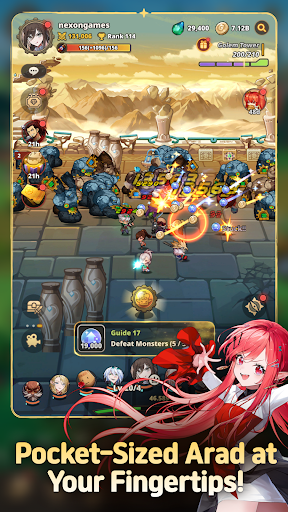
▶ Pocket-Sized Arad at Your Fingertips!
Dungeon & Fighter is now an idle RPG!
Explore Arad and grow stronger, even while you're away!
Experience nonstop progression in Arad!
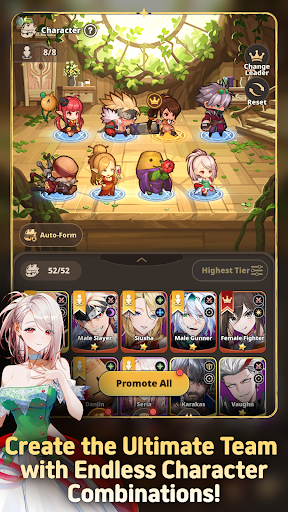
▶ Familiar NPCs Join as Playable Characters!
Fan-favorite NPCs like Seria, Aganzo, and Danjin now take center stage on the battlefield!
Collect and combine a variety of characters to create your ultimate team.
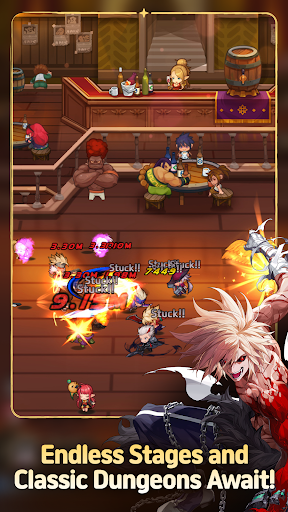
▶ Endless Stages and Dungeons
Return to classic dungeons like the Tower of the Dead and the King's Ruin, along with all-new stories!
Defeat powerful bosses and conquer every corner of Arad!
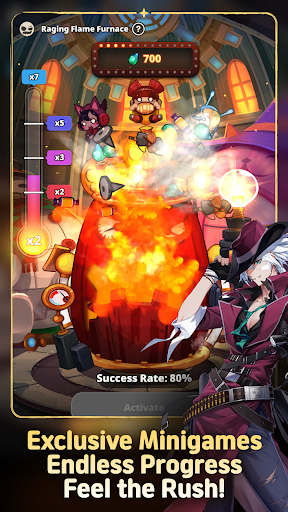
▶ Minigames Found Only in Arad: Idle RPG!
Experience the thrill of nonstop progression with a variety of minigames,
including the Dorniar, Supply Drop, Item Vending Machine, and more!
▶ Arad: Idle RPG Official Discord: https://discord.gg/aradidle
▶ Arad: Idle RPG Official Website: https://aradidle.nexon.com
[App Permissions Guide]
To provide certain features, the app may request the following permissions.
[Optional Permissions]
- Camera: Required for taking photos or videos to attach and submit reference materials to Customer Support.
- Storage: Required for saving videos and uploading photos and videos.
- Notifications: Required to receive service notifications.
* You can still use the service even if you do not consent to optional permissions.
[How to Revoke Access Permissions]
- Android 6.0 and higher: Settings > Apps > Select the app > Permissions > Select the permission to revoke > Select Don't allow
* The app may not provide individual consent options, and permissions can be revoked using the method above.
----
Nexon Korea Corporation
7, Pangyo-ro 256beon-gil (Sampyeong-dong), Bundang-gu, Seongnam-si, Gyeonggi-do 13487, Republic of Korea
South Korea 220-87-17483 2013-Gyeonggi Seongnam-1659 Seongnam City Hall
أظهر المزيد

1. قم بتنزيل برنامج MEmu واكمال تثبيته

2. قم بتشغيل برنامج MEmu وفتح Google Play على الصفحة الرئيسية

3. ابح Arad: Idle RPG في Google Play
Install
4. تنزيل وتثبيت Arad: Idle RPG
5. انقر على الرمز للتشغيل بعد اكتمال التثبيت

6. استمتع بلعب *** على الكمبيوتر Arad: Idle RPG تخدام برنامج MEmu
تطبيق MEmuهو افضل محاكى اندرويد مجانى وبالفعل 50 مليون شخص يستمتعون حاليا بتجربه اللعب عليه. تمكّنك تقنية MEmu الافتراضية من تشغيل آلاف ألعاب Android بسلاسة على الكمبيوتر الشخصي ، حتى أكثرها استخدامًا للرسومات.
شاشة أكبر وجرافيك افضل ووقت أطول بدون حدود البطارية وباقة التليفون
لوحة مفاتيح كاملة تدعم تحكم كامل عن طريق لوحة المفاتيح و الفأره وجيم باد
عدة العاب وحسابات ومهمات علي جهاز الكمبيوتر في وقت معين عن طريق Memu متعدد النوافذ
Play Arad: Idle RPG on PC by following steps: