Arad: Idle RPG
Обновлено
Текущая версия
0.01.28196
Продавец

При всей вашей страсти к игре в ххх, ваши руки не должны быть ограничены на крошечном экране вашего телефона. Играйте как профессионал и получите полный контроль над игрой с помощью клавиатуры и мыши. MEmu предлагает вам все то, что вы ожидаете. Скачайте и играйте ххх на ПК. Играйте сколько угодно, никаких ограничений по батарее, мобильным данным и звонкам. Совершенно новый MEmu 9 - лучший выбор для игры в ххх на ПК. Благодаря изысканной системе предустановки клавиш, ххх превращается в настоящую игру для ПК. Менеджер нескольких экземпляров делает возможным игру с двумя или более учетными записями на одном устройстве. И самое главное, наш эксклюзивный механизм эмуляции может полностью раскрыть потенциал вашего ПК, сделать все гладко. Нам важно не только то, как вы играете, но и весь процесс наслаждения игровым счастьем.
Показать больше
Скачайте Arad: Idle RPG на ПК с помощью Андроид эмулятора MEmu. Наслаждайтесь на большом экране. Dungeon & Fighter returns, now as an idle RPG!
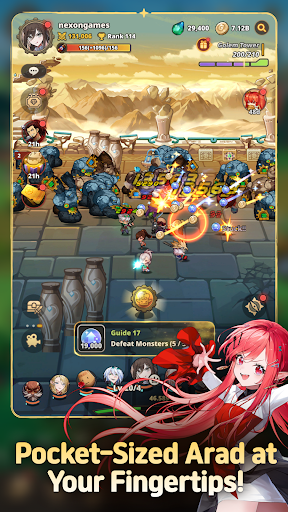
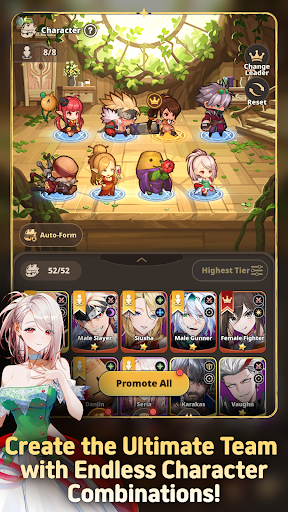
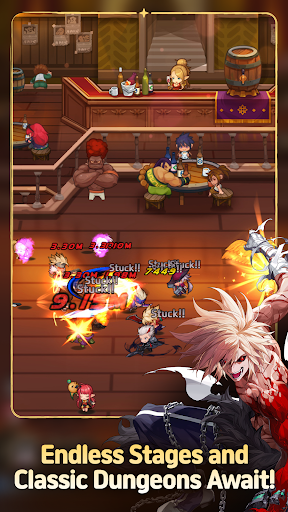
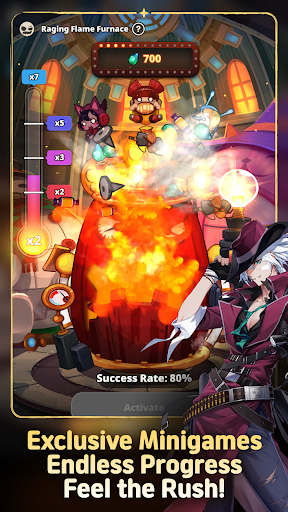
Dungeon & Fighter returns, now as an idle RPG!
Experience the rush of growing stronger and collecting new characters in Arad: Idle RPG!
▶ Pocket-Sized Arad at Your Fingertips!
Dungeon & Fighter is now an idle RPG!
Explore Arad and grow stronger, even while you're away!
Experience nonstop progression in Arad!
▶ Familiar NPCs Join as Playable Characters!
Fan-favorite NPCs like Seria, Aganzo, and Danjin now take center stage on the battlefield!
Collect and combine a variety of characters to create your ultimate team.
▶ Endless Stages and Dungeons
Return to classic dungeons like the Tower of the Dead and the King's Ruin, along with all-new stories!
Defeat powerful bosses and conquer every corner of Arad!
▶ Minigames Found Only in Arad: Idle RPG!
Experience the thrill of nonstop progression with a variety of minigames,
including the Dorniar, Supply Drop, Item Vending Machine, and more!
▶ Arad: Idle RPG Official Discord: https://discord.gg/aradidle
▶ Arad: Idle RPG Official Website: https://aradidle.nexon.com
[App Permissions Guide]
To provide certain features, the app may request the following permissions.
[Optional Permissions]
- Camera: Required for taking photos or videos to attach and submit reference materials to Customer Support.
- Storage: Required for saving videos and uploading photos and videos.
- Notifications: Required to receive service notifications.
* You can still use the service even if you do not consent to optional permissions.
[How to Revoke Access Permissions]
- Android 6.0 and higher: Settings > Apps > Select the app > Permissions > Select the permission to revoke > Select Don't allow
* The app may not provide individual consent options, and permissions can be revoked using the method above.
----
Nexon Korea Corporation
7, Pangyo-ro 256beon-gil (Sampyeong-dong), Bundang-gu, Seongnam-si, Gyeonggi-do 13487, Republic of Korea
South Korea 220-87-17483 2013-Gyeonggi Seongnam-1659 Seongnam City Hall
Показать больше

1. Скачать инсталлятор MEmu и завершайте установку

2. Запускайте MEmu, затем откройте Google Play на главной странице

3. Ищите Arad: Idle RPG в Google Play
Install
4. Скачайте и установите Arad: Idle RPG
5. При завершении установки, нажмите на значок для старта

6. Наслаждайтесь Arad: Idle RPG на своем компьютере с помощью MEmu
MEmu App Player лучший бесплатный андроид эмулятор и 50 миллионов людей уже наслаждаются превосходным игровым опытом в андроид. Технология виртуализации MEmu позволяет вам запускать тысячи игр андроида на вашем ПК без тормозов, даже самые графически насыщенные.
Большой экран с лучшей графикой; Большая продолжительность, без ограничения батареи или мобильных данных.
Полная поддержка установки клавиш для точного управления клавиатурой и мышью или геймпадом.
Несколько игровых учетных записей или задач на одном компьютере одновременно с менеджером нескольких экземпляров.
Play Arad: Idle RPG on PC by following steps: