Easy Homescreen
Aggiornata
Versione corrente
1.7.21
Offerta da

Non devi più preoccuparti dei sovraccarichi durante l'utilizzo di Easy Homescreen sul tuo cellulare, liberati dal piccolo schermo e goditi dell'App su uno schermo molto più grande. D'ora in poi, sperimenta la tua App a schermo intero con tastiera e mouse. MEmu ti offre tutte le sorprendenti funzioni che ti aspettavi: installazione rapida e impostazione semplice, controlli intuitivi, niente più limitazioni di batteria, dati mobili e chiamate fastidiose. Il MEmu 9 nuovo di zecca è la prima scelta per utilizzare Easy Homescreen sul tuo computer. Codificato con il nostro assorbimento, il gestore multi-istanza consente di aprire 2 o più account contemporaneamente. E soprattutto, il nostro esclusivo motore di emulazione può sbloccare il pieno potenziale del tuo PC, rendendo tutto liscio e piacevole.
Mostra altro
Scarica Easy Homescreen su PC con MEmu Android Emulator. Divertiti giocando sul grande schermo. Simplify your device.

Simplify your device. Simplify your life.
Do you ever feel overwhelmed with your phone? Or struggle to find apps you need quickly?
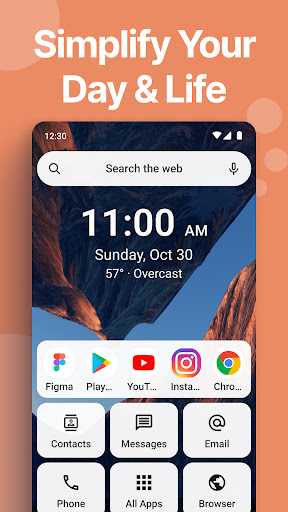
Easy Homescreen is a launcher that replaces the Android interface and simplifies your phone with easy menus, larger text and buttons, and minimal aesthetic.
Life is complicated enough without a phone that overstimulates. Make your smartphone an oasis of tranquility and elegant design.
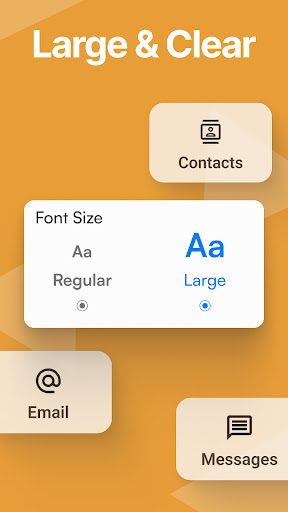
Easy to Read
The home screen uses larger fonts and simplified controls. Large text makes it easy to see what you’re looking for, and with large buttons you won’t have to worry about trying to click on tiny icons to get where you need.
Simple Menu
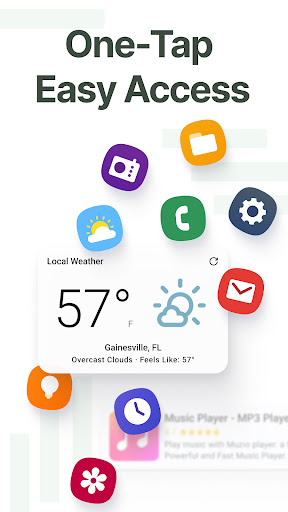
The Easy Homescreen app consists of a simple screen containing the options you choose, including apps, shortcuts, text conversations, contacts and more. It also uses text labels rather than icons, making navigation more simple than ever.
Minimal
Our phones can serve as a huge source of distraction and overwhelm if we let them. Organize your apps simply, and keep your mind clear to focus on things in life that are most important to you.
Beautiful Aesthetic
Display all of your apps in an aesthetically pleasing way so your phone can bring you all the vibes. Life is too short to have mismatched icons scattered all over your phone causing chaos and stress.
Utility Features
Includes commonly used features you can access quickly from your homescreen. Maximizes ease of use and productivity.
- Weather
Easily access the current weather and future forecasts. Click on the weather widget at the top of your homescreen to view more detailed weather forecasts.
By clicking “install”, I accept and agree to install Easy Homescreen and setting the application’s search functionality to that provided by the service and the Terms of Use and Privacy Policy. The app will update your search settings and will change your Homescreen search experience to use Yahoo.
Mostra altro

1. Scarica il programma di installazione di MEmu e completa l'installazione

2. Avvia il Memu e apri il Google Play sulla homepage

3. Cerca Easy Homescreen in Google Play
Install
4. Scarica e installa Easy Homescreen
5. Al termine dell'installazione, fai clic sull'icona per avviar

6. Divertiti giocando a Easy Homescreen su PC con MEmu
MEmu App Player è il miglior emulatore Android gratuito, utilizzato da 50 milioni di persone per ottenere un'esperienza di gioco Android superba. La tecnilogia di virtualizzazione MEmu ti permette di giocare a migliaia di giochi Android con semplicità sul tuo computer, anche i giochi con la grafica più esigente.
Schermo più grande con una grafica migliore; Lunga durata, senza limitazione di batteria o dati mobili.
Supporto completo per mappa di tastiera per un controllo preciso di tastiera e mouse o gamepad.
Multipli account di gioco o attività su un singolo PC contemporaneamente con il gestore di multi istanza.
Use Easy Homescreen on PC by following steps: