MapleStory R- Evolution US
更新日
現在のバージョン
1.0.15
提供元

スマホ不要!プロ選手のようにキーボードとマウスで操作しよう。MEmuエミュはあなたにすべての期待を与える。電池が切れてしまうとか画面が小さいとかの問題を心配する必要がなくて、存分MapleStory R- Evolution USを楽しんでください。新しいMEmuエミュ7はPCでMapleStory R- Evolution USをプレイするのに最適!完璧なキーマッピングシステムにより、まるでパソコンゲームみたい。マルチインスタンスで複数のゲームやアプリを同時に実行!唯一無二な仮想化エンジンがパソコンの可能性を最大限になる。遊べるだけでなく、より楽しめる!
もっと見る
MapleStory R- Evolution USをPCでダウンロード!大画面でより楽しむ。電源が落ちてしまうとか通信料が足りないとかの問題を心配する必要がなく、PCの大画面でより快適にゲームを楽しましょう! [MapleStory R – Evolution US] × Bugcat Capoo Collaboration Is Coming!


[MapleStory R – Evolution US] × Bugcat Capoo Collaboration Is Coming!
Join exclusive events to claim limited rewards, including Capoo outfits, pets, stickers, and more.
Pre-register now to receive an SSR pet, Zakum outfit set, and 170 draws.
Take part in official events to compete for a share of the $10,000 prize pool, with chances to win an iPhone 17 Pro, PS5, or Switch 2!
=====Game Features======
[Official IP Authorization, Relive Classic Adventure]
Relive the classic visuals and return to Maple World.
Reunite with familiar faces, begin your journey of memories.
[Auto-Battle, Effortless Growth]
Command with one hand. Play anytime, anywhere.
Level up offline 24/7. Enjoy effortless auto-battles.
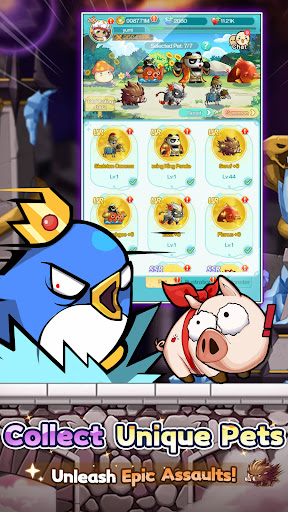
[Pet Evolution, All Out Attack]
Diverse cultivation unlocks multiple evolutionary forms.
With Seven Pets by your side, experience full power.
[Fashion Forward, Shine with Style]
Abundant outfits, limitless combinations.
Set the style, and be the brightest spotlight in Maple World!
Dominate the massive GVG battlefield with superior strategy and teamwork.
Command your forces. Coordinate perfectly. Seize Victoria Island!
[Exclusive Home, Cozy Space]
Craft your dream home with hundreds of customizable furnishings.
After every adventure, return to your own peaceful haven.
[All Pets Battle, Classic Showdown]
Command your pets and face iconic bosses once more.
Feel the thrill reignite with the legendary soundtrack!
[Strategic Synergy, Fresh Experience]
Combine pet and hero skills to unleash powerful combos.
Discover unique tactics and master truly strategic battles.
[Map Renewal, Local Customization]
Dive into world premieres: exclusive maps and events!
All content tailored just for our Western players.
Tap to Team Up, Lead Your Pet Legion!
Jump into the adventure and join the community for exclusive rewards!
[Follow Us]
Discord:https://msrdc.onelink.me/bluj/uyn5zfpk
Facebook (EN):https://msrus.onelink.me/xKn7/cu47c4yj
Facebook (ES):https://msrsp.onelink.me/D0n0/75cqw72u
Reddit:https://www.reddit.com/r/MapleR/
Website(US):https://msrus.rastargames.com/
もっと見る

1. MEmuインストーラーをダウンロードしてセットアップを完了する

2. MEmuを起動し、デスクトップでのPlayストアを開く

3. PlayストアでMapleStory R- Evolution USを検索する
Install
4. MapleStory R- Evolution USをダウンロードしてインストールする
5. インストールが完了したら、アイコンをクリックしてスタート

6. MEmuを使用してPCでMapleStory R- Evolution USを楽しむ
MEmu App Playerは最高の無料で提供されるAndroidエミュレータで、5,000万人がすでに優れたAndroidゲーム体験を楽しんでいます。 MEmuの仮想化技術は、あなたのPCで何千ものAndroidゲームを快適にプレイすることを可能にします。
大画面でより精細;無限の待機、電池とドラフィックの極限を超え
キーボード・マウス・コントローラーを全力でサポート、より快適
マルチインスタンスで複数のゲームを同時に実行
Play MapleStory R- Evolution US on PC by following steps: