MapleStory R- Evolution US
Aktualisiert
Aktuelle Version
1.0.15
Angeboten von

Bei all Ihrer Leidenschaft für das Spielen von MapleStory R- Evolution US sollten Ihre Hände nicht auf einen winzigen Bildschirm Ihres Telefons beschränkt sein. Spielen Sie wie ein Profi und übernehmen Sie die volle Kontrolle über Ihr Spiel mit Tastatur und Maus. MEmu bietet Ihnen all die Dinge, die Sie erwarten. Laden Sie MapleStory R- Evolution US herunter und spielen Sie es auf dem PC. Spielen Sie so lange, wie Sie wollen, ohne Grenzwerte für Akku, mobile Daten und störende Anrufe. Das brandneue MEmu 9 ist die beste Wahl, um MapleStory R- Evolution US auf dem PC zu spielen. Das exquisite voreingestellte Tastaturbelegungssystem, das mit unserem Fachwissen vorbereitet wurde, macht MapleStory R- Evolution US zu einem echten PC-Spiel. Der MEmu Multi-Instanz-Manager ermöglicht das Spielen von 2 oder mehr Konten auf demselben Gerät. Und das Wichtigste: Unsere exklusive Emulations-Engine kann das volle Potenzial Ihres PCs freisetzen und für reibungslose Abläufe sorgen.
Mehr anzeigen
Laden Sie Play MapleStory R- Evolution US auf dem PC mit MEmu Android Emulator. Viel Spaß beim Spielen auf großmundieren. [MapleStory R – Evolution US] × Bugcat Capoo Collaboration Is Coming!



[MapleStory R – Evolution US] × Bugcat Capoo Collaboration Is Coming!
Join exclusive events to claim limited rewards, including Capoo outfits, pets, stickers, and more.
Pre-register now to receive an SSR pet, Zakum outfit set, and 170 draws.
Take part in official events to compete for a share of the $10,000 prize pool, with chances to win an iPhone 17 Pro, PS5, or Switch 2!
=====Game Features======
[Official IP Authorization, Relive Classic Adventure]
Relive the classic visuals and return to Maple World.
Reunite with familiar faces, begin your journey of memories.
[Auto-Battle, Effortless Growth]
Command with one hand. Play anytime, anywhere.
Level up offline 24/7. Enjoy effortless auto-battles.
[Pet Evolution, All Out Attack]
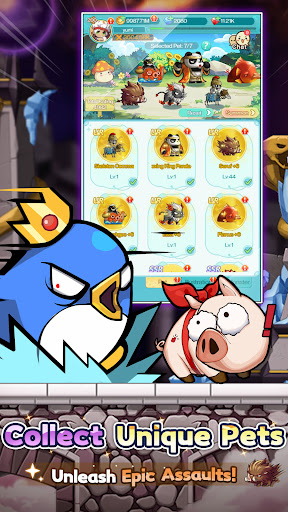
Diverse cultivation unlocks multiple evolutionary forms.
With Seven Pets by your side, experience full power.
[Fashion Forward, Shine with Style]
Abundant outfits, limitless combinations.
Set the style, and be the brightest spotlight in Maple World!
Dominate the massive GVG battlefield with superior strategy and teamwork.
Command your forces. Coordinate perfectly. Seize Victoria Island!
[Exclusive Home, Cozy Space]
Craft your dream home with hundreds of customizable furnishings.
After every adventure, return to your own peaceful haven.
[All Pets Battle, Classic Showdown]
Command your pets and face iconic bosses once more.
Feel the thrill reignite with the legendary soundtrack!
[Strategic Synergy, Fresh Experience]
Combine pet and hero skills to unleash powerful combos.
Discover unique tactics and master truly strategic battles.
[Map Renewal, Local Customization]
Dive into world premieres: exclusive maps and events!
All content tailored just for our Western players.
Tap to Team Up, Lead Your Pet Legion!
Jump into the adventure and join the community for exclusive rewards!
[Follow Us]
Discord:https://msrdc.onelink.me/bluj/uyn5zfpk
Facebook (EN):https://msrus.onelink.me/xKn7/cu47c4yj
Facebook (ES):https://msrsp.onelink.me/D0n0/75cqw72u
Reddit:https://www.reddit.com/r/MapleR/
Website(US):https://msrus.rastargames.com/
Mehr anzeigen

1. Laden das MEmu-Installationsprogramm herunter und beenden die Installation

2. MEmu starten und Google Play auf der Homepage öffnen

3. Suchen MapleStory R- Evolution US in Google Play
Install
4. Herunterladen und Installieren MapleStory R- Evolution US
5. Klicken nach Abschluss der Installation auf das Symbol, um es zu starten

6. Viel Spaß beim Spielen von MapleStory R- Evolution US auf dem PC mit MEmu
MEmu App Player ist der beste kostenlose Android-Emulator und 50 Millionen Menschen genießen bereits seine hervorragende Android-Gaming-Erfahrung. Mit der MEmu-Virtualisierungstechnologie können Sie Tausende von Android-Spielen problemlos auf Ihrem PC spielen, selbst bei grafikintensiven Spielen.
BGrößeres Bild mit besserer Grafik; Keine unterbrechungen, keine sorgen um Akku
Komplette Tastenbelegung unterstützt mit Maus und Tastatur oder Controller
Mit dem „Multi-Instance-Manager“ können Sie mehrere Spielkonten oder Spiele gleichzeitig auf einem PC ausführen.
Play MapleStory R- Evolution US on PC by following steps: