MapleStory R- Evolution US
อัปเดตเมื่อ
เวอร์ชันปัจจุบัน
1.0.15
ให้บริการโดย

เวลาคุณเล่น MapleStory R- Evolution US, คุณอาจรู้สึกว่ามือคุณอาจบังจอแล้วทำให้ไม่ได้เล่นแบบเต็มที่. เล่นแบบไร้ขีดจำกัดด้วยเม้าส์และคีย์บอร์ด. MEmu มีตัวเลือกหลายอย่างให้คุณใช้งานเกมที่คุณเล่นแบบที่คุณต้องการ. ดาวน์โหลดและเล่น MapleStory R- Evolution US บน PC. เล่นนานแค่ไหนก็ได้, ไม่ต้องชาร์จแบตเตอรี่, หรือเจอคนโทรเข้ามาระหว่างเล่น. MEmu 9 เป็นตัวเลือกสำหรับการเล่น MapleStory R- Evolution US บน PC. ทางทีมงานเราได้ปรับแต่งเกม, ปรับให้เล่นเกมบางเกมได้เหมือนเล่น MapleStory R- Evolution US เป็นเกม PC เช่นเล็งด้วยเม้าส์หรือใช้คีย์บอร์ด. ระบบของเรายังทำให้คุณสามารถเปิดเล่นได้มากกว่า 2 เกมพร้อมๆกันในคอมของคุณ. และที่สำคัญที่สุด, ระบบโปรแกรมของเราสามารถทำให้คุณใช้ระบบของ PC ทำให้เกมลื่นเหมือนกับใช้โทรศัพท์รุ่นล่าสุด. เราไม่ได้ดูแลเรื่องการเล่นเกม, แต่เราดูแลถึงความสนุกสนานที่คุณได้จากการเล่นด้วย.
แสดงเพิ่มเติม
ดาวน์โหลด MapleStory R- Evolution US บน PC ด้วย MEmu Android Emulator สนุกกับการเล่นบนหน้าจอขนาดใหญ่ [MapleStory R – Evolution US] × Bugcat Capoo Collaboration Is Coming!



[MapleStory R – Evolution US] × Bugcat Capoo Collaboration Is Coming!
Join exclusive events to claim limited rewards, including Capoo outfits, pets, stickers, and more.
Pre-register now to receive an SSR pet, Zakum outfit set, and 170 draws.
Take part in official events to compete for a share of the $10,000 prize pool, with chances to win an iPhone 17 Pro, PS5, or Switch 2!
=====Game Features======
[Official IP Authorization, Relive Classic Adventure]
Relive the classic visuals and return to Maple World.
Reunite with familiar faces, begin your journey of memories.
[Auto-Battle, Effortless Growth]
Command with one hand. Play anytime, anywhere.
Level up offline 24/7. Enjoy effortless auto-battles.
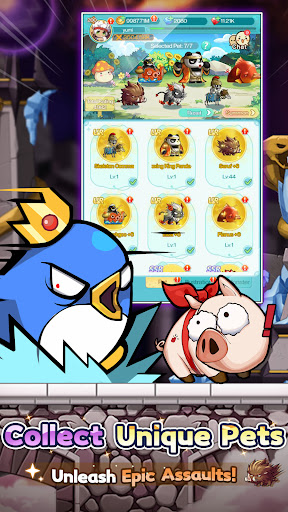
[Pet Evolution, All Out Attack]
Diverse cultivation unlocks multiple evolutionary forms.
With Seven Pets by your side, experience full power.
[Fashion Forward, Shine with Style]
Abundant outfits, limitless combinations.
Set the style, and be the brightest spotlight in Maple World!
Dominate the massive GVG battlefield with superior strategy and teamwork.
Command your forces. Coordinate perfectly. Seize Victoria Island!
[Exclusive Home, Cozy Space]
Craft your dream home with hundreds of customizable furnishings.
After every adventure, return to your own peaceful haven.
[All Pets Battle, Classic Showdown]
Command your pets and face iconic bosses once more.
Feel the thrill reignite with the legendary soundtrack!
[Strategic Synergy, Fresh Experience]
Combine pet and hero skills to unleash powerful combos.
Discover unique tactics and master truly strategic battles.
[Map Renewal, Local Customization]
Dive into world premieres: exclusive maps and events!
All content tailored just for our Western players.
Tap to Team Up, Lead Your Pet Legion!
Jump into the adventure and join the community for exclusive rewards!
[Follow Us]
Discord:https://msrdc.onelink.me/bluj/uyn5zfpk
Facebook (EN):https://msrus.onelink.me/xKn7/cu47c4yj
Facebook (ES):https://msrsp.onelink.me/D0n0/75cqw72u
Reddit:https://www.reddit.com/r/MapleR/
Website(US):https://msrus.rastargames.com/
แสดงเพิ่มเติม

1. ดาวน์โหลดตัวติดตั้ง MEmu และสิ้นสุดการติดตั้ง

2. เริ่ม MEmu จากนั้นเปิด Google Play บนหน้าแรก

3. ค้นหา MapleStory R- Evolution US ใน Google Play
Install
4. ดาวน์โหลดและติดตั้ง MapleStory R- Evolution US
5. เมื่อติดตั้งเสร็จให้คลิกที่ไอคอนเพื่อเริ่มใช้งาน

6. สนุกกับการเล่น MapleStory R- Evolution US บนพีซีด้วย MEmu
MEmu App Player เป็นอีมูเลเตอร์ Android ที่ดีที่สุดและผู้คนกว่า 50 ล้านคนเพลิดเพลินไปกับประสบการณ์การเล่นเกม Android ที่ยอดเยี่ยม เทคโนโลยีการจำลองเสมือนของ MEmu ช่วยให้คุณเล่นเกม Android หลายพันเกมได้อย่างราบรื่นบนพีซีของคุณแม้แต่เกมที่ต้องใช้กราฟิกมากที่สุด
จอใหญ่และกราฟฟิกสวยกว่า; เล่นได้นาน, ไม่ต้องใช้แบตเตอรี่โทรศัพท์หรือเน็ตโทรศัพท์.
ระบบปรับแต่งปุ่มคีย์บอร์ดและเม้าส์ตามที่คุณเลือก
เล่นมากกว่าหนึ่งเกมบน PC ในเวลาเดียวกันด้วยระบบหลายจอหรือ Multi-Instance manager.
Play MapleStory R- Evolution US on PC by following steps: