FX File Explorer
更新日
現在のバージョン
9.0.1.2
提供元

スマートフォンは不要!パソコンと同じようにキーボードとマウスで操作できます。MEmu Playは、あなたが待ち望んでいたすべての楽しみをお届けします。バッテリー残量や小さな画面を気にすることなく、FX File Explorerをご利用ください。最新のMEmu 9は、FX File ExplorerをPCで体験するのに最適です!完璧なキーマッピングシステムにより、PCのようなスムーズな操作性を実現します。マルチインスタンス機能により、複数のアプリケーションを同時に実行できます。独自の仮想化エンジンがPCのパフォーマンスを最大限に引き出します。アプリを使用するだけでなく、高品質な体験を得ることができます。
もっと見る
FX File ExplorerをPCでダウンロード!大画面でより楽しむ。電源が落ちてしまうとか通信料が足りないとかの問題を心配する必要がなく、PCの大画面でより快適にゲームを楽しましょう! FX File Explorer features a Material Design UI and new ways to transfer your files between devices and computers:.
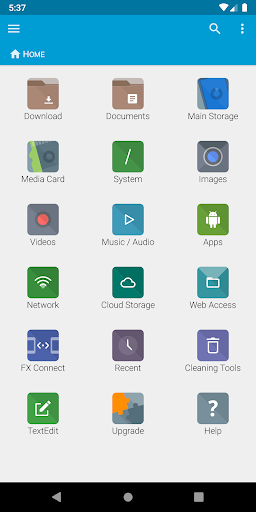
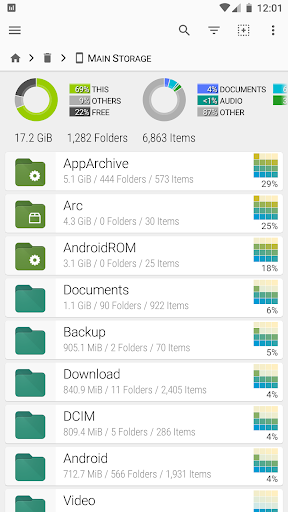
FX File Explorer features a Material Design UI and new ways to transfer your files between devices and computers:
* SMBv2 support.
* New "FX Connect" transfers files from phone-to-phone with Wi-Fi Direct. Supports NFC to connect two phones by physically touching their backs together. (requires FX+)
* New "Web Access" enables transfer and management of files and media from your computer's web browser. You can drag-and-drop entire folders to your phone from your computer, or stream your phone's music playlists to your computer over Wi-Fi. (requires FX+)
FX is a file explorer built to make working with files and media on your phone or tablet as easy as it is on your computer:
* Productivity-oriented "Home Screen": Directly access your important folders, media, and cloud storage
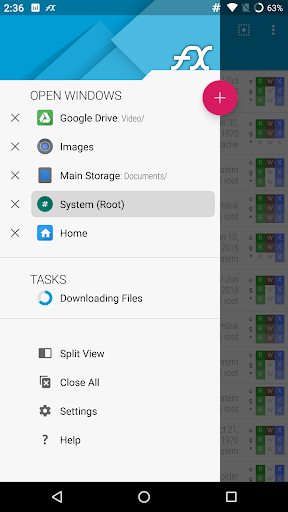
* Multiple window support, with dual-view mode to see two windows at once
* "Usage View" mode shows the total size and content makeup of every folder, as you browse and manage files
* Support for most file archive formats
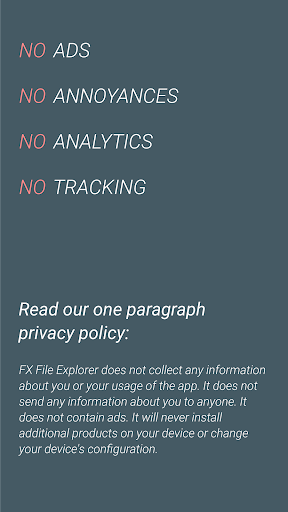
FX protects your privacy:
* No advertisements
* No tracking of user activity: FX does not ever "phone home"
* Built by NextApp, Inc., a US corporation founded in 2002; all proprietary code was developed in-house
The optional FX+ Add-On module enables more functionality:
* Access networked computers, including FTP, SSH FTP, WebDAV, and Windows Networking (SMB1 and SMB2)
* Connect to cloud storage including Google Drive, Dropbox, SugarSync, Box, SkyDrive, and OwnCloud
* Manage installed applications, with support for browsing applications based on their required permissions
* Create and explore inside AES-256/AES-128 encrypted zip files
* Browse audio content by artist/album/playlist; manage and organize playlists
* Directly browse photo and video folders
* Encrypted password keyring (use one password to access network and cloud locations)
FX includes a number of built-in editing/viewing applets:
* Text Editor (with undo/redo history, cut/paste, search, and pinch-to-zoom)
* Binary (Hex) Viewer
* Image Viewer
* Media Player and pop-up Audio Player
* Zip, Tar, GZip, Bzip2, 7zip archive creators and extractors
* RAR file extractor
* Shell Script Executor
Android 8 / 9 Location Permission Notice
* NOTE: Android 8.0+ unfortunately required us to add the "approximate location" permission, as it's now required for apps that support Wi-Fi direct (because Wi-Fi direct leaks this information). FX does not ever actually query your location, and this permission will only ever be asked for on Android 8.0 and later when using FX Connect. This requirement previously applied only to Android 9.0, but because FX now specifies full support for the latest Android API, Android 8.0 also requires this permission.
もっと見る

1. MEmuインストーラーをダウンロードしてセットアップを完了する

2. MEmuを起動し、デスクトップでのPlayストアを開く

3. PlayストアでFX File Explorerを検索する
Install
4. FX File Explorerをダウンロードしてインストールする
5. インストールが完了したら、アイコンをクリックしてスタート

6. MEmuを使ってパソコンでFX File Explorerを体験する
MEmu Playは現在、最高の無料Androidエミュレーターであり、5,000万人のユーザーが優れたAndroidアプリ体験を楽しんでいます。MEmuの仮想化テクノロジーにより、数千ものAndroidアプリをコンピューターでスムーズに実行できます。
大画面でより精細;無限の待機、電池とドラフィックの極限を超え
キーボード・マウス・コントローラーを全力でサポート、より快適
マルチインスタンスで複数のゲームを同時に実行
Use FX File Explorer on PC by following steps: