FX File Explorer
Updated
Current Version
9.0.1.2
Offered By

Stop worrying about high battery drain when using FX File Explorer on your phone. Free yourself from the tiny screen and enjoy the app on a much larger display. From now on, get a full-screen experience of your app with the convenience of a keyboard and mouse. MEmu offers you all the surprising features you’d expect: quick installation and easy setup, intuitive controls, and no more worries about battery life, mobile data, or unexpected calls. The all-new MEmu 9 is the choice for using FX File Explorer on your computer. With the MEmu multi-instance manager, you can run two or more accounts at the same time. Most importantly, our exclusive emulation engine unlocks your PC’s full potential, delivering smooth and enjoyable performance.
Show more
Enjoy superb experience of using FX File Explorer on PC with MEMU App Player. It's a powerful free Android emulator which provides you with thousands of android apps for their desktop version. Enjoy connecting with friends and polishing your work with higher efficiency! FX File Explorer features a Material Design UI and new ways to transfer your files between devices and computers:.
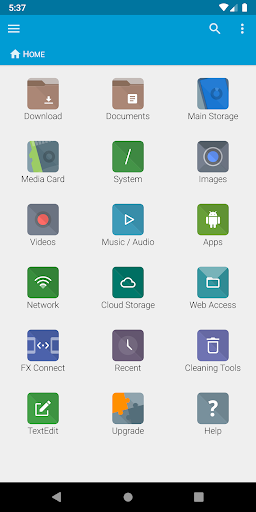
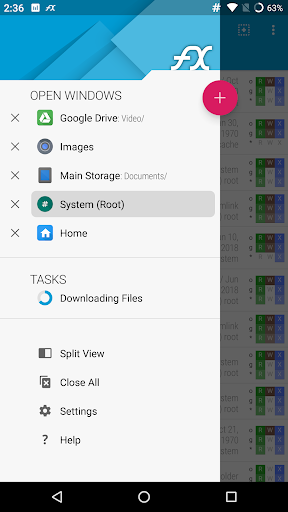
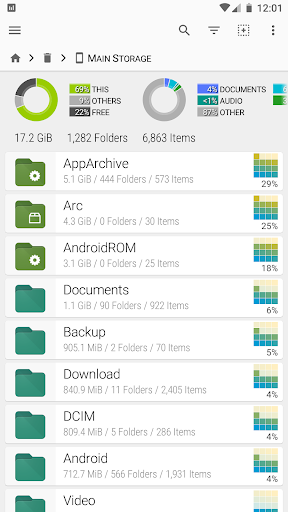
FX File Explorer features a Material Design UI and new ways to transfer your files between devices and computers:
* SMBv2 support.
* New "FX Connect" transfers files from phone-to-phone with Wi-Fi Direct. Supports NFC to connect two phones by physically touching their backs together. (requires FX+)
* New "Web Access" enables transfer and management of files and media from your computer's web browser. You can drag-and-drop entire folders to your phone from your computer, or stream your phone's music playlists to your computer over Wi-Fi. (requires FX+)
FX is a file explorer built to make working with files and media on your phone or tablet as easy as it is on your computer:
* Productivity-oriented "Home Screen": Directly access your important folders, media, and cloud storage
* Multiple window support, with dual-view mode to see two windows at once
* "Usage View" mode shows the total size and content makeup of every folder, as you browse and manage files
* Support for most file archive formats
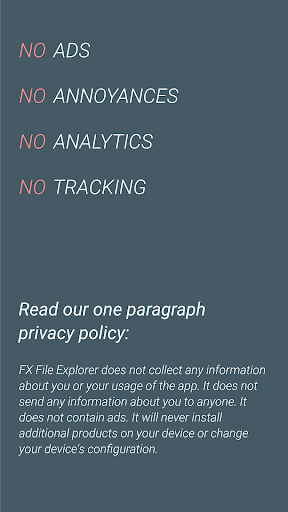
FX protects your privacy:
* No advertisements
* No tracking of user activity: FX does not ever "phone home"
* Built by NextApp, Inc., a US corporation founded in 2002; all proprietary code was developed in-house
The optional FX+ Add-On module enables more functionality:
* Access networked computers, including FTP, SSH FTP, WebDAV, and Windows Networking (SMB1 and SMB2)
* Connect to cloud storage including Google Drive, Dropbox, SugarSync, Box, SkyDrive, and OwnCloud
* Manage installed applications, with support for browsing applications based on their required permissions
* Create and explore inside AES-256/AES-128 encrypted zip files
* Browse audio content by artist/album/playlist; manage and organize playlists
* Directly browse photo and video folders
* Encrypted password keyring (use one password to access network and cloud locations)
FX includes a number of built-in editing/viewing applets:
* Text Editor (with undo/redo history, cut/paste, search, and pinch-to-zoom)
* Binary (Hex) Viewer
* Image Viewer
* Media Player and pop-up Audio Player
* Zip, Tar, GZip, Bzip2, 7zip archive creators and extractors
* RAR file extractor
* Shell Script Executor
Android 8 / 9 Location Permission Notice
* NOTE: Android 8.0+ unfortunately required us to add the "approximate location" permission, as it's now required for apps that support Wi-Fi direct (because Wi-Fi direct leaks this information). FX does not ever actually query your location, and this permission will only ever be asked for on Android 8.0 and later when using FX Connect. This requirement previously applied only to Android 9.0, but because FX now specifies full support for the latest Android API, Android 8.0 also requires this permission.
Show more

1. Download MEmu installer and finish the setup

2. Start MEmu then open Google Play on the desktop

3. Search FX File Explorer in Google Play
Install
4. Download and Install FX File Explorer
5. On install completion click the icon to start

6. Enjoy using FX File Explorer on PC with MEmu
MEmu Play is the best Android emulator, and 100 million users already enjoy its superb Android app experience. Powered by advanced virtualization technology, it lets you enjoy thousands of Android apps smoothly on your PC—including the most graphics-intensive ones.
Bigger screen with better graphics; Long duration, without limitation of battery or mobile data.
Full Keymapping support for precise control of keyboard and mouse or gamepad.
Multiple game accounts or tasks on single PC at one time with Multi-Instance manager.
Use FX File Explorer on PC by following steps: