FX File Explorer
Обновлено
Текущая версия
9.0.1.2
Продавец

Перестаньте беспокоиться о быстром разряде батареи при использовании FX File Explorer на вашем телефоне. Освободитесь от крошечного экрана и наслаждайтесь приложением на гораздо большем экране. Теперь вы можете работать с приложением в полноэкранном режиме с удобством клавиатуры и мыши. MEmu предлагает вам все ожидаемые удивительные функции: быструю установку и простую настройку, интуитивно понятное управление и больше никаких забот о времени автономной работы, мобильном трафике или неожиданных звонках. Совершенно новый MEmu 9 — идеальный выбор для использования FX File Explorer на вашем компьютере. С помощью менеджера нескольких экземпляров MEmu вы можете одновременно использовать два или более аккаунтов. И самое главное, наш эксклюзивный движок эмуляции раскрывает весь потенциал вашего ПК, обеспечивая плавную и приятную работу.
Показать больше
Скачайте FX File Explorer на ПК с помощью Андроид эмулятора MEmu. Наслаждайтесь на большом экране. FX File Explorer features a Material Design UI and new ways to transfer your files between devices and computers:.
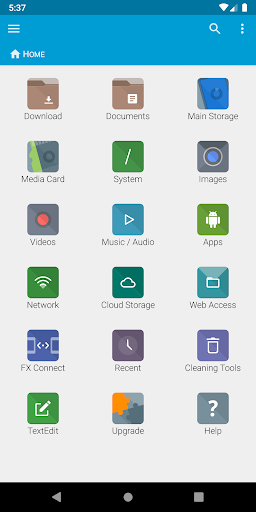
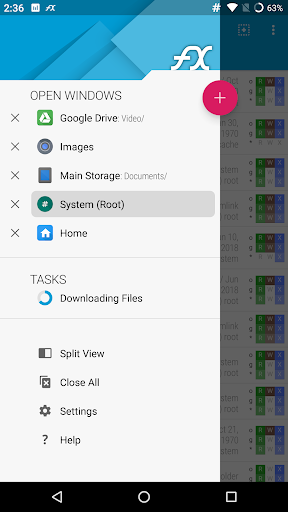
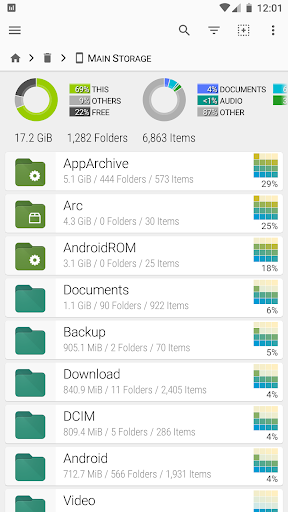
FX File Explorer features a Material Design UI and new ways to transfer your files between devices and computers:
* SMBv2 support.
* New "FX Connect" transfers files from phone-to-phone with Wi-Fi Direct. Supports NFC to connect two phones by physically touching their backs together. (requires FX+)
* New "Web Access" enables transfer and management of files and media from your computer's web browser. You can drag-and-drop entire folders to your phone from your computer, or stream your phone's music playlists to your computer over Wi-Fi. (requires FX+)
FX is a file explorer built to make working with files and media on your phone or tablet as easy as it is on your computer:
* Productivity-oriented "Home Screen": Directly access your important folders, media, and cloud storage
* Multiple window support, with dual-view mode to see two windows at once
* "Usage View" mode shows the total size and content makeup of every folder, as you browse and manage files
* Support for most file archive formats
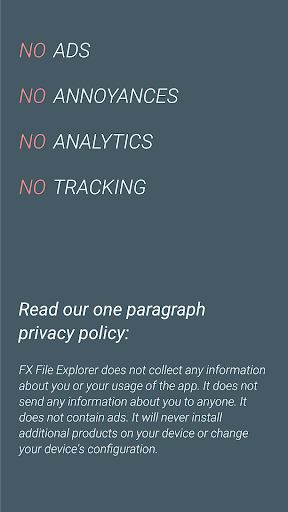
FX protects your privacy:
* No advertisements
* No tracking of user activity: FX does not ever "phone home"
* Built by NextApp, Inc., a US corporation founded in 2002; all proprietary code was developed in-house
The optional FX+ Add-On module enables more functionality:
* Access networked computers, including FTP, SSH FTP, WebDAV, and Windows Networking (SMB1 and SMB2)
* Connect to cloud storage including Google Drive, Dropbox, SugarSync, Box, SkyDrive, and OwnCloud
* Manage installed applications, with support for browsing applications based on their required permissions
* Create and explore inside AES-256/AES-128 encrypted zip files
* Browse audio content by artist/album/playlist; manage and organize playlists
* Directly browse photo and video folders
* Encrypted password keyring (use one password to access network and cloud locations)
FX includes a number of built-in editing/viewing applets:
* Text Editor (with undo/redo history, cut/paste, search, and pinch-to-zoom)
* Binary (Hex) Viewer
* Image Viewer
* Media Player and pop-up Audio Player
* Zip, Tar, GZip, Bzip2, 7zip archive creators and extractors
* RAR file extractor
* Shell Script Executor
Android 8 / 9 Location Permission Notice
* NOTE: Android 8.0+ unfortunately required us to add the "approximate location" permission, as it's now required for apps that support Wi-Fi direct (because Wi-Fi direct leaks this information). FX does not ever actually query your location, and this permission will only ever be asked for on Android 8.0 and later when using FX Connect. This requirement previously applied only to Android 9.0, but because FX now specifies full support for the latest Android API, Android 8.0 also requires this permission.
Показать больше

1. Скачать инсталлятор MEmu и завершайте установку

2. Запускайте MEmu, затем откройте Google Play на главной странице

3. Ищите FX File Explorer в Google Play
Install
4. Скачайте и установите FX File Explorer
5. При завершении установки, нажмите на значок для старта

6. Наслаждайтесь FX File Explorer на своем компьютере с помощью MEmu.
MEmu Play — лучший бесплатный эмулятор Android, превосходный опыт работы с которым оценили 50 миллионов пользователей. Технология виртуализации MEmu позволяет без проблем запускать тысячи Android-приложений на вашем компьютере, даже самые требовательные.
Большой экран с лучшей графикой; Большая продолжительность, без ограничения батареи или мобильных данных.
Полная поддержка установки клавиш для точного управления клавиатурой и мышью или геймпадом.
Несколько игровых учетных записей или задач на одном компьютере одновременно с менеджером нескольких экземпляров.
Use FX File Explorer on PC by following steps: