FX File Explorer
Đã cập nhật
Phiên bản hiện tại
9.0.1.2
Cung cấp bởi

Bạn không cần phải lo lắng về việc sạc quá mức khi sử dụng FX File Explorer trên điện thoại của bạn, không phải sử dụng trên màn hình nhỏ bé và tận hưởng ứng dụng trên màn hình lớn hơn rất nhiều. Từ bây giờ, bạn hãy trải nghiệm ứng dụng của bạn toàn màn hình bằng bàn phím và chuột. MEmu cung cấp cho bạn tất cả các tính năng đáng ngạc nhiên mà bạn mong đợi: cài đặt nhanh, cài đặt dễ dàng, điều khiển trực quan, không còn giới hạn về pin, dữ liệu di động và các cuộc gọi làm phiền. MEmu 9 hoàn toàn mới là sự lựa chọn tốt nhất để sử dụng FX File Explorer trên máy tính của bạn. Được mã hóa với sự hợp nhất của chúng tôi, trình quản lý multi-instance giúp mở 2 tài khoản trở lên cùng một lúc. Và điều quan trọng nhất là, công cụ mô phỏng độc quyền của chúng tôi có thể tận dụng hết toàn bộ tiềm năng trên PC của bạn, giúp mọi thứ vận hành trơn tru và thú vị.
Nhiều hơn
Tải FX File Explorer trên PC với Trình giả lập Android MEmu. Tận hưởng trải nghiệm chơi game trên màn hình lớn FX File Explorer features a Material Design UI and new ways to transfer your files between devices and computers:.
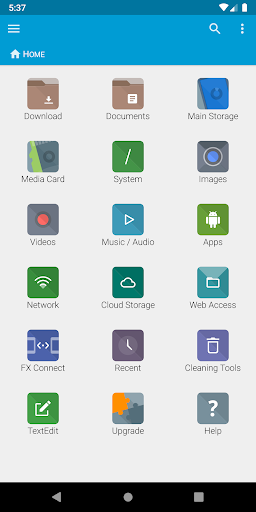
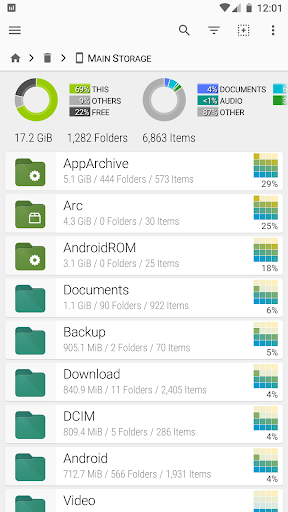
FX File Explorer features a Material Design UI and new ways to transfer your files between devices and computers:
* SMBv2 support.
* New "FX Connect" transfers files from phone-to-phone with Wi-Fi Direct. Supports NFC to connect two phones by physically touching their backs together. (requires FX+)
* New "Web Access" enables transfer and management of files and media from your computer's web browser. You can drag-and-drop entire folders to your phone from your computer, or stream your phone's music playlists to your computer over Wi-Fi. (requires FX+)
FX is a file explorer built to make working with files and media on your phone or tablet as easy as it is on your computer:
* Productivity-oriented "Home Screen": Directly access your important folders, media, and cloud storage
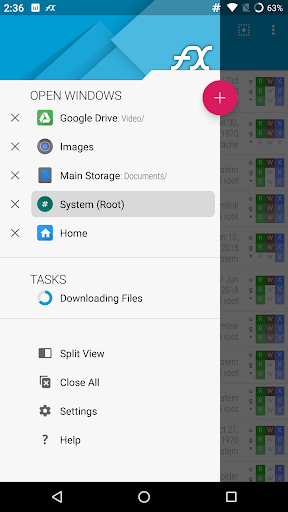
* Multiple window support, with dual-view mode to see two windows at once
* "Usage View" mode shows the total size and content makeup of every folder, as you browse and manage files
* Support for most file archive formats
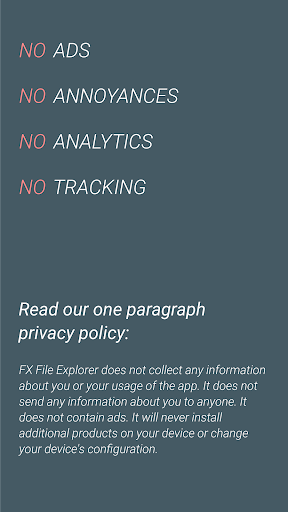
FX protects your privacy:
* No advertisements
* No tracking of user activity: FX does not ever "phone home"
* Built by NextApp, Inc., a US corporation founded in 2002; all proprietary code was developed in-house
The optional FX+ Add-On module enables more functionality:
* Access networked computers, including FTP, SSH FTP, WebDAV, and Windows Networking (SMB1 and SMB2)
* Connect to cloud storage including Google Drive, Dropbox, SugarSync, Box, SkyDrive, and OwnCloud
* Manage installed applications, with support for browsing applications based on their required permissions
* Create and explore inside AES-256/AES-128 encrypted zip files
* Browse audio content by artist/album/playlist; manage and organize playlists
* Directly browse photo and video folders
* Encrypted password keyring (use one password to access network and cloud locations)
FX includes a number of built-in editing/viewing applets:
* Text Editor (with undo/redo history, cut/paste, search, and pinch-to-zoom)
* Binary (Hex) Viewer
* Image Viewer
* Media Player and pop-up Audio Player
* Zip, Tar, GZip, Bzip2, 7zip archive creators and extractors
* RAR file extractor
* Shell Script Executor
Android 8 / 9 Location Permission Notice
* NOTE: Android 8.0+ unfortunately required us to add the "approximate location" permission, as it's now required for apps that support Wi-Fi direct (because Wi-Fi direct leaks this information). FX does not ever actually query your location, and this permission will only ever be asked for on Android 8.0 and later when using FX Connect. This requirement previously applied only to Android 9.0, but because FX now specifies full support for the latest Android API, Android 8.0 also requires this permission.
Nhiều hơn

1. Tải trình cài đặt MEmu và hoàn tất cài đặt

2. Khởi động MEmu, sau đó mở Google Play trên trang chủ

3. Tìm kiếm FX File Explorer trong Google Play
Install
4. Tải và Cài Đặt FX File Explorer
5. Khi cài đặt hoàn tất, nhấp vào biểu tượng để bắt đầu

6. Trải nghiệm FX File Explorer trên PC của bạn bằng MEmu
MEmu Play là trình giả lập Android miễn phí tốt nhất, với 50 triệu người dùng trải nghiệm ứng dụng Android tuyệt vời. Công nghệ ảo hóa của MEmu cho phép bạn chạy mượt mà hàng ngàn ứng dụng Android trên máy tính, ngay cả những ứng dụng đòi hỏi cấu hình cao nhất.
Màn hình lớn hơn cùng với đồ hoạ tốt hơn; thời lượng dài, không giới hạn về pin hoặc dữ liệu di động
Hỗ trợ đầy đủ Keymapping cho việc kiểm soát chính xác bàn phím và chuột hoặc gamepad
Nhiều tài khoản trò chơi hoặc tác vụ cùng lúc trên một PC với Quản lý Đa năng
Use FX File Explorer on PC by following steps: