FX File Explorer
Zaktualizowano
Aktualna wersja
9.0.1.2
Sprzedawca

Przestań martwić się nadmiernymi opłatami podczas korzystania z FX File Explorer na telefonie komórkowym, uwolnij się od małego ekranu i ciesz się korzystaniem z aplikacji na znacznie większym wyświetlaczu. Od teraz korzystaj z aplikacji na pełnym ekranie za pomocą klawiatury i myszy. MEmu oferuje wszystkie zaskakujące funkcje, których się spodziewałeś: szybką instalację i łatwą konfigurację, intuicyjne sterowanie, koniec z ograniczeniami baterii, danych mobilnych i niepokojących połączeń. Zupełnie nowy MEmu 9 to najlepszy wybór do używania FX File Explorer na twoim komputerze. Zakodowany przez naszą absorpcję, menedżer wielu instancji umożliwia otwarcie 2 lub więcej kont w tym samym czasie. A co najważniejsze, nasz ekskluzywny emulator może uwolnić pełny potencjał twojego komputera, sprawić, że wszystko będzie płynne i przyjemne.
Pokaż więcej
Ciesz się wspaniałym doświadczeniem podczas grania w FX File Explorer na komputerze z aplikacją MEMU App Player. Jest to potężny darmowy emulator Androida pozwalający grać w tysiące gier na Androida. FX File Explorer features a Material Design UI and new ways to transfer your files between devices and computers:.
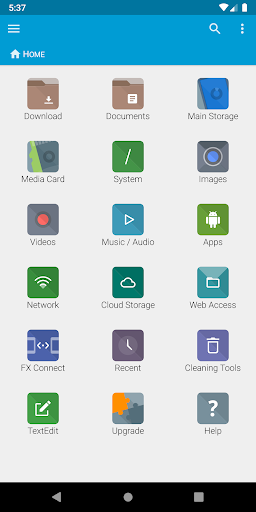
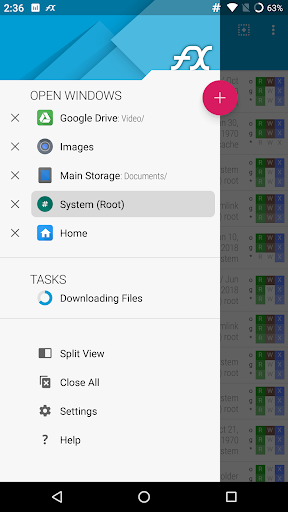
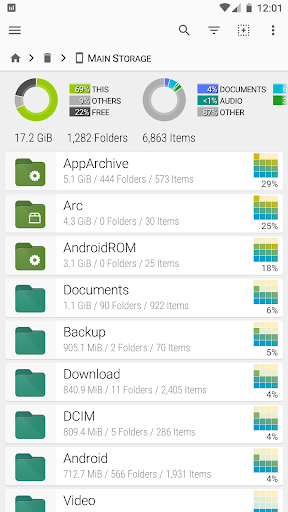
FX File Explorer features a Material Design UI and new ways to transfer your files between devices and computers:
* SMBv2 support.
* New "FX Connect" transfers files from phone-to-phone with Wi-Fi Direct. Supports NFC to connect two phones by physically touching their backs together. (requires FX+)
* New "Web Access" enables transfer and management of files and media from your computer's web browser. You can drag-and-drop entire folders to your phone from your computer, or stream your phone's music playlists to your computer over Wi-Fi. (requires FX+)
FX is a file explorer built to make working with files and media on your phone or tablet as easy as it is on your computer:
* Productivity-oriented "Home Screen": Directly access your important folders, media, and cloud storage
* Multiple window support, with dual-view mode to see two windows at once
* "Usage View" mode shows the total size and content makeup of every folder, as you browse and manage files
* Support for most file archive formats
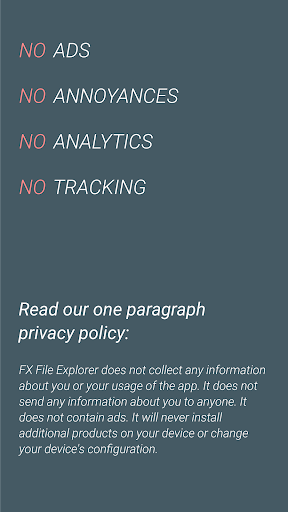
FX protects your privacy:
* No advertisements
* No tracking of user activity: FX does not ever "phone home"
* Built by NextApp, Inc., a US corporation founded in 2002; all proprietary code was developed in-house
The optional FX+ Add-On module enables more functionality:
* Access networked computers, including FTP, SSH FTP, WebDAV, and Windows Networking (SMB1 and SMB2)
* Connect to cloud storage including Google Drive, Dropbox, SugarSync, Box, SkyDrive, and OwnCloud
* Manage installed applications, with support for browsing applications based on their required permissions
* Create and explore inside AES-256/AES-128 encrypted zip files
* Browse audio content by artist/album/playlist; manage and organize playlists
* Directly browse photo and video folders
* Encrypted password keyring (use one password to access network and cloud locations)
FX includes a number of built-in editing/viewing applets:
* Text Editor (with undo/redo history, cut/paste, search, and pinch-to-zoom)
* Binary (Hex) Viewer
* Image Viewer
* Media Player and pop-up Audio Player
* Zip, Tar, GZip, Bzip2, 7zip archive creators and extractors
* RAR file extractor
* Shell Script Executor
Android 8 / 9 Location Permission Notice
* NOTE: Android 8.0+ unfortunately required us to add the "approximate location" permission, as it's now required for apps that support Wi-Fi direct (because Wi-Fi direct leaks this information). FX does not ever actually query your location, and this permission will only ever be asked for on Android 8.0 and later when using FX Connect. This requirement previously applied only to Android 9.0, but because FX now specifies full support for the latest Android API, Android 8.0 also requires this permission.
Pokaż więcej

1. Pobierz instalator MEmu i zakończ instalację

2. Uruchom MEmu, a następnie otwórz Google Play na pulpicie

3. Wyszukaj FX File Explorer w Google Play
Install
4. Pobierz i zainstaluj FX File Explorer
5. Po zakończeniu instalacji kliknij ikonę, aby rozpocząć

6. Użyj MEmu, aby doświadczyć FX File Explorer na swoim komputerze
MEmu Play to najlepszy emulator Androida, z którego korzysta ponad 100 milionów użytkowników, ciesząc się wyjątkowym doświadczeniem aplikacji na Androida. Technologia wirtualizacji MEmu pozwala na płynne uruchamianie tysięcy aplikacji Androida na komputerze, nawet tych najbardziej wymagających.
Większy ekran z lepszą grafiką; Długi czas, bez ograniczeń baterii lub danych mobilnych.
Pełna obsługa mapowania klawiszy dla precyzyjnego sterowania klawiaturą i myszą lub gamepadem.
Wiele kont gier lub zadań na jednym komputerze jednocześnie z menedżerem wielu instancji.
Use FX File Explorer on PC by following steps: