War Steel
Bijgewerkt
Huidige Versie
Aangeboden door

Met al je passie voor het spelen van War Steel, zouden je handen niet beperkt moeten zijn tot een klein scherm van je telefoon. Speel als een professional en krijg volledige controle over je spel met toetsenbord en muis. MEmu biedt je alles wat je verwacht. Download en speel War Steel op PC. Speel zo lang als je wilt, geen beperkingen meer van batterij, mobiele data en storende oproepen. De gloednieuwe MEmu 9 is de beste keuze om War Steel op PC te spelen. Voorbereid met onze expertise, maakt het uitmuntende vooraf ingestelde keymapping systeem van War Steel een echt PC-spel. MEmu multi-instance manager maakt het spelen van 2 of meer accounts op hetzelfde apparaat mogelijk. En het belangrijkste, onze exclusieve emulatie-engine kan het volledige potentieel van je PC benutten, waardoor alles soepel verloopt.
Meer tonen
Download War Steel op je pc met de MEmu Android-emulator. Geniet van spelen op een groot scherm. War Steel is a strategy-driven mobile game set in a war-torn world that blends real historical inspiration with an original fictional narrative.

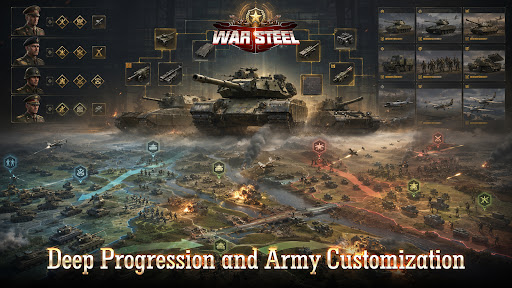
War Steel is a strategy-driven mobile game set in a war-torn world that blends real historical inspiration with an original fictional narrative. Taking place in a reimagined modern warfare era, the game unfolds through an immersive storyline filled with conflict, mystery, and hidden agendas. Players step into the role of a commander, leading forces on the battlefield while uncovering the truth behind the chaos of war. Featuring a realistic military art style with detailed visuals and atmospheric environments, War Steel delivers an intense and immersive combat experience. By combining real-time strategy with tactical command elements, the game offers a dynamic balance between decision-making depth and hands-on control.
[Historical-Inspired World with Fictional Twist]
Experience a unique war universe that merges iconic historical inspirations with original storytelling, creating a familiar yet unpredictable battlefield setting.
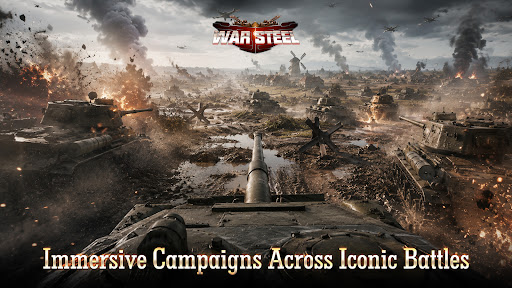
[Immersive Campaigns Across Iconic Battles]
Engage in numerous large-scale war scenarios inspired by classic conflicts, where you take direct command and shape the outcome of each battle.
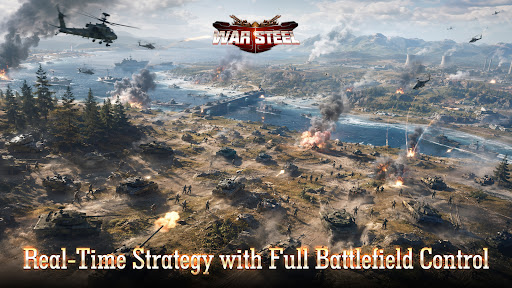
[Real-Time Strategy with Full Battlefield Control]
Take full control in real-time combat, where every decision and action immediately impacts the flow of battle, delivering a highly engaging strategic experience.
[Top-Down Tactical View with Precision Control]
Oversee the entire battlefield from a strategic perspective, allowing precise unit control, positioning, and terrain utilization for deeper tactical gameplay.
[Deep Progression and Army Customization]
Develop and customize your forces through multiple progression systems, combining units, equipment, and commanders to create powerful strategies.
[Global Competition and Diverse Game Modes]
Compete with players worldwide through various PvP and PvE modes, including global warfare, arenas, and cooperative challenges, for a rich and competitive experience.
Facebook: https://www.facebook.com/gamehollywoodgames
Discord: https://discord.gg/3VFM2eseFq
YouTube: https://www.youtube.com/@WarSteel
Meer tonen

1. Download de MEmu-installatie en voltooi de setup

2. Start MEmu en open vervolgens Google Play op het bureaublad

3. Zoek War Steel in Google Play
Install
4. Download en installeer War Steel
5. Klik op het icoon om te starten na het voltooien van de installatie

6. Geniet van het spelen van War Steel op PC met MEmu
MEmu Play is de beste Android Emulator en 100 miljoen mensen genieten al van de superieure Android-game-ervaring. De virtualisatietechnologie van MEmu stelt je in staat om duizenden Android-spellen soepel op je PC te spelen, zelfs de meest grafisch intensieve.
Groter scherm met betere graphics; Lange duur, zonder beperking van batterij of mobiele data.
Volledige Keymapping-ondersteuning voor nauwkeurige besturing van toetsenbord en muis of gamepad.
Meerdere game-accounts of taken op één PC tegelijk met Multi-Instance manager.
Speel War Steel op PC door de volgende stappen te volgen: