
SnapTik - Video Downloader
Bijgewerkt
Huidige Versie
1.0.26
Aangeboden door

Maak je geen zorgen meer over extra kosten bij het gebruik van SnapTik - Video Downloader op je mobiele telefoon, bevrijd jezelf van het kleine scherm en geniet van het gebruik van de app op een veel groter display. Vanaf nu, krijg een volledige schermervaring van je app met toetsenbord en muis. MEmu biedt je alle verrassende functies die je verwachtte: snelle installatie en eenvoudige configuratie, intuïtieve besturing, geen beperkingen meer van batterij, mobiele data en storende oproepen. De gloednieuwe MEmu 9 is de beste keuze voor het gebruik van SnapTik - Video Downloader op je computer. MEmu multi-instance manager maakt het mogelijk om tegelijkertijd 2 of meer accounts te openen. En het belangrijkste, onze exclusieve emulatiemotor kan het volledige potentieel van je PC benutten, waardoor alles soepel en plezierig wordt.
Meer tonen
Geniet van een fantastische ervaring met SnapTik - Video Downloader op je pc met MEmu Play. Het is een krachtige gratis Android-emulator die je duizenden Android-apps biedt voor de desktopversie. Geniet van contact met vrienden en verbeter je werk met hogere efficiëntie! Looking for a fast, free, and reliable video downloader for save videos without watermark in HD quality?
Looking for a fast, free, and reliable video downloader for save videos without watermark in HD quality?
Meet Video Downloader for – the ultimate video saver tool designed to let you download and save your favorite short clips, trending reels, and MP3 music audio directly to your phone gallery with a single tap.
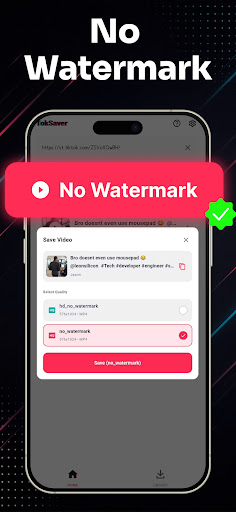
Whether you want to watch videos offline, backup your favorite creator moments, or extract clean audio tracks, this all-in-one video downloader makes it effortless. Experience 100% clean, watermark-free downloads in crisp HD resolution!
Key Features of Video Downloader:
• No Watermark Downloader: Save videos without any logos, stamps, or distracting watermarks.
• High Definition (HD) Quality: Download clips in original 1080p, 720p, and full HD clarity.
• Lightning Fast Speeds: Multi-threaded background downloader saves large video files in seconds.
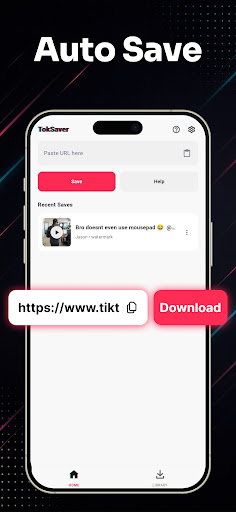
• Copy Link & Auto-Download: Simply copy the video link from TT and download starts automatically.
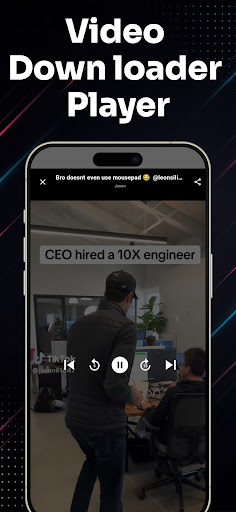
• Built-in Video Player: Watch your saved media offline anytime with the integrated HD video player.
• Audio & MP3 Extractor: Easily extract background music, sounds, and audio from any video clip.
• Smart Download Manager: Pause, resume, rename, and organize all your saved videos in one place.
• Lightweight & Battery-Friendly: Compact app size, minimal storage usage, and dark mode support.
• Easy Share & Repost: Share saved videos directly to WhatsApp, Instagram, Facebook, and friends.
How to Download Videos (2 Simple Steps):
Method 1: Copy Link (Instant Auto-Detection)
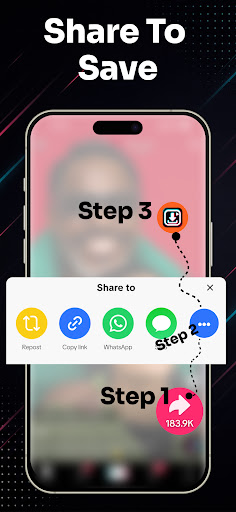
1. Open the video app and tap "Share" on the video you wish to download.
2. Select "Copy Link".
3. Open Video Downloader for TT – the link is automatically pasted and detected!
4. Tap "Download Without Watermark" or "Download MP3 Audio". Your video is saved instantly!
Method 2: Share Link Directly
1. Tap "Share" on any video clip.
2. Choose SnapTik from the Android share menu.
3. Your download starts automatically in the background.
Manage, Play & Share Offline:
All your downloaded files are neatly organized in the built-in media gallery. Enjoy offline playback anytime without internet or mobile data, rename files, or delete old clips to free up storage space.
Disclaimer & Legal Notice:
• Video Downloader for is an independent utility tool for saving videos and is NOT affiliated with, sponsored by, or endorsed by TikTok, ByteDance Ltd., or any of their parent or subsidiary companies.
• We strictly respect the intellectual property and copyright rights of all content creators. Please obtain permission from the content owner before downloading, re-uploading, or reposting any media.
• Any unauthorized downloading, sharing, or re-uploading of copyrighted materials and any infringement of intellectual property rights are the sole responsibility of the user.
Meer tonen

1. Download de MEmu-installatie en voltooi de setup

2. Start MEmu en open vervolgens Google Play op het bureaublad

3. Zoek SnapTik - Video Downloader in Google Play
Install
4. Download en installeer SnapTik - Video Downloader
5. Klik op het icoon om te starten na het voltooien van de installatie

6. Ervaar SnapTik - Video Downloader op pc met MEmu
MEmu Play is de beste Android-emulator, met meer dan 100 miljoen gebruikers die genieten van de superieure Android-app-ervaring. Dankzij de virtualisatietechnologie van MEmu kun je duizenden Android-apps soepel op je computer draaien, zelfs de meest veeleisende.
Groter scherm met betere graphics; Lange duur, zonder beperking van batterij of mobiele data.
Volledige Keymapping-ondersteuning voor nauwkeurige besturing van toetsenbord en muis of gamepad.
Meerdere game-accounts of taken op één PC tegelijk met Multi-Instance manager.
Gebruik SnapTik - Video Downloader op PC door de volgende stappen te volgen: