SnapTik - Video Downloader
Zaktualizowano
Aktualna wersja
1.0.26
Sprzedawca

Przestań martwić się nadmiernymi opłatami podczas korzystania z SnapTik - Video Downloader na telefonie komórkowym, uwolnij się od małego ekranu i ciesz się korzystaniem z aplikacji na znacznie większym wyświetlaczu. Od teraz korzystaj z aplikacji na pełnym ekranie za pomocą klawiatury i myszy. MEmu oferuje wszystkie zaskakujące funkcje, których się spodziewałeś: szybką instalację i łatwą konfigurację, intuicyjne sterowanie, koniec z ograniczeniami baterii, danych mobilnych i niepokojących połączeń. Zupełnie nowy MEmu 9 to najlepszy wybór do używania SnapTik - Video Downloader na twoim komputerze. Zakodowany przez naszą absorpcję, menedżer wielu instancji umożliwia otwarcie 2 lub więcej kont w tym samym czasie. A co najważniejsze, nasz ekskluzywny emulator może uwolnić pełny potencjał twojego komputera, sprawić, że wszystko będzie płynne i przyjemne.
Pokaż więcej
Ciesz się wspaniałym doświadczeniem podczas grania w SnapTik - Video Downloader na komputerze z aplikacją MEMU App Player. Jest to potężny darmowy emulator Androida Umożliwia korzystanie z tysięcy aplikacji Androida. Looking for a fast, free, and reliable video downloader for save videos without watermark in HD quality?
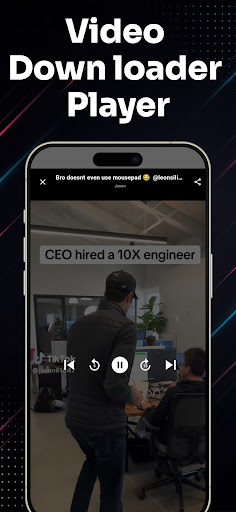
Looking for a fast, free, and reliable video downloader for save videos without watermark in HD quality?
Meet Video Downloader for – the ultimate video saver tool designed to let you download and save your favorite short clips, trending reels, and MP3 music audio directly to your phone gallery with a single tap.
Whether you want to watch videos offline, backup your favorite creator moments, or extract clean audio tracks, this all-in-one video downloader makes it effortless. Experience 100% clean, watermark-free downloads in crisp HD resolution!
Key Features of Video Downloader:
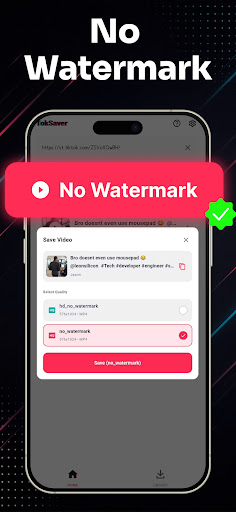
• No Watermark Downloader: Save videos without any logos, stamps, or distracting watermarks.
• High Definition (HD) Quality: Download clips in original 1080p, 720p, and full HD clarity.
• Lightning Fast Speeds: Multi-threaded background downloader saves large video files in seconds.
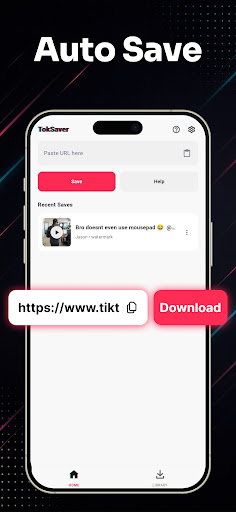
• Copy Link & Auto-Download: Simply copy the video link from TT and download starts automatically.
• Built-in Video Player: Watch your saved media offline anytime with the integrated HD video player.
• Audio & MP3 Extractor: Easily extract background music, sounds, and audio from any video clip.
• Smart Download Manager: Pause, resume, rename, and organize all your saved videos in one place.
• Lightweight & Battery-Friendly: Compact app size, minimal storage usage, and dark mode support.
• Easy Share & Repost: Share saved videos directly to WhatsApp, Instagram, Facebook, and friends.
How to Download Videos (2 Simple Steps):
Method 1: Copy Link (Instant Auto-Detection)
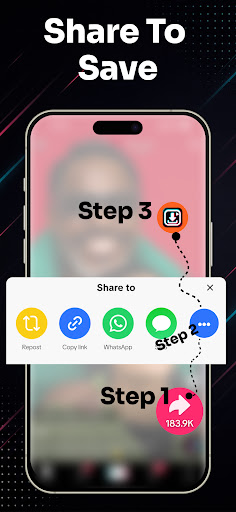
1. Open the video app and tap "Share" on the video you wish to download.
2. Select "Copy Link".
3. Open Video Downloader for TT – the link is automatically pasted and detected!
4. Tap "Download Without Watermark" or "Download MP3 Audio". Your video is saved instantly!
Method 2: Share Link Directly
1. Tap "Share" on any video clip.
2. Choose SnapTik from the Android share menu.
3. Your download starts automatically in the background.
Manage, Play & Share Offline:
All your downloaded files are neatly organized in the built-in media gallery. Enjoy offline playback anytime without internet or mobile data, rename files, or delete old clips to free up storage space.
Disclaimer & Legal Notice:
• Video Downloader for is an independent utility tool for saving videos and is NOT affiliated with, sponsored by, or endorsed by TikTok, ByteDance Ltd., or any of their parent or subsidiary companies.
• We strictly respect the intellectual property and copyright rights of all content creators. Please obtain permission from the content owner before downloading, re-uploading, or reposting any media.
• Any unauthorized downloading, sharing, or re-uploading of copyrighted materials and any infringement of intellectual property rights are the sole responsibility of the user.
Pokaż więcej

1. Pobierz instalator MEmu i zakończ instalację

2. Uruchom MEmu, a następnie otwórz Google Play na pulpicie

3. Wyszukaj SnapTik - Video Downloader w Google Play
Install
4. Pobierz i zainstaluj SnapTik - Video Downloader
5. Po zakończeniu instalacji kliknij ikonę, aby rozpocząć

6. Użyj MEmu, aby doświadczyć SnapTik - Video Downloader na swoim komputerze
MEmu Play to najlepszy emulator Androida, z którego korzysta ponad 100 milionów użytkowników, ciesząc się wyjątkowym doświadczeniem aplikacji na Androida. Technologia wirtualizacji MEmu pozwala na płynne uruchamianie tysięcy aplikacji Androida na komputerze, nawet tych najbardziej wymagających.
Większy ekran z lepszą grafiką; Długi czas, bez ograniczeń baterii lub danych mobilnych.
Pełna obsługa mapowania klawiszy dla precyzyjnego sterowania klawiaturą i myszą lub gamepadem.
Wiele kont gier lub zadań na jednym komputerze jednocześnie z menedżerem wielu instancji.
Use SnapTik - Video Downloader on PC by following steps: