
SnapTik - Video Downloader
Aktualisiert
Aktuelle Version
1.0.26
Angeboten von

Machen Sie sich keine Sorgen mehr über überhöhte Gebühren, wenn Sie SnapTik - Video Downloader auf Ihrem Mobiltelefon verwenden, befreien Sie sich von dem winzigen Bildschirm und genießen Sie die Nutzung der App auf einem viel größeren Display. Von nun an können Sie Ihre App mit Tastatur und Maus im Vollbildmodus nutzen. MEmu bietet Ihnen all die überraschenden Funktionen, die Sie erwartet haben: schnelle Installation und einfache Einrichtung, intuitive Steuerung, keine Einschränkungen mehr durch Batterie, mobile Daten und störende Anrufe. Der brandneue MEmu 9 ist die beste Wahl für die Nutzung von SnapTik - Video Downloader auf Ihrem Computer. Mit unserer Absorption kodiert, ermöglicht der Multi-Instanz-Manager die Eröffnung von 2 oder mehr Konten zur gleichen Zeit. Und das Wichtigste, unsere exklusive Emulations-Engine kann das volle Potenzial Ihres PCs freisetzen und alles reibungslos und angenehm gestalten.
Mehr anzeigen
Genieße SnapTik - Video Downloader auf deinem PC mit MEmu Play in einer fantastischen Version. Dieser leistungsstarke, kostenlose Android-Emulator bietet dir Zugriff auf Tausende von Android-Apps für deinen Desktop. Bleib mit Freunden in Kontakt und arbeite effizienter! Looking for a fast, free, and reliable video downloader for save videos without watermark in HD quality?
Looking for a fast, free, and reliable video downloader for save videos without watermark in HD quality?
Meet Video Downloader for – the ultimate video saver tool designed to let you download and save your favorite short clips, trending reels, and MP3 music audio directly to your phone gallery with a single tap.
Whether you want to watch videos offline, backup your favorite creator moments, or extract clean audio tracks, this all-in-one video downloader makes it effortless. Experience 100% clean, watermark-free downloads in crisp HD resolution!
Key Features of Video Downloader:
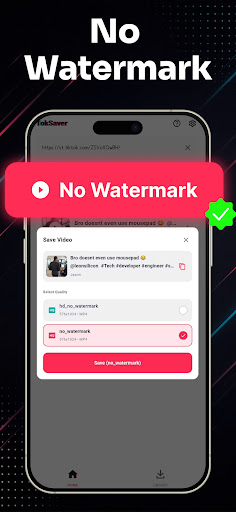
• No Watermark Downloader: Save videos without any logos, stamps, or distracting watermarks.
• High Definition (HD) Quality: Download clips in original 1080p, 720p, and full HD clarity.
• Lightning Fast Speeds: Multi-threaded background downloader saves large video files in seconds.
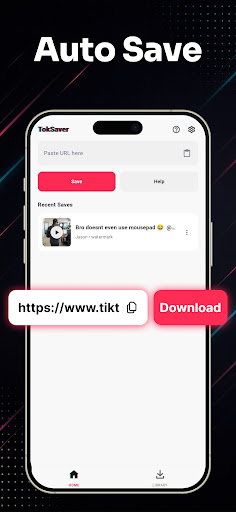
• Copy Link & Auto-Download: Simply copy the video link from TT and download starts automatically.
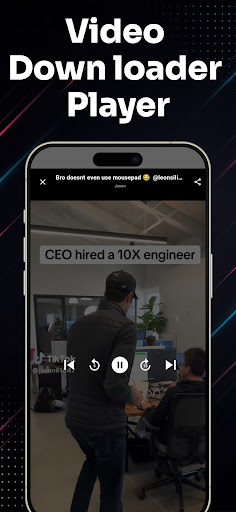
• Built-in Video Player: Watch your saved media offline anytime with the integrated HD video player.
• Audio & MP3 Extractor: Easily extract background music, sounds, and audio from any video clip.
• Smart Download Manager: Pause, resume, rename, and organize all your saved videos in one place.
• Lightweight & Battery-Friendly: Compact app size, minimal storage usage, and dark mode support.
• Easy Share & Repost: Share saved videos directly to WhatsApp, Instagram, Facebook, and friends.
How to Download Videos (2 Simple Steps):
Method 1: Copy Link (Instant Auto-Detection)
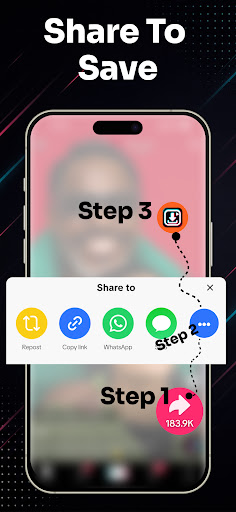
1. Open the video app and tap "Share" on the video you wish to download.
2. Select "Copy Link".
3. Open Video Downloader for TT – the link is automatically pasted and detected!
4. Tap "Download Without Watermark" or "Download MP3 Audio". Your video is saved instantly!
Method 2: Share Link Directly
1. Tap "Share" on any video clip.
2. Choose SnapTik from the Android share menu.
3. Your download starts automatically in the background.
Manage, Play & Share Offline:
All your downloaded files are neatly organized in the built-in media gallery. Enjoy offline playback anytime without internet or mobile data, rename files, or delete old clips to free up storage space.
Disclaimer & Legal Notice:
• Video Downloader for is an independent utility tool for saving videos and is NOT affiliated with, sponsored by, or endorsed by TikTok, ByteDance Ltd., or any of their parent or subsidiary companies.
• We strictly respect the intellectual property and copyright rights of all content creators. Please obtain permission from the content owner before downloading, re-uploading, or reposting any media.
• Any unauthorized downloading, sharing, or re-uploading of copyrighted materials and any infringement of intellectual property rights are the sole responsibility of the user.
Mehr anzeigen

1. Laden das MEmu-Installationsprogramm herunter und beenden die Installation

2. MEmu starten und Google Play auf der Homepage öffnen

3. Suchen SnapTik - Video Downloader in Google Play
Install
4. Herunterladen und Installieren SnapTik - Video Downloader
5. Klicken nach Abschluss der Installation auf das Symbol, um es zu starten

6. Verwenden Sie MEmu, um SnapTik - Video Downloader auf Ihrem PC zu nutzen
MEmu Play ist aktuell der beste kostenlose Android-Emulator und bietet 50 Millionen Nutzern ein überragendes Android-App-Erlebnis. Dank der Virtualisierungstechnologie von MEmu können Sie Tausende von Android-Apps problemlos auf Ihrem Computer nutzen, selbst solche mit hohen Grafikanforderungen.
BGrößeres Bild mit besserer Grafik; Keine unterbrechungen, keine sorgen um Akku
Komplette Tastenbelegung unterstützt mit Maus und Tastatur oder Controller
Mit dem „Multi-Instance-Manager“ können Sie mehrere Spielkonten oder Spiele gleichzeitig auf einem PC ausführen.
Use SnapTik - Video Downloader on PC by following steps: