SnapTik - Video Downloader
Обновлено
Текущая версия
1.0.26
Продавец

Перестаньте беспокоиться о быстром разряде батареи при использовании SnapTik - Video Downloader на вашем телефоне. Освободитесь от крошечного экрана и наслаждайтесь приложением на гораздо большем экране. Теперь вы можете работать с приложением в полноэкранном режиме с удобством клавиатуры и мыши. MEmu предлагает вам все ожидаемые удивительные функции: быструю установку и простую настройку, интуитивно понятное управление и больше никаких забот о времени автономной работы, мобильном трафике или неожиданных звонках. Совершенно новый MEmu 9 — идеальный выбор для использования SnapTik - Video Downloader на вашем компьютере. С помощью менеджера нескольких экземпляров MEmu вы можете одновременно использовать два или более аккаунтов. И самое главное, наш эксклюзивный движок эмуляции раскрывает весь потенциал вашего ПК, обеспечивая плавную и приятную работу.
Показать больше
Наслаждайтесь превосходным опытом использования SnapTik - Video Downloader на ПК с MEmu Play. Это мощный бесплатный эмулятор Android, который предлагает тысячи приложений для настольных компьютеров. Наслаждайтесь общением с друзьями и совершенствуйте свою работу ещё эффективнее! Looking for a fast, free, and reliable video downloader for save videos without watermark in HD quality?
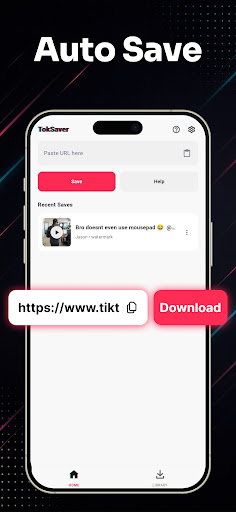
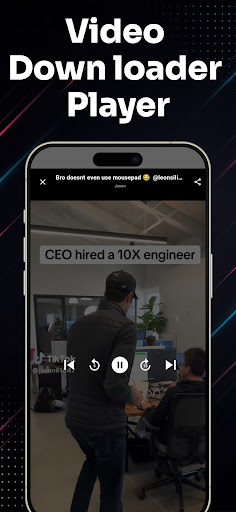
Looking for a fast, free, and reliable video downloader for save videos without watermark in HD quality?
Meet Video Downloader for – the ultimate video saver tool designed to let you download and save your favorite short clips, trending reels, and MP3 music audio directly to your phone gallery with a single tap.
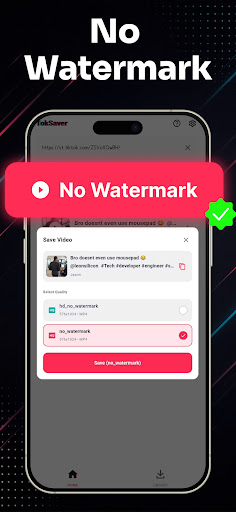
Whether you want to watch videos offline, backup your favorite creator moments, or extract clean audio tracks, this all-in-one video downloader makes it effortless. Experience 100% clean, watermark-free downloads in crisp HD resolution!
Key Features of Video Downloader:
• No Watermark Downloader: Save videos without any logos, stamps, or distracting watermarks.
• High Definition (HD) Quality: Download clips in original 1080p, 720p, and full HD clarity.
• Lightning Fast Speeds: Multi-threaded background downloader saves large video files in seconds.
• Copy Link & Auto-Download: Simply copy the video link from TT and download starts automatically.
• Built-in Video Player: Watch your saved media offline anytime with the integrated HD video player.
• Audio & MP3 Extractor: Easily extract background music, sounds, and audio from any video clip.
• Smart Download Manager: Pause, resume, rename, and organize all your saved videos in one place.
• Lightweight & Battery-Friendly: Compact app size, minimal storage usage, and dark mode support.
• Easy Share & Repost: Share saved videos directly to WhatsApp, Instagram, Facebook, and friends.
How to Download Videos (2 Simple Steps):
Method 1: Copy Link (Instant Auto-Detection)
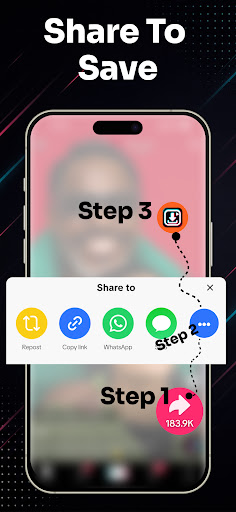
1. Open the video app and tap "Share" on the video you wish to download.
2. Select "Copy Link".
3. Open Video Downloader for TT – the link is automatically pasted and detected!
4. Tap "Download Without Watermark" or "Download MP3 Audio". Your video is saved instantly!
Method 2: Share Link Directly
1. Tap "Share" on any video clip.
2. Choose SnapTik from the Android share menu.
3. Your download starts automatically in the background.
Manage, Play & Share Offline:
All your downloaded files are neatly organized in the built-in media gallery. Enjoy offline playback anytime without internet or mobile data, rename files, or delete old clips to free up storage space.
Disclaimer & Legal Notice:
• Video Downloader for is an independent utility tool for saving videos and is NOT affiliated with, sponsored by, or endorsed by TikTok, ByteDance Ltd., or any of their parent or subsidiary companies.
• We strictly respect the intellectual property and copyright rights of all content creators. Please obtain permission from the content owner before downloading, re-uploading, or reposting any media.
• Any unauthorized downloading, sharing, or re-uploading of copyrighted materials and any infringement of intellectual property rights are the sole responsibility of the user.
Показать больше

1. Скачать инсталлятор MEmu и завершайте установку

2. Запускайте MEmu, затем откройте Google Play на главной странице

3. Ищите SnapTik - Video Downloader в Google Play
Install
4. Скачайте и установите SnapTik - Video Downloader
5. При завершении установки, нажмите на значок для старта

6. Наслаждайтесь SnapTik - Video Downloader на своем компьютере с помощью MEmu.
MEmu Play — лучший бесплатный эмулятор Android, превосходный опыт работы с которым оценили 50 миллионов пользователей. Технология виртуализации MEmu позволяет без проблем запускать тысячи Android-приложений на вашем компьютере, даже самые требовательные.
Большой экран с лучшей графикой; Большая продолжительность, без ограничения батареи или мобильных данных.
Полная поддержка установки клавиш для точного управления клавиатурой и мышью или геймпадом.
Несколько игровых учетных записей или задач на одном компьютере одновременно с менеджером нескольких экземпляров.
Use SnapTik - Video Downloader on PC by following steps: