SnapTik - Video Downloader
อัปเดตเมื่อ
เวอร์ชันปัจจุบัน
1.0.26
ให้บริการโดย

เมื่อใช้ SnapTik - Video Downloader บนโทรศัพท์ของคุณไม่ต้องกังวลกับการชาร์จไฟมากเกินไปปลดปล่อยตัวคุณเองจากหน้าจอขนาดเล็กและสนุกกับการใช้แอพนี้บนหน้าจอขนาดใหญ่ จากนี้ไปรับประสบการณ์เต็มหน้าจอของแอปพลิเคชันของคุณด้วยคีย์บอร์ดและเมาส์ MEmu มีคุณสมบัติที่น่าแปลกใจที่คุณคาดหวัง: การติดตั้งที่รวดเร็วและการตั้งค่าที่ง่ายควบคุมได้ง่ายไม่ จำกัด แบตเตอรี่ข้อมูลมือถือและการโทรที่รบกวน MEmu 9 ใหม่ล่าสุดเป็นตัวเลือกที่ดีที่สุดสำหรับการใช้ Meitu – โปรแกรมแก้ไขภาพแนวธรรมชาติ บนคอมพิวเตอร์ของคุณ ด้วยรหัสการดูดซึมของเราผู้จัดการหลายอินสแตนซ์ทำให้สามารถเปิดบัญชี 2 บัญชีขึ้นไปในเวลาเดียวกันได้ และที่สำคัญที่สุดเอ็นจิ้นจำลองพิเศษของเราสามารถปลดปล่อยศักยภาพของPCของคุณและทำให้ทุกอย่างราบรื่นและสนุกสนาน
แสดงเพิ่มเติม
สัมผัสประสบการณ์สุดยอดการใช้งาน SnapTik - Video Downloader บนพีซีด้วย MEmu Play นี่คือโปรแกรมจำลอง Android ฟรีที่ทรงพลัง ให้คุณใช้งานแอป Android นับพันบนเดสก์ท็อป สนุกกับการเชื่อมต่อกับเพื่อนๆ และขัดเกลาผลงานของคุณอย่างมีประสิทธิภาพยิ่งขึ้น! Looking for a fast, free, and reliable video downloader for save videos without watermark in HD quality?
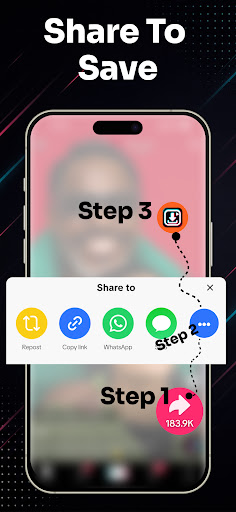
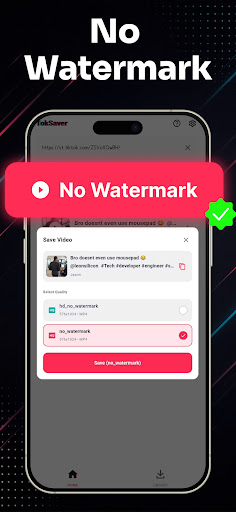
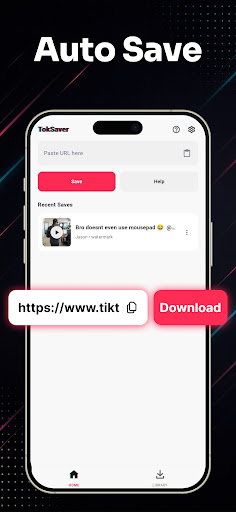
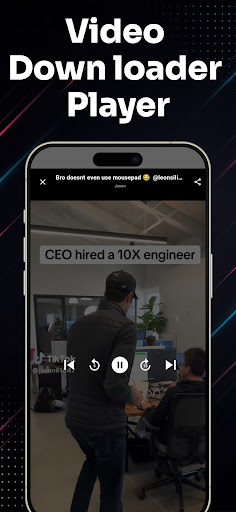
Looking for a fast, free, and reliable video downloader for save videos without watermark in HD quality?
Meet Video Downloader for – the ultimate video saver tool designed to let you download and save your favorite short clips, trending reels, and MP3 music audio directly to your phone gallery with a single tap.
Whether you want to watch videos offline, backup your favorite creator moments, or extract clean audio tracks, this all-in-one video downloader makes it effortless. Experience 100% clean, watermark-free downloads in crisp HD resolution!
Key Features of Video Downloader:
• No Watermark Downloader: Save videos without any logos, stamps, or distracting watermarks.
• High Definition (HD) Quality: Download clips in original 1080p, 720p, and full HD clarity.
• Lightning Fast Speeds: Multi-threaded background downloader saves large video files in seconds.
• Copy Link & Auto-Download: Simply copy the video link from TT and download starts automatically.
• Built-in Video Player: Watch your saved media offline anytime with the integrated HD video player.
• Audio & MP3 Extractor: Easily extract background music, sounds, and audio from any video clip.
• Smart Download Manager: Pause, resume, rename, and organize all your saved videos in one place.
• Lightweight & Battery-Friendly: Compact app size, minimal storage usage, and dark mode support.
• Easy Share & Repost: Share saved videos directly to WhatsApp, Instagram, Facebook, and friends.
How to Download Videos (2 Simple Steps):
Method 1: Copy Link (Instant Auto-Detection)
1. Open the video app and tap "Share" on the video you wish to download.
2. Select "Copy Link".
3. Open Video Downloader for TT – the link is automatically pasted and detected!
4. Tap "Download Without Watermark" or "Download MP3 Audio". Your video is saved instantly!
Method 2: Share Link Directly
1. Tap "Share" on any video clip.
2. Choose SnapTik from the Android share menu.
3. Your download starts automatically in the background.
Manage, Play & Share Offline:
All your downloaded files are neatly organized in the built-in media gallery. Enjoy offline playback anytime without internet or mobile data, rename files, or delete old clips to free up storage space.
Disclaimer & Legal Notice:
• Video Downloader for is an independent utility tool for saving videos and is NOT affiliated with, sponsored by, or endorsed by TikTok, ByteDance Ltd., or any of their parent or subsidiary companies.
• We strictly respect the intellectual property and copyright rights of all content creators. Please obtain permission from the content owner before downloading, re-uploading, or reposting any media.
• Any unauthorized downloading, sharing, or re-uploading of copyrighted materials and any infringement of intellectual property rights are the sole responsibility of the user.
แสดงเพิ่มเติม

1. ดาวน์โหลดตัวติดตั้ง MEmu และสิ้นสุดการติดตั้ง

2. เริ่ม MEmu จากนั้นเปิด Google Play บนหน้าแรก

3. ค้นหา SnapTik - Video Downloader ใน Google Play
Install
4. ดาวน์โหลดและติดตั้ง SnapTik - Video Downloader
5. เมื่อติดตั้งเสร็จให้คลิกที่ไอคอนเพื่อเริ่มใช้งาน

6. ใช้ MEmu เพื่อสัมผัสประสบการณ์ SnapTik - Video Downloader บนคอมพิวเตอร์ของคุณ
MEmu Play คือโปรแกรมจำลอง Android ที่ดีที่สุด มีผู้ใช้มากกว่า 50 ล้านคน มอบประสบการณ์การใช้งานแอป Android ขั้นสุดยอดให้กับคุณ เทคโนโลยีจำลองเสมือนของ MEmu ช่วยให้คุณรันแอป Android หลายพันแอปบนคอมพิวเตอร์ได้อย่างราบรื่น แม้แอปที่กินทรัพยากรเครื่องสูงที่สุด
จอใหญ่และกราฟฟิกสวยกว่า; เล่นได้นาน, ไม่ต้องใช้แบตเตอรี่โทรศัพท์หรือเน็ตโทรศัพท์.
ระบบปรับแต่งปุ่มคีย์บอร์ดและเม้าส์ตามที่คุณเลือก
เล่นมากกว่าหนึ่งเกมบน PC ในเวลาเดียวกันด้วยระบบหลายจอหรือ Multi-Instance manager.
Use SnapTik - Video Downloader on PC by following steps: