Bloodstained: The Scarlet Engagement
Zaktualizowano
Aktualna wersja
Sprzedawca

Przy całej swojej pasji do grania w Bloodstained: The Scarlet Engagement, twoje ręce nie powinny być ograniczone na małym ekranie telefonu. Graj jak zawodowiec i uzyskaj pełną kontrolę nad grą za pomocą klawiatury i myszy. MEmu oferuje ci wszystko, czego oczekujesz. Pobierz i graj Bloodstained: The Scarlet Engagement na PC. Graj tak długo, jak chcesz, bez ograniczeń baterii, danych komórkowych i niepokojących połączeń. Zupełnie nowy MEmu 9 to najlepszy wybór do grania w Bloodstained: The Scarlet Engagement na PC. Przygotowany dzięki naszej wiedzy, znakomity, wstępnie ustawiony system mapowania klawiszy sprawia, że Bloodstained: The Scarlet Engagement jest prawdziwą grą na PC. Zakodowany naszą absorpcją, menedżer wielu instancji umożliwia granie na 2 lub więcej kontach na tym samym urządzeniu. A co najważniejsze, nasz emulator może uwolnić pełny potencjał twojego komputera, sprawić, że wszystko będzie płynne. Dbamy nie tylko o to, jak grasz, ale także o cały proces czerpania radości z grania.
Pokaż więcej
Ciesz się wspaniałym doświadczeniem podczas grania w Bloodstained: The Scarlet Engagement na komputerze z aplikacją MEMU App Player. Jest to potężny darmowy emulator Androida pozwalający grać w tysiące gier na Androida. Unravel the dark history of the Bloodstained universe and explore a hauntingly immersive 16th-century England steeped in a 2.
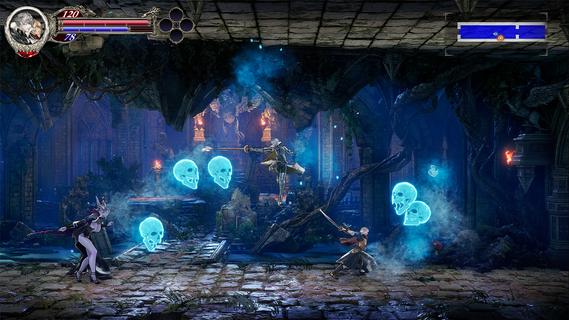
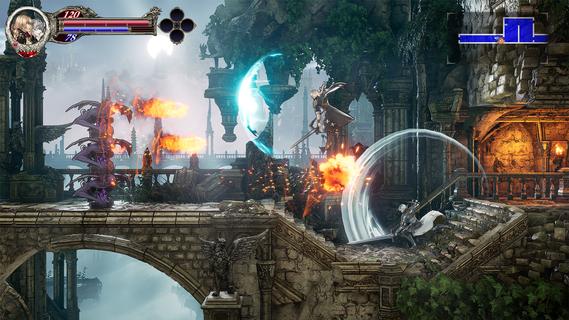
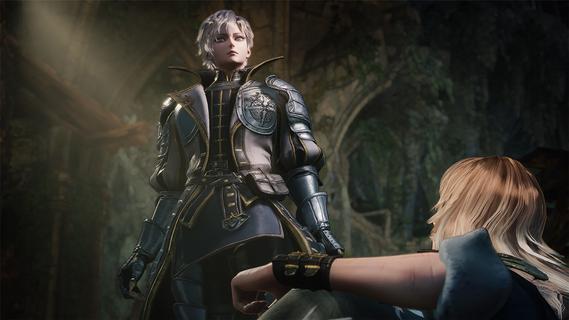
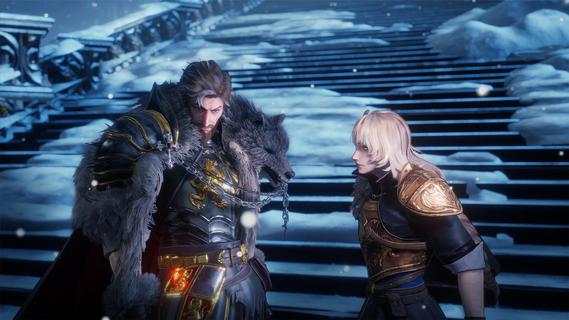
Unravel the dark history of the Bloodstained universe and explore a hauntingly immersive 16th-century England steeped in a 2.5D gothic atmosphere, enthralling players in strategic battles, crafting, and exploration across a sprawling, cursed land.The story unfolds as a mysterious ethereal castle, under the control of "Demon Lord Elias," casts a shadow over the land, terrorizing citizens with its demonic forces. Time and again, the Kingdom and the Church have deployed strike forces— each effort ending in failure. As another opportunity arises, two heroes are brought together by fate. Leonard Brandon, a young fighter with the Church's Black Wolves clan and Alexander Kyteler, a knight of the Kingdom's White Stags and lone survivor of an initial, unsuccessful expedition.Join Leo and Alex as they rise together to defeat Demon Lord Elias’s reign of terror and shatter the chains of a kingdom tormented by evil forces.Dive Deeper into the Bloodstained WorldExperience an early chapter of the Bloodstained universe filled with a fresh cast of allies and foes. New players can jump in without prior knowledge, while long-time fans will uncover deep connections.New Buddy SystemThis journey will not be carried out alone! Play simultaneously as both Leo and Alex to defeat enemies, break through traps, and push toward victory.Navigate an Expansive WorldTraverse Bloodstained’s largest map yet. Experience dawn, day, dusk, and night, including shifting light and darkness as time passes. Transforming not only the gameplay, but also the way you interact with the world.Experience The Epiphany Combat SystemDiscover new moves as you battle. Unleash unique attacks and uncover powerful abilities that allow players to master combat in innovative ways.Craft, Cook, and CustomizeExperience personalization with a wide range of visually impactful armor changes, along with expanded character appearance options, crafting, and cooking side quests to strengthen your player.
Pokaż więcej

1. Pobierz instalator MEmu i zakończ instalację

2. Uruchom MEmu, a następnie otwórz Google Play na pulpicie

3. Wyszukaj Bloodstained: The Scarlet Engagement w Google Play
Install
4. Pobierz i zainstaluj Bloodstained: The Scarlet Engagement
5. Po zakończeniu instalacji kliknij ikonę, aby rozpocząć

6. Ciesz się grą Bloodstained: The Scarlet Engagement na PC z MEmu
MEmu Play to najlepszy emulator Androida, a 100 milionów ludzi już korzysta z jego i dosta doskonałe wrażenia z gier na Androida. Technologia wirtualizacji MEmu umożliwia płynne granie w tysiące gier Androida na komputerze, nawet tych najbardziej wymagających grafiki.
Większy ekran z lepszą grafiką; Długi czas, bez ograniczeń baterii lub danych mobilnych.
Pełna obsługa mapowania klawiszy dla precyzyjnego sterowania klawiaturą i myszą lub gamepadem.
Wiele kont gier lub zadań na jednym komputerze jednocześnie z menedżerem wielu instancji.
Play Bloodstained: The Scarlet Engagement on PC by following steps: