Bloodstained: The Scarlet Engagement
Aktualisiert
Aktuelle Version
Angeboten von

Bei all Ihrer Leidenschaft für das Spielen von Bloodstained: The Scarlet Engagement sollten Ihre Hände nicht auf einen winzigen Bildschirm Ihres Telefons beschränkt sein. Spielen Sie wie ein Profi und übernehmen Sie die volle Kontrolle über Ihr Spiel mit Tastatur und Maus. MEmu bietet Ihnen all die Dinge, die Sie erwarten. Laden Sie Bloodstained: The Scarlet Engagement herunter und spielen Sie es auf dem PC. Spielen Sie so lange, wie Sie wollen, ohne Grenzwerte für Akku, mobile Daten und störende Anrufe. Das brandneue MEmu 9 ist die beste Wahl, um Bloodstained: The Scarlet Engagement auf dem PC zu spielen. Das exquisite voreingestellte Tastaturbelegungssystem, das mit unserem Fachwissen vorbereitet wurde, macht Bloodstained: The Scarlet Engagement zu einem echten PC-Spiel. Der MEmu Multi-Instanz-Manager ermöglicht das Spielen von 2 oder mehr Konten auf demselben Gerät. Und das Wichtigste: Unsere exklusive Emulations-Engine kann das volle Potenzial Ihres PCs freisetzen und für reibungslose Abläufe sorgen.
Mehr anzeigen
Laden Sie Play Bloodstained: The Scarlet Engagement auf dem PC mit MEmu Android Emulator. Viel Spaß beim Spielen auf großmundieren. Unravel the dark history of the Bloodstained universe and explore a hauntingly immersive 16th-century England steeped in a 2.
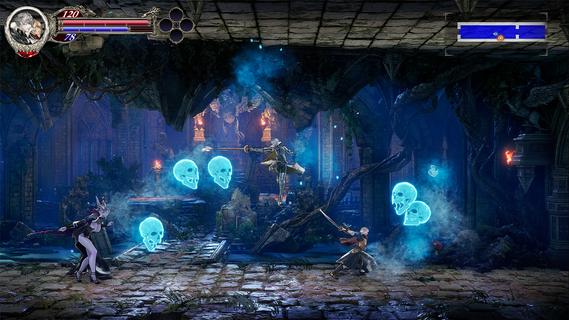
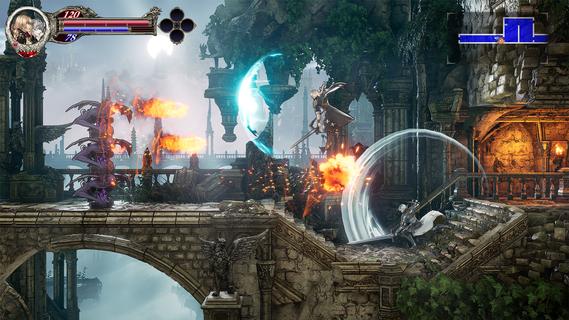
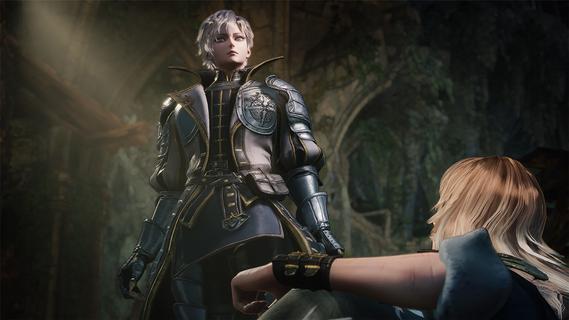

Unravel the dark history of the Bloodstained universe and explore a hauntingly immersive 16th-century England steeped in a 2.5D gothic atmosphere, enthralling players in strategic battles, crafting, and exploration across a sprawling, cursed land.The story unfolds as a mysterious ethereal castle, under the control of "Demon Lord Elias," casts a shadow over the land, terrorizing citizens with its demonic forces. Time and again, the Kingdom and the Church have deployed strike forcesâ each effort ending in failure. As another opportunity arises, two heroes are brought together by fate. Leonard Brandon, a young fighter with the Church's Black Wolves clan and Alexander Kyteler, a knight of the Kingdom's White Stags and lone survivor of an initial, unsuccessful expedition.Join Leo and Alex as they rise together to defeat Demon Lord Eliasâs reign of terror and shatter the chains of a kingdom tormented by evil forces.Dive Deeper into the Bloodstained WorldExperience an early chapter of the Bloodstained universe filled with a fresh cast of allies and foes. New players can jump in without prior knowledge, while long-time fans will uncover deep connections.New Buddy SystemThis journey will not be carried out alone! Play simultaneously as both Leo and Alex to defeat enemies, break through traps, and push toward victory.Navigate an Expansive WorldTraverse Bloodstainedâs largest map yet. Experience dawn, day, dusk, and night, including shifting light and darkness as time passes. Transforming not only the gameplay, but also the way you interact with the world.Experience The Epiphany Combat SystemDiscover new moves as you battle. Unleash unique attacks and uncover powerful abilities that allow players to master combat in innovative ways.Craft, Cook, and CustomizeExperience personalization with a wide range of visually impactful armor changes, along with expanded character appearance options, crafting, and cooking side quests to strengthen your player.
Mehr anzeigen

1. Laden das MEmu-Installationsprogramm herunter und beenden die Installation

2. MEmu starten und Google Play auf der Homepage öffnen

3. Suchen Bloodstained: The Scarlet Engagement in Google Play
Install
4. Herunterladen und Installieren Bloodstained: The Scarlet Engagement
5. Klicken nach Abschluss der Installation auf das Symbol, um es zu starten

6. Viel Spaß beim Spielen von Bloodstained: The Scarlet Engagement auf dem PC mit MEmu
MEmu App Player ist der beste kostenlose Android-Emulator und 50 Millionen Menschen genießen bereits seine hervorragende Android-Gaming-Erfahrung. Mit der MEmu-Virtualisierungstechnologie können Sie Tausende von Android-Spielen problemlos auf Ihrem PC spielen, selbst bei grafikintensiven Spielen.
BGrößeres Bild mit besserer Grafik; Keine unterbrechungen, keine sorgen um Akku
Komplette Tastenbelegung unterstützt mit Maus und Tastatur oder Controller
Mit dem „Multi-Instance-Manager“ können Sie mehrere Spielkonten oder Spiele gleichzeitig auf einem PC ausführen.
Play Bloodstained: The Scarlet Engagement on PC by following steps: