Uber Eats: Food Delivery
Zaktualizowano
Aktualna wersja
Sprzedawca

Przestań martwić się nadmiernymi opłatami podczas korzystania z Uber Eats: Food Delivery na telefonie komórkowym, uwolnij się od małego ekranu i ciesz się korzystaniem z aplikacji na znacznie większym wyświetlaczu. Od teraz korzystaj z aplikacji na pełnym ekranie za pomocą klawiatury i myszy. MEmu oferuje wszystkie zaskakujące funkcje, których się spodziewałeś: szybką instalację i łatwą konfigurację, intuicyjne sterowanie, koniec z ograniczeniami baterii, danych mobilnych i niepokojących połączeń. Zupełnie nowy MEmu 9 to najlepszy wybór do używania Uber Eats: Food Delivery na twoim komputerze. Zakodowany przez naszą absorpcję, menedżer wielu instancji umożliwia otwarcie 2 lub więcej kont w tym samym czasie. A co najważniejsze, nasz ekskluzywny emulator może uwolnić pełny potencjał twojego komputera, sprawić, że wszystko będzie płynne i przyjemne.
Pokaż więcej
Ciesz się wspaniałym doświadczeniem podczas grania w Uber Eats: Food Delivery na komputerze z aplikacją MEMU App Player. Jest to potężny darmowy emulator Androida pozwalający grać w tysiące gier na Androida. Get food delivery to your doorstep from thousands of amazing local and national restaurants.
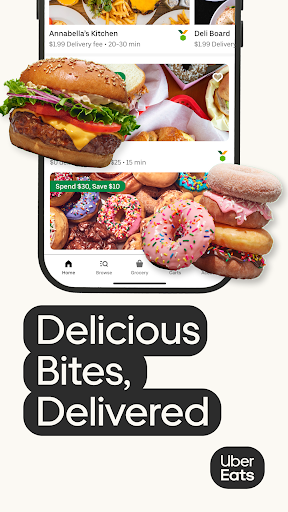
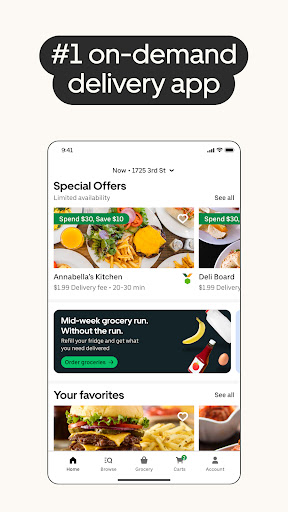
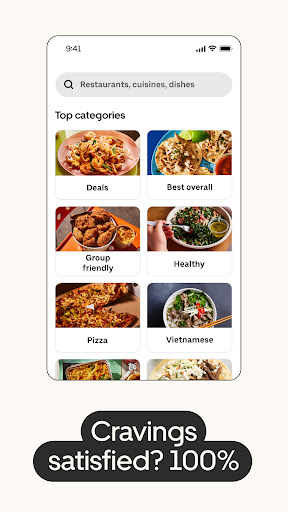
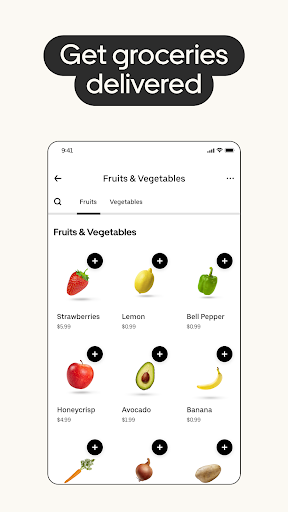
Get food delivery to your doorstep from thousands of amazing local and national restaurants. Find the meal you crave and order food from restaurants easily with the Uber Eats app. Track your order in real-time.
FIND YOUR FAVORITE FOOD & RESTAURANTS
Order food from nearby restaurants and search by cuisine, restaurant name, dish, and meal.
Food delivery options for you to order and enjoy including pizza, burritos, burgers, sushi, donuts, and Chinese takeout.
Prefer pickup? Skip the line and reservations and choose to pick up your order instead. Choose your favorite delivery options with the Uber Eats app now.
SUBSCRIBE TO UBER ONE
For $9.99 per month, Uber One subscribers enjoy $0 Delivery Fee and up to 10% off orders over $15 at participating non-grocery stores (and 5% off orders over $35 at participating grocery stores) available on Uber Eats. Members are also eligible for rewards, perks, coupons, and offers. View full Uber One Terms & Conditions in app.
ORDER ALMOST ANYTHING, ANYTIME
Order household needs from your favorite drug stores, supermarkets, and pet shops. Baby food or diapers, pharmacy needs, beauty products and cosmetics. Grocery staples like bread and milk, bananas and produce, flowers and plants, packaged foods or frozen treats.
SIMPLE DELIVERY ORDERING
Pick your food order from any menu and add it to your cart with a few taps. That’s it.
Uber Eats makes it easy to order food delivery online or through the app and have it delivered by restaurants and delivery people near you.
Or, schedule your order in advance for a delivery person to pick it up later. Your choice!
ORDER FOOD AHEAD WITH PICKUP
Now you can also order food ahead for Pickup instead of just ordering delivery. Select Pickup, add food items to your cart, and skip the lines to the restaurant to get your food.
REAL-TIME ORDER TRACKING
Track your food delivery order on a map as it heads your way.
See the estimated arrival time at your address.
Get notified when your order arrives.
FIND SOME OF YOUR FAVORITE NATIONAL RESTAURANTS
Some of our food delivery partners include: Pizza Hut, Little Caesars, Buffalo Wild Wings, Papa Johns, Shake Shack, Domino’s Pizza, Nando’s, Burger King, CAVA, A&W, Chick-fil-A, Chipotle, Dunkin', IHOP, KFC, McDonald's, Panda Express, Panera, Popeyes, Shake Shack, Sonic, Starbucks, Subway, Sweetgreen, Taco Bell, Tim Hortons, Wendy's, Five Guys, Jersey Mikes, White Castle, Jack in the Box, Outback Steakhouse, Red Lobster.
FIND PHARMACIES, GROCERY STORES, AND MORE
Order from grocers such as Albertsons and SEG. Other delivery partners in the pharmacy, convenience, and retail space include CVS, Walgreens, 7-Eleven, Wawa, BevMo!, and Gopuff. Order from stores such as Walmart, Walgreens, CVS and Safeway. Other delivery partners include Petco, Drizly, and Favor.
ABOUT UBER EATS
Uber Eats is the way to order the food you love through an easy delivery experience. Uber Eats is available in hundreds of cities around the world. Enter your delivery address to explore restaurant and grocery delivery options near you.
AVAILABLE INTERNATIONALLY
Join the thousands of others in your city who use the Uber Eats app to order from their favorites restaurants and schedule delivery
Uber Eats is currently available in cities and metro areas including Adelaide, Amsterdam, Atlanta, Auckland, Austin, Baltimore, Brussels, Cape Town, Chicago, Dallas, Denver, Johannesburg, Glasgow, London, Los Angeles, Madrid, Melbourne, Mexico City, Miami, Milan, Nashville, New Orleans, New York, Ottawa, Paris, Philadelphia, Rio de Janeiro, San Diego, San Francisco, Seattle, Stockholm, Sydney, Taipei, Tokyo, Toronto, Warsaw, and Washington DC. Uber Eats helps you find food delivery around the world. See full list of available countries in the app.
Pokaż więcej

1. Pobierz instalator MEmu i zakończ instalację

2. Uruchom MEmu, a następnie otwórz Google Play na pulpicie

3. Wyszukaj Uber Eats: Food Delivery w Google Play
Install
4. Pobierz i zainstaluj Uber Eats: Food Delivery
5. Po zakończeniu instalacji kliknij ikonę, aby rozpocząć

6. Użyj MEmu, aby doświadczyć Uber Eats: Food Delivery na swoim komputerze
MEmu Play to najlepszy emulator Androida, z którego korzysta ponad 100 milionów użytkowników, ciesząc się wyjątkowym doświadczeniem aplikacji na Androida. Technologia wirtualizacji MEmu pozwala na płynne uruchamianie tysięcy aplikacji Androida na komputerze, nawet tych najbardziej wymagających.
Większy ekran z lepszą grafiką; Długi czas, bez ograniczeń baterii lub danych mobilnych.
Pełna obsługa mapowania klawiszy dla precyzyjnego sterowania klawiaturą i myszą lub gamepadem.
Wiele kont gier lub zadań na jednym komputerze jednocześnie z menedżerem wielu instancji.
Use Uber Eats: Food Delivery on PC by following steps: