Uber Eats: Food Delivery
Aktualisiert
Aktuelle Version
Angeboten von

Machen Sie sich keine Sorgen mehr über überhöhte Gebühren, wenn Sie Uber Eats: Food Delivery auf Ihrem Mobiltelefon verwenden, befreien Sie sich von dem winzigen Bildschirm und genießen Sie die Nutzung der App auf einem viel größeren Display. Von nun an können Sie Ihre App mit Tastatur und Maus im Vollbildmodus nutzen. MEmu bietet Ihnen all die überraschenden Funktionen, die Sie erwartet haben: schnelle Installation und einfache Einrichtung, intuitive Steuerung, keine Einschränkungen mehr durch Batterie, mobile Daten und störende Anrufe. Der brandneue MEmu 9 ist die beste Wahl für die Nutzung von Uber Eats: Food Delivery auf Ihrem Computer. Mit unserer Absorption kodiert, ermöglicht der Multi-Instanz-Manager die Eröffnung von 2 oder mehr Konten zur gleichen Zeit. Und das Wichtigste, unsere exklusive Emulations-Engine kann das volle Potenzial Ihres PCs freisetzen und alles reibungslos und angenehm gestalten.
Mehr anzeigen
Laden Sie Play Uber Eats: Food Delivery auf dem PC mit MEmu Android Emulator. Viel Spaß beim Spielen auf großmundieren. Get food delivery to your doorstep from thousands of amazing local and national restaurants.
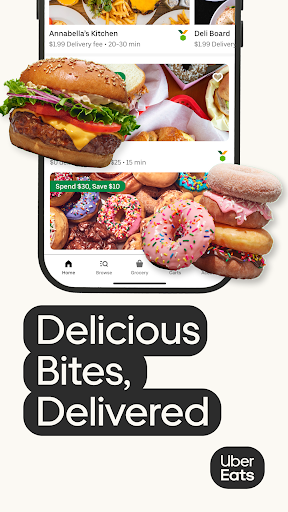
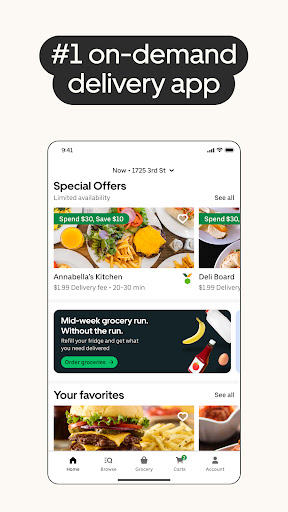
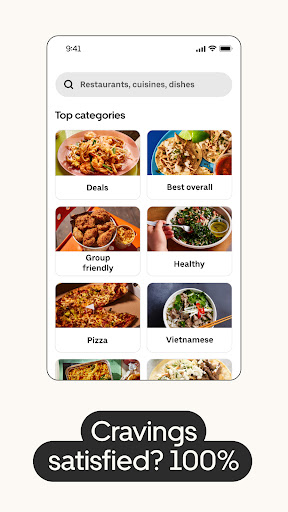
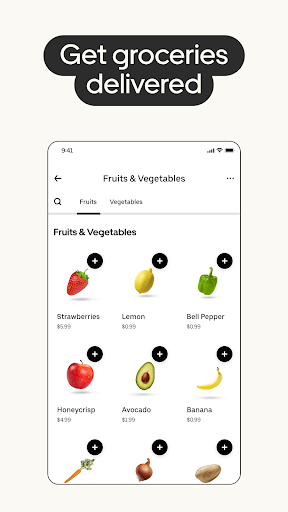
Get food delivery to your doorstep from thousands of amazing local and national restaurants. Find the meal you crave and order food from restaurants easily with the Uber Eats app. Track your order in real-time.
FIND YOUR FAVORITE FOOD & RESTAURANTS
Order food from nearby restaurants and search by cuisine, restaurant name, dish, and meal.
Food delivery options for you to order and enjoy including pizza, burritos, burgers, sushi, donuts, and Chinese takeout.
Prefer pickup? Skip the line and reservations and choose to pick up your order instead. Choose your favorite delivery options with the Uber Eats app now.
SUBSCRIBE TO UBER ONE
For $9.99 per month, Uber One subscribers enjoy $0 Delivery Fee and up to 10% off orders over $15 at participating non-grocery stores (and 5% off orders over $35 at participating grocery stores) available on Uber Eats. Members are also eligible for rewards, perks, coupons, and offers. View full Uber One Terms & Conditions in app.
ORDER ALMOST ANYTHING, ANYTIME
Order household needs from your favorite drug stores, supermarkets, and pet shops. Baby food or diapers, pharmacy needs, beauty products and cosmetics. Grocery staples like bread and milk, bananas and produce, flowers and plants, packaged foods or frozen treats.
SIMPLE DELIVERY ORDERING
Pick your food order from any menu and add it to your cart with a few taps. That’s it.
Uber Eats makes it easy to order food delivery online or through the app and have it delivered by restaurants and delivery people near you.
Or, schedule your order in advance for a delivery person to pick it up later. Your choice!
ORDER FOOD AHEAD WITH PICKUP
Now you can also order food ahead for Pickup instead of just ordering delivery. Select Pickup, add food items to your cart, and skip the lines to the restaurant to get your food.
REAL-TIME ORDER TRACKING
Track your food delivery order on a map as it heads your way.
See the estimated arrival time at your address.
Get notified when your order arrives.
FIND SOME OF YOUR FAVORITE NATIONAL RESTAURANTS
Some of our food delivery partners include: Pizza Hut, Little Caesars, Buffalo Wild Wings, Papa Johns, Shake Shack, Domino’s Pizza, Nando’s, Burger King, CAVA, A&W, Chick-fil-A, Chipotle, Dunkin', IHOP, KFC, McDonald's, Panda Express, Panera, Popeyes, Shake Shack, Sonic, Starbucks, Subway, Sweetgreen, Taco Bell, Tim Hortons, Wendy's, Five Guys, Jersey Mikes, White Castle, Jack in the Box, Outback Steakhouse, Red Lobster.
FIND PHARMACIES, GROCERY STORES, AND MORE
Order from grocers such as Albertsons and SEG. Other delivery partners in the pharmacy, convenience, and retail space include CVS, Walgreens, 7-Eleven, Wawa, BevMo!, and Gopuff. Order from stores such as Walmart, Walgreens, CVS and Safeway. Other delivery partners include Petco, Drizly, and Favor.
ABOUT UBER EATS
Uber Eats is the way to order the food you love through an easy delivery experience. Uber Eats is available in hundreds of cities around the world. Enter your delivery address to explore restaurant and grocery delivery options near you.
AVAILABLE INTERNATIONALLY
Join the thousands of others in your city who use the Uber Eats app to order from their favorites restaurants and schedule delivery
Uber Eats is currently available in cities and metro areas including Adelaide, Amsterdam, Atlanta, Auckland, Austin, Baltimore, Brussels, Cape Town, Chicago, Dallas, Denver, Johannesburg, Glasgow, London, Los Angeles, Madrid, Melbourne, Mexico City, Miami, Milan, Nashville, New Orleans, New York, Ottawa, Paris, Philadelphia, Rio de Janeiro, San Diego, San Francisco, Seattle, Stockholm, Sydney, Taipei, Tokyo, Toronto, Warsaw, and Washington DC. Uber Eats helps you find food delivery around the world. See full list of available countries in the app.
Mehr anzeigen

1. Laden das MEmu-Installationsprogramm herunter und beenden die Installation

2. MEmu starten und Google Play auf der Homepage öffnen

3. Suchen Uber Eats: Food Delivery in Google Play
Install
4. Herunterladen und Installieren Uber Eats: Food Delivery
5. Klicken nach Abschluss der Installation auf das Symbol, um es zu starten

6. Verwenden Sie MEmu, um Uber Eats: Food Delivery auf Ihrem PC zu nutzen
MEmu Play ist aktuell der beste kostenlose Android-Emulator und bietet 50 Millionen Nutzern ein überragendes Android-App-Erlebnis. Dank der Virtualisierungstechnologie von MEmu können Sie Tausende von Android-Apps problemlos auf Ihrem Computer nutzen, selbst solche mit hohen Grafikanforderungen.
BGrößeres Bild mit besserer Grafik; Keine unterbrechungen, keine sorgen um Akku
Komplette Tastenbelegung unterstützt mit Maus und Tastatur oder Controller
Mit dem „Multi-Instance-Manager“ können Sie mehrere Spielkonten oder Spiele gleichzeitig auf einem PC ausführen.
Use Uber Eats: Food Delivery on PC by following steps: