Biped 2
อัปเดตเมื่อ
เวอร์ชันปัจจุบัน
ให้บริการโดย

เวลาคุณเล่น Biped 2, คุณอาจรู้สึกว่ามือคุณอาจบังจอแล้วทำให้ไม่ได้เล่นแบบเต็มที่. เล่นแบบไร้ขีดจำกัดด้วยเม้าส์และคีย์บอร์ด. MEmu มีตัวเลือกหลายอย่างให้คุณใช้งานเกมที่คุณเล่นแบบที่คุณต้องการ. ดาวน์โหลดและเล่น Biped 2 บน PC. เล่นนานแค่ไหนก็ได้, ไม่ต้องชาร์จแบตเตอรี่, หรือเจอคนโทรเข้ามาระหว่างเล่น. MEmu 9 เป็นตัวเลือกสำหรับการเล่น Biped 2 บน PC. ทางทีมงานเราได้ปรับแต่งเกม, ปรับให้เล่นเกมบางเกมได้เหมือนเล่น Biped 2 เป็นเกม PC เช่นเล็งด้วยเม้าส์หรือใช้คีย์บอร์ด. ระบบของเรายังทำให้คุณสามารถเปิดเล่นได้มากกว่า 2 เกมพร้อมๆกันในคอมของคุณ. และที่สำคัญที่สุด, ระบบโปรแกรมของเราสามารถทำให้คุณใช้ระบบของ PC ทำให้เกมลื่นเหมือนกับใช้โทรศัพท์รุ่นล่าสุด. เราไม่ได้ดูแลเรื่องการเล่นเกม, แต่เราดูแลถึงความสนุกสนานที่คุณได้จากการเล่นด้วย.
แสดงเพิ่มเติม
ดาวน์โหลด Biped 2 บน PC ด้วย MEmu Android Emulator สนุกกับการเล่นบนหน้าจอขนาดใหญ่ Biped 2 is a delightful co-op action-adventure game that emphasizes collaboration and teamwork, allowing players to enjoy the experience solo or with friends in groups of up to four.
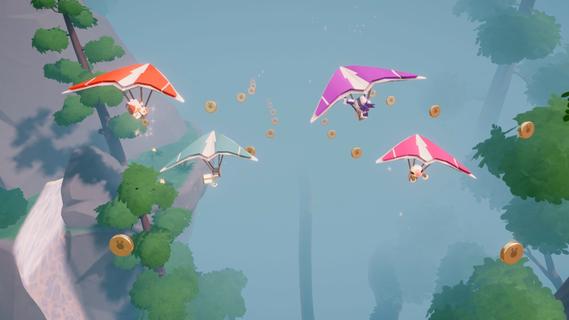
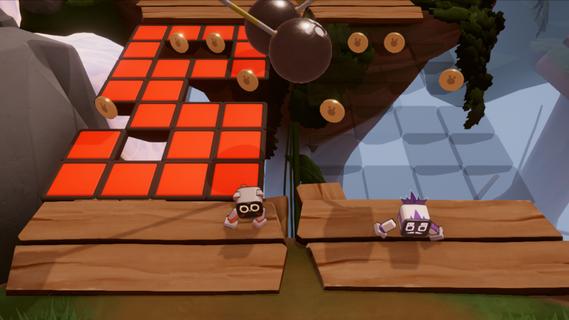
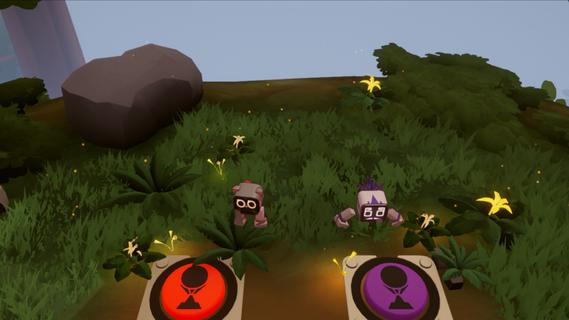
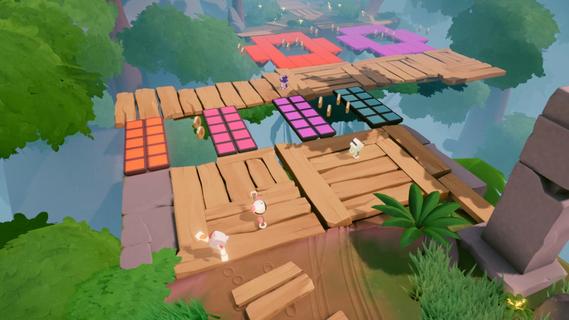
Biped 2 is a delightful co-op action-adventure game that emphasizes collaboration and teamwork, allowing players to enjoy the experience solo or with friends in groups of up to four. Developed by NEXT Studios and published by META Publishing, this sequel to the original Biped game promises to deliver an even more engaging and fun experience with its innovative mechanics and colorful world. Gameplay MechanicsAt the heart of Biped 2 is its unique movement system, where players control the legs of adorable bipedal robots named Aku and Sila. This two-stick control mechanism allows for precise movement, requiring players to coordinate their steps to navigate through challenging obstacle courses. The game introduces new movement options such as gliding and grappling hooks, adding variety to the gameplay and enhancing the sense of exploration. Solo and Co-op ModesBiped 2 is designed to be enjoyable whether you're playing alone or with friends. In solo mode, players must rely on their timing and precision to overcome obstacles, while co-op mode adds a layer of teamwork and communication. With up to four players, the game becomes even more dynamic, requiring coordination to solve complex puzzles and navigate through levels. Puzzle SolvingThe game is filled with physics-based puzzles that require strategic thinking and teamwork. Players must work together to press buttons, pull levers, and guide objects to specific locations. These puzzles become increasingly complex as the game progresses, demanding better coordination and timing from the players. Customization and Level CreationPlayers can customize their robots with various cosmetic items, adding a personal touch to the game. Additionally, Biped 2 includes a level creator feature, allowing players to design and share their own obstacle courses via the Steam Workshop. This feature enhances the game's replayability and encourages creativity within the community. Visuals and AtmosphereThe game boasts vibrant, colorful visuals that create a cheerful and uplifting atmosphere. The music is equally charming, making the experience feel light-hearted and enjoyable. Even when faced with challenges, the instant respawn feature ensures that the game remains fun and non-frustrating. StorylineIn Biped 2, Aku and Sila embark on a new adventure after reactivating all the beacons on Earth. They receive a distress signal from a distant planet and set out to help those in need. This narrative framework provides a backdrop for the game's exploration and puzzle-solving elements, as players navigate through diverse biomes and encounter new characters. Platforms and ReleaseBiped 2 is scheduled for release in Q3 2025 on multiple platforms, including PC, PlayStation, Xbox, and Nintendo Switch. A free demo is currently available on Steam, offering a glimpse into the game's mechanics and charm. ConclusionBiped 2 promises to be an exciting addition to the world of co-op puzzle games. With its unique movement mechanics, colorful visuals, and emphasis on teamwork, it offers a fun and engaging experience for players of all ages. Whether you're playing solo or with friends, Biped 2 is sure to bring laughter and excitement to your gaming sessions.
แสดงเพิ่มเติม

1. ดาวน์โหลดตัวติดตั้ง MEmu และสิ้นสุดการติดตั้ง

2. เริ่ม MEmu จากนั้นเปิด Google Play บนหน้าแรก

3. ค้นหา Biped 2 ใน Google Play
Install
4. ดาวน์โหลดและติดตั้ง Biped 2
5. เมื่อติดตั้งเสร็จให้คลิกที่ไอคอนเพื่อเริ่มใช้งาน

6. สนุกกับการเล่น Biped 2 บนพีซีด้วย MEmu
MEmu App Player เป็นอีมูเลเตอร์ Android ที่ดีที่สุดและผู้คนกว่า 50 ล้านคนเพลิดเพลินไปกับประสบการณ์การเล่นเกม Android ที่ยอดเยี่ยม เทคโนโลยีการจำลองเสมือนของ MEmu ช่วยให้คุณเล่นเกม Android หลายพันเกมได้อย่างราบรื่นบนพีซีของคุณแม้แต่เกมที่ต้องใช้กราฟิกมากที่สุด
จอใหญ่และกราฟฟิกสวยกว่า; เล่นได้นาน, ไม่ต้องใช้แบตเตอรี่โทรศัพท์หรือเน็ตโทรศัพท์.
ระบบปรับแต่งปุ่มคีย์บอร์ดและเม้าส์ตามที่คุณเลือก
เล่นมากกว่าหนึ่งเกมบน PC ในเวลาเดียวกันด้วยระบบหลายจอหรือ Multi-Instance manager.
Play Biped 2 on PC by following steps: