Bloodless
อัปเดตเมื่อ
เวอร์ชันปัจจุบัน
1.3.9
ให้บริการโดย

เวลาคุณเล่น Bloodless, คุณอาจรู้สึกว่ามือคุณอาจบังจอแล้วทำให้ไม่ได้เล่นแบบเต็มที่. เล่นแบบไร้ขีดจำกัดด้วยเม้าส์และคีย์บอร์ด. MEmu มีตัวเลือกหลายอย่างให้คุณใช้งานเกมที่คุณเล่นแบบที่คุณต้องการ. ดาวน์โหลดและเล่น Bloodless บน PC. เล่นนานแค่ไหนก็ได้, ไม่ต้องชาร์จแบตเตอรี่, หรือเจอคนโทรเข้ามาระหว่างเล่น. MEmu 9 เป็นตัวเลือกสำหรับการเล่น Bloodless บน PC. ทางทีมงานเราได้ปรับแต่งเกม, ปรับให้เล่นเกมบางเกมได้เหมือนเล่น Bloodless เป็นเกม PC เช่นเล็งด้วยเม้าส์หรือใช้คีย์บอร์ด. ระบบของเรายังทำให้คุณสามารถเปิดเล่นได้มากกว่า 2 เกมพร้อมๆกันในคอมของคุณ. และที่สำคัญที่สุด, ระบบโปรแกรมของเราสามารถทำให้คุณใช้ระบบของ PC ทำให้เกมลื่นเหมือนกับใช้โทรศัพท์รุ่นล่าสุด. เราไม่ได้ดูแลเรื่องการเล่นเกม, แต่เราดูแลถึงความสนุกสนานที่คุณได้จากการเล่นด้วย.
แสดงเพิ่มเติม
ดาวน์โหลด Bloodless บน PC ด้วย MEmu Android Emulator สนุกกับการเล่นบนหน้าจอขนาดใหญ่ Break the cycle of violence.
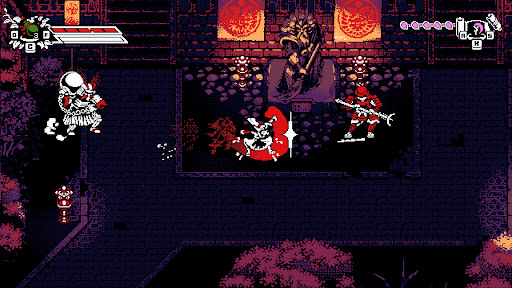
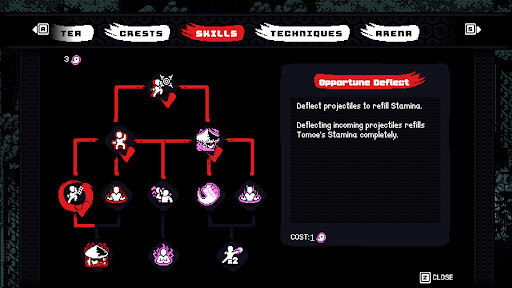
Break the cycle of violence.
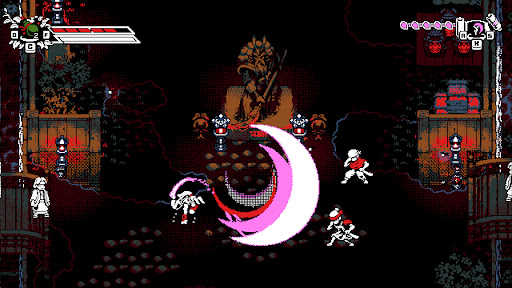
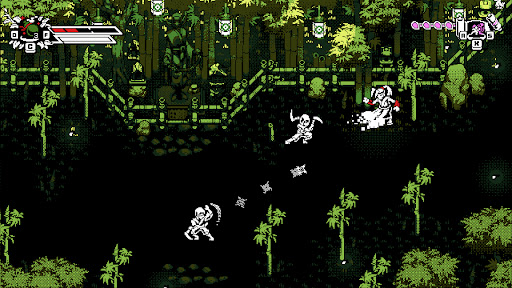
Bloodless is a stylish, retro-inspired 2D action-adventure featuring counter-based, non-lethal combat. Take control of Tomoe, a peaceful Ronin haunted by her bloody past, as she returns to her shattered homeland of Bakugawa.
Having witnessed all the blood a blade can shed, Tomoe has sworn never to take another life. To defeat the samurai army of her former master, Shogun Akechi, she must fight with nothing but her bare fists to disarm her former allies in a dance of precision and rhythm.
FEATURES
• Unique Non-Lethal Combat
Tomoe has sworn not to take another life and must instead disarm her enemies. Use a combination of counters and disarming ki attacks to defeat the shogun’s army.
• Depth and Customization
Develop your own fighting style using powerful ki techniques, combo variations, crests, and herb infusions discovered throughout Bakugawa.
• Namazu’s Wrath (Roguelike Mode)
Push your skills to the limit on a mysterious, shifting island. Guided by ancient gods, fight through waves of corruption and face off against "The Slasher", the manifestation of Tomoe’s violent past.
• Optimized for Mobile
Experience responsive touch controls designed for fast-paced action, plus full controller support.
• Assist Mode Included
Customize the experience with accessibility options including casual tuning and invincibility settings so players of any skill level can enjoy the journey.
แสดงเพิ่มเติม

1. ดาวน์โหลดตัวติดตั้ง MEmu และสิ้นสุดการติดตั้ง

2. เริ่ม MEmu จากนั้นเปิด Google Play บนหน้าแรก

3. ค้นหา Bloodless ใน Google Play
Install
4. ดาวน์โหลดและติดตั้ง Bloodless
5. เมื่อติดตั้งเสร็จให้คลิกที่ไอคอนเพื่อเริ่มใช้งาน

6. สนุกกับการเล่น Bloodless บนพีซีด้วย MEmu
MEmu App Player เป็นอีมูเลเตอร์ Android ที่ดีที่สุดและผู้คนกว่า 50 ล้านคนเพลิดเพลินไปกับประสบการณ์การเล่นเกม Android ที่ยอดเยี่ยม เทคโนโลยีการจำลองเสมือนของ MEmu ช่วยให้คุณเล่นเกม Android หลายพันเกมได้อย่างราบรื่นบนพีซีของคุณแม้แต่เกมที่ต้องใช้กราฟิกมากที่สุด
จอใหญ่และกราฟฟิกสวยกว่า; เล่นได้นาน, ไม่ต้องใช้แบตเตอรี่โทรศัพท์หรือเน็ตโทรศัพท์.
ระบบปรับแต่งปุ่มคีย์บอร์ดและเม้าส์ตามที่คุณเลือก
เล่นมากกว่าหนึ่งเกมบน PC ในเวลาเดียวกันด้วยระบบหลายจอหรือ Multi-Instance manager.
Play Bloodless on PC by following steps:






















![[ไกด์เกม] CookieRun Classic แนะนำ 5 คุกกี้น่าปั้น น่าลงทุน ที่มือใหม่ห้ามพลาด! (เล่นบน PC ผ่าน MEmu ให้ลื่นสุด ๆ) PC](https://www.memuplay.com/blog/wp-content/uploads/2026/08/579c01ab-a953-45b3-8115-9b6279b7d6f9.png)