DAVE THE DIVER
อัปเดตเมื่อ
เวอร์ชันปัจจุบัน
1.0.38
ให้บริการโดย

เวลาคุณเล่น DAVE THE DIVER, คุณอาจรู้สึกว่ามือคุณอาจบังจอแล้วทำให้ไม่ได้เล่นแบบเต็มที่. เล่นแบบไร้ขีดจำกัดด้วยเม้าส์และคีย์บอร์ด. MEmu มีตัวเลือกหลายอย่างให้คุณใช้งานเกมที่คุณเล่นแบบที่คุณต้องการ. ดาวน์โหลดและเล่น DAVE THE DIVER บน PC. เล่นนานแค่ไหนก็ได้, ไม่ต้องชาร์จแบตเตอรี่, หรือเจอคนโทรเข้ามาระหว่างเล่น. MEmu 9 เป็นตัวเลือกสำหรับการเล่น DAVE THE DIVER บน PC. ทางทีมงานเราได้ปรับแต่งเกม, ปรับให้เล่นเกมบางเกมได้เหมือนเล่น DAVE THE DIVER เป็นเกม PC เช่นเล็งด้วยเม้าส์หรือใช้คีย์บอร์ด. ระบบของเรายังทำให้คุณสามารถเปิดเล่นได้มากกว่า 2 เกมพร้อมๆกันในคอมของคุณ. และที่สำคัญที่สุด, ระบบโปรแกรมของเราสามารถทำให้คุณใช้ระบบของ PC ทำให้เกมลื่นเหมือนกับใช้โทรศัพท์รุ่นล่าสุด. เราไม่ได้ดูแลเรื่องการเล่นเกม, แต่เราดูแลถึงความสนุกสนานที่คุณได้จากการเล่นด้วย.
แสดงเพิ่มเติม
ดาวน์โหลด DAVE THE DIVER บน PC ด้วย MEmu Android Emulator สนุกกับการเล่นบนหน้าจอขนาดใหญ่ กลางวันดำน้ำ กลางคืนเปิดร้าน!
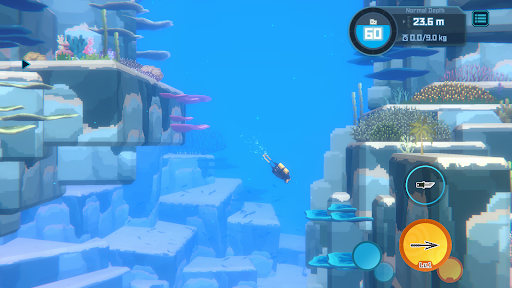
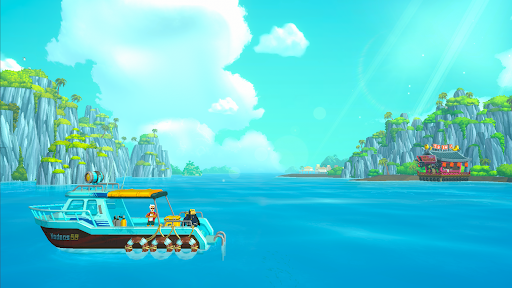
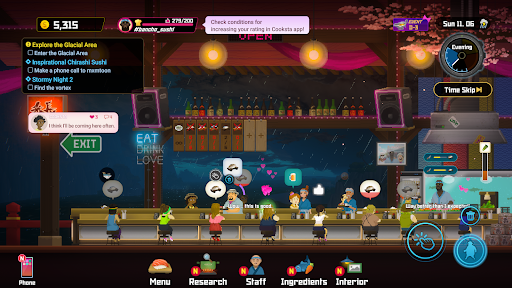
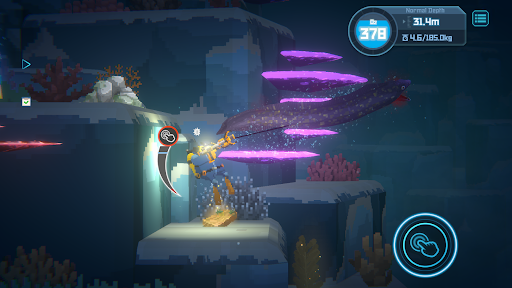
กลางวันดำน้ำ กลางคืนเปิดร้าน!
[เกมที่ผสานการผจญภัย RPG และการบริหารจัดการไว้ด้วยกัน]
กลางวันดำดิ่งไปกับการสำรวจและไขปริศนาในห้วงลึกของบลูโฮล กลางคืนเปิดร้านซูชิชื่อดังสุดแหวกแนว
เกมที่เล่นเพลินขนาดนี้คงโดนตกได้ไม่ยาก!
[เกมต่อสู้และรวบรวมทรัพยากรสุดชิลที่มาพร้อมองค์ประกอบแนวโร้กไลก์]
ดำดิ่งสู่บลูโฮลที่เปลี่ยนแปลงตลอดเวลา ใช้ฉมวกกับอุปกรณ์อื่นๆ ในการจับปลาและสัตว์ต่างๆ
ใช้ทรัพยากรที่มีและกำไรจากร้านซูชิอัปเกรดและหลอมอุปกรณ์ เพื่อรับมือกับอันตรายที่ซ่อนเร้น
ถ้าออกซิเจนหมดแปลว่าจะต้องทิ้งไอเท็มและปลาที่จับได้!
[ตัวละครสุดป่วนที่มาพร้อมเรื่องราวสนุกสนาน]
ตัวละครสุดเพี้ยนชวนยิ้มกับเรื่องราวที่เต็มไปด้วยมุกตลก และฉากเรียกเสียงหัวเราะมากมายพร้อมมอบประสบการณ์การเล่นเกมที่สนุกสนานให้ผู้เล่นแล้ว
[โลกใต้ทะเลที่งดงามจากงานผลงานศิลปะ 2D/3D ชวนหลงใหล]
การผสมผสานระหว่างกราฟิกพิกเซลและกราฟิก 3D สร้างสรรค์ทัศนียภาพใต้น้ำที่สวยงามตระการตา การผจญภัยในมหาสมุทรครั้งนี้อยู่ในบลูโฮล โลกใต้ทะเลขนานแท้ ซึ่งเต็มไปด้วยสิ่งมีชีวิตใต้ทะเลกว่า 200 ชนิด
[เนื้อหาเพิ่มเติมมากมายที่พร้อมเติมเต็มรูปแบบการเล่นหลัก]
มินิเกม ภารกิจรอง และเนื้อเรื่องมากมายพร้อมมอบความบันเทิงในการเล่นเกมอย่างยาวนาน
[อุปกรณ์ที่รองรับ]
ขั้นต่ำ: Android 8.0 ขึ้นไป / RAM 6GB ขึ้นไป / Snapdragon 680 ขึ้นไปหรือเทียบเท่า
แนะนำ: Android 8.0 ขึ้นไป / RAM 8GB ขึ้นไป / Snapdragon 730G ขึ้นไปหรือเทียบเท่า
แสดงเพิ่มเติม

1. ดาวน์โหลดตัวติดตั้ง MEmu และสิ้นสุดการติดตั้ง

2. เริ่ม MEmu จากนั้นเปิด Google Play บนหน้าแรก

3. ค้นหา DAVE THE DIVER ใน Google Play
Install
4. ดาวน์โหลดและติดตั้ง DAVE THE DIVER
5. เมื่อติดตั้งเสร็จให้คลิกที่ไอคอนเพื่อเริ่มใช้งาน

6. สนุกกับการเล่น DAVE THE DIVER บนพีซีด้วย MEmu
MEmu App Player เป็นอีมูเลเตอร์ Android ที่ดีที่สุดและผู้คนกว่า 50 ล้านคนเพลิดเพลินไปกับประสบการณ์การเล่นเกม Android ที่ยอดเยี่ยม เทคโนโลยีการจำลองเสมือนของ MEmu ช่วยให้คุณเล่นเกม Android หลายพันเกมได้อย่างราบรื่นบนพีซีของคุณแม้แต่เกมที่ต้องใช้กราฟิกมากที่สุด
จอใหญ่และกราฟฟิกสวยกว่า; เล่นได้นาน, ไม่ต้องใช้แบตเตอรี่โทรศัพท์หรือเน็ตโทรศัพท์.
ระบบปรับแต่งปุ่มคีย์บอร์ดและเม้าส์ตามที่คุณเลือก
เล่นมากกว่าหนึ่งเกมบน PC ในเวลาเดียวกันด้วยระบบหลายจอหรือ Multi-Instance manager.
Play DAVE THE DIVER on PC by following steps: