Exoborne
อัปเดตเมื่อ
เวอร์ชันปัจจุบัน
ให้บริการโดย

เวลาคุณเล่น Exoborne, คุณอาจรู้สึกว่ามือคุณอาจบังจอแล้วทำให้ไม่ได้เล่นแบบเต็มที่. เล่นแบบไร้ขีดจำกัดด้วยเม้าส์และคีย์บอร์ด. MEmu มีตัวเลือกหลายอย่างให้คุณใช้งานเกมที่คุณเล่นแบบที่คุณต้องการ. ดาวน์โหลดและเล่น Exoborne บน PC. เล่นนานแค่ไหนก็ได้, ไม่ต้องชาร์จแบตเตอรี่, หรือเจอคนโทรเข้ามาระหว่างเล่น. MEmu 9 เป็นตัวเลือกสำหรับการเล่น Exoborne บน PC. ทางทีมงานเราได้ปรับแต่งเกม, ปรับให้เล่นเกมบางเกมได้เหมือนเล่น Exoborne เป็นเกม PC เช่นเล็งด้วยเม้าส์หรือใช้คีย์บอร์ด. ระบบของเรายังทำให้คุณสามารถเปิดเล่นได้มากกว่า 2 เกมพร้อมๆกันในคอมของคุณ. และที่สำคัญที่สุด, ระบบโปรแกรมของเราสามารถทำให้คุณใช้ระบบของ PC ทำให้เกมลื่นเหมือนกับใช้โทรศัพท์รุ่นล่าสุด. เราไม่ได้ดูแลเรื่องการเล่นเกม, แต่เราดูแลถึงความสนุกสนานที่คุณได้จากการเล่นด้วย.
แสดงเพิ่มเติม
ดาวน์โหลด Exoborne บน PC ด้วย MEmu Android Emulator สนุกกับการเล่นบนหน้าจอขนาดใหญ่ Exoborne is a thrilling open-world tactical extraction shooter set in a post-apocalyptic United States devastated by extreme natural disasters and corporate greed.

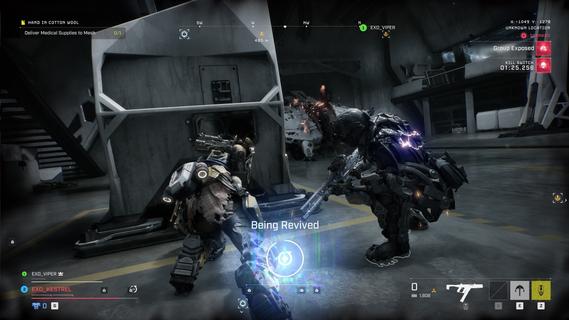
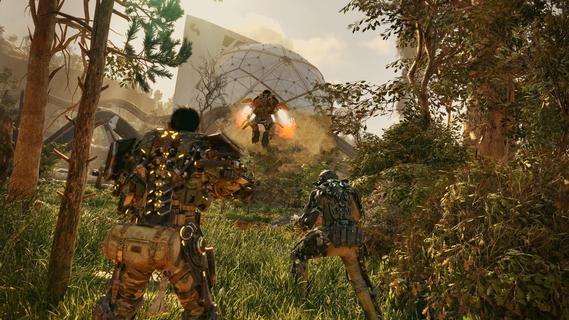
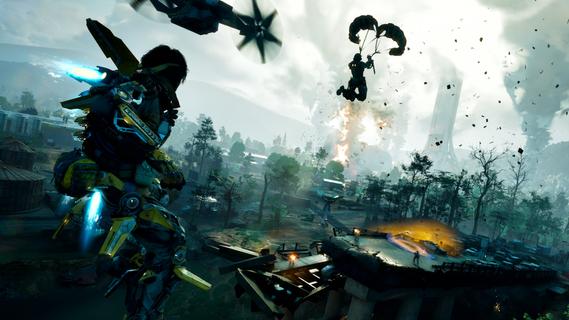
Exoborne is a thrilling open-world tactical extraction shooter set in a post-apocalyptic United States devastated by extreme natural disasters and corporate greed. The game drops you into a dynamic and hostile environment where survival hinges on scavenging, crafting, and intense combat against both AI-controlled enemies and rival players. Each session is unique, as you face shifting weather conditions such as tornadoes, lightning storms, and apocalyptic tempests that can disrupt your strategies and turn the tide of battle. Central to Exoborne’s gameplay are powerful customizable exo-rigs, mechanical suits that dramatically impact your movement and combat style. These EXO suits come with unique modules that allow you to tailor your loadout for specific tactics—whether you prefer heavy armor and close-quarters combat or nimble scouting and long-range sniping. Mobility is a key aspect, with grappling hooks and parachutes enabling vertical exploration to gain strategic advantages during firefights or quick escapes. The combination of PvP and PvE elements deepens the tactical complexity. You not only contend with other skilled players competing for limited resources, but you also must adapt to the threats posed by Mother Nature’s fury. Strategic use of environmental hazards can be turned against your enemies—for example, forcing them into tornadoes or using storms as cover. Crafting plays a vital role as well, letting you upgrade your gear, weapons, and exo-rig modules to suit evolving challenges in the field. Visually, Exoborne impresses with its Unreal Engine 5-powered landscapes, realistic weather effects, and fluid third-person combat animations. The game features a dynamic camera system that smoothly switches between third- and first-person perspectives, enhancing immersion and precision during combat. The apocalyptic world is richly detailed with ruined cities, sci-fi structures, and a variety of terrains that reward creative exploration. Teamwork is encouraged but not mandatory; you can choose to go solo or cooperate with up to two other players to maximize your chances of successful extraction. The narrative immerses players as "Reborns," resistance fighters navigating a ravaged America, adding purpose to your tactical missions. High risks promise high rewards as you scavenge valuable loot and execute daring extractions under pressure. In summary, Exoborne offers a fresh take on the extraction shooter genre by blending tactical squad combat, deep EXO suit customization, and unpredictable environmental challenges into a high-stakes, action-packed experience. Its open-world setting, dynamic weather, and vertical gameplay encourage strategic thinking and adaptability, making each match a unique test of skill and survival.
แสดงเพิ่มเติม

1. ดาวน์โหลดตัวติดตั้ง MEmu และสิ้นสุดการติดตั้ง

2. เริ่ม MEmu จากนั้นเปิด Google Play บนหน้าแรก

3. ค้นหา Exoborne ใน Google Play
Install
4. ดาวน์โหลดและติดตั้ง Exoborne
5. เมื่อติดตั้งเสร็จให้คลิกที่ไอคอนเพื่อเริ่มใช้งาน

6. สนุกกับการเล่น Exoborne บนพีซีด้วย MEmu
MEmu App Player เป็นอีมูเลเตอร์ Android ที่ดีที่สุดและผู้คนกว่า 50 ล้านคนเพลิดเพลินไปกับประสบการณ์การเล่นเกม Android ที่ยอดเยี่ยม เทคโนโลยีการจำลองเสมือนของ MEmu ช่วยให้คุณเล่นเกม Android หลายพันเกมได้อย่างราบรื่นบนพีซีของคุณแม้แต่เกมที่ต้องใช้กราฟิกมากที่สุด
จอใหญ่และกราฟฟิกสวยกว่า; เล่นได้นาน, ไม่ต้องใช้แบตเตอรี่โทรศัพท์หรือเน็ตโทรศัพท์.
ระบบปรับแต่งปุ่มคีย์บอร์ดและเม้าส์ตามที่คุณเลือก
เล่นมากกว่าหนึ่งเกมบน PC ในเวลาเดียวกันด้วยระบบหลายจอหรือ Multi-Instance manager.
Play Exoborne on PC by following steps: